1019572 REV. 03 65
Table 4.8 User I/O Input and Output Function Selection
*This option is not available at J3-1 Input.
4.5.12 Input Power Plug
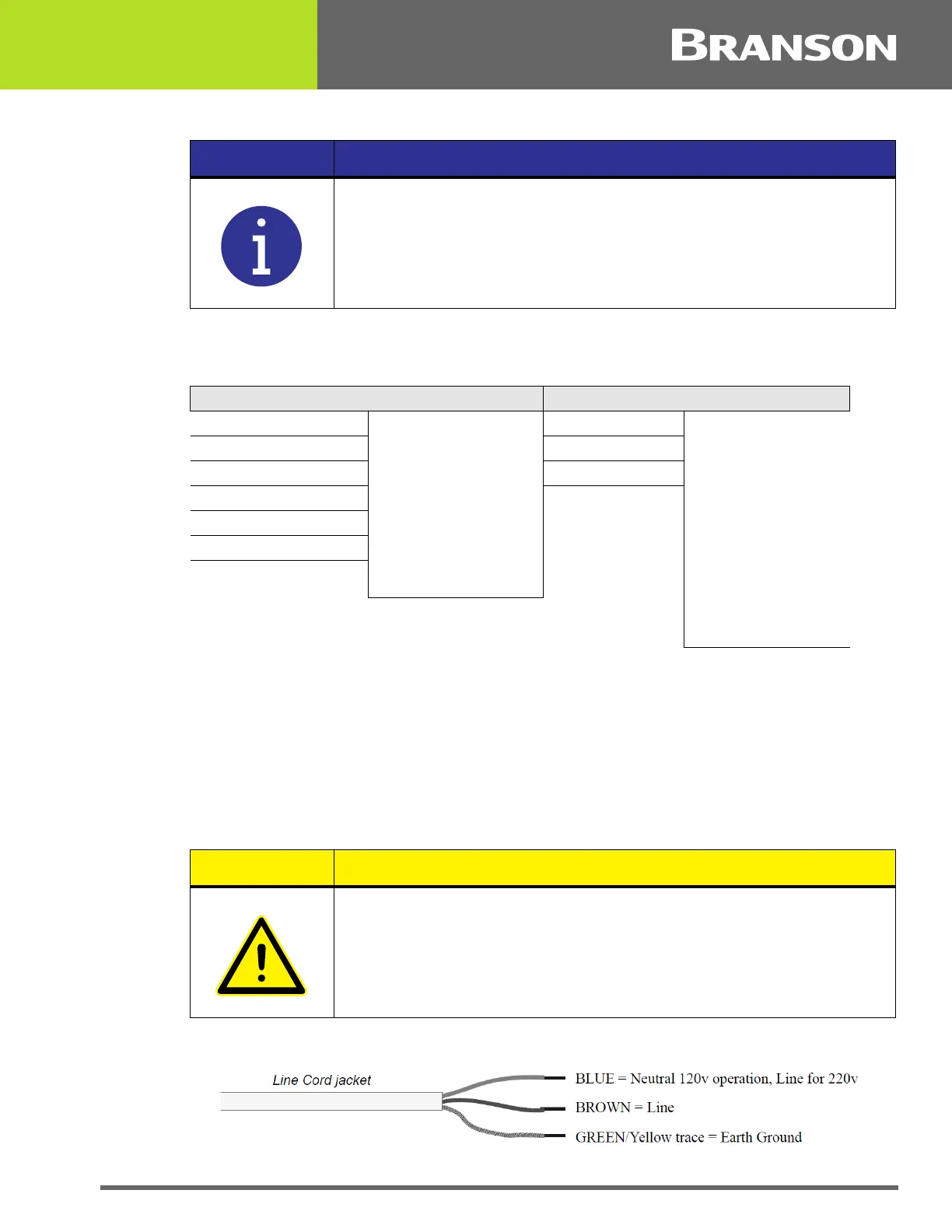
If you must add or change the input power plug, use the following color code for the
conductors found in the international harmonized line cord. Add the plug that is
appropriate for your input power receptacle.
Figure 4.19 Line Cord Color Code
NOTICE
Refer to the Branson Automation Guide (EDP 100-214-273) for
additional information about selection and use of Input and Output
features listed in the following Table.
Input Output
J3_1_INPUT Disabled
Select Preset*
Ext U/S Delay
Display Lock
Sonics Disable
Memory Reset
External Start
Ext Signal
Sync In
J3_8_OUTPUT
Disabled
Confirm Preset
Ext Beeper
Cycle Okay
No Cycle Alarm
Overload Alarm
Modified Alarm
Note
Missing Part
External Start
Sync Out
J3_17_INPUT J3_22_OUTPUT
J3_19_INPUT J3_36_OUTPUT
J3_31_INPUT
J3_32_INPUT
J3_33_INPUT
CAUTION
The power supply can be permanently damaged if it is connected to
the incorrect line voltage, or if the wiring connection is mis-wired. It
also presents a safety hazard if mis-wired. Use of the correct plug or
connector helps prevent incorrect connections.



 To Next Page