7850-Install-IG101 Installation Guide
Brocade
®
7850 Extension Switch Hardware Installation Guide
Attaching the Rear Brackets to the Extensions
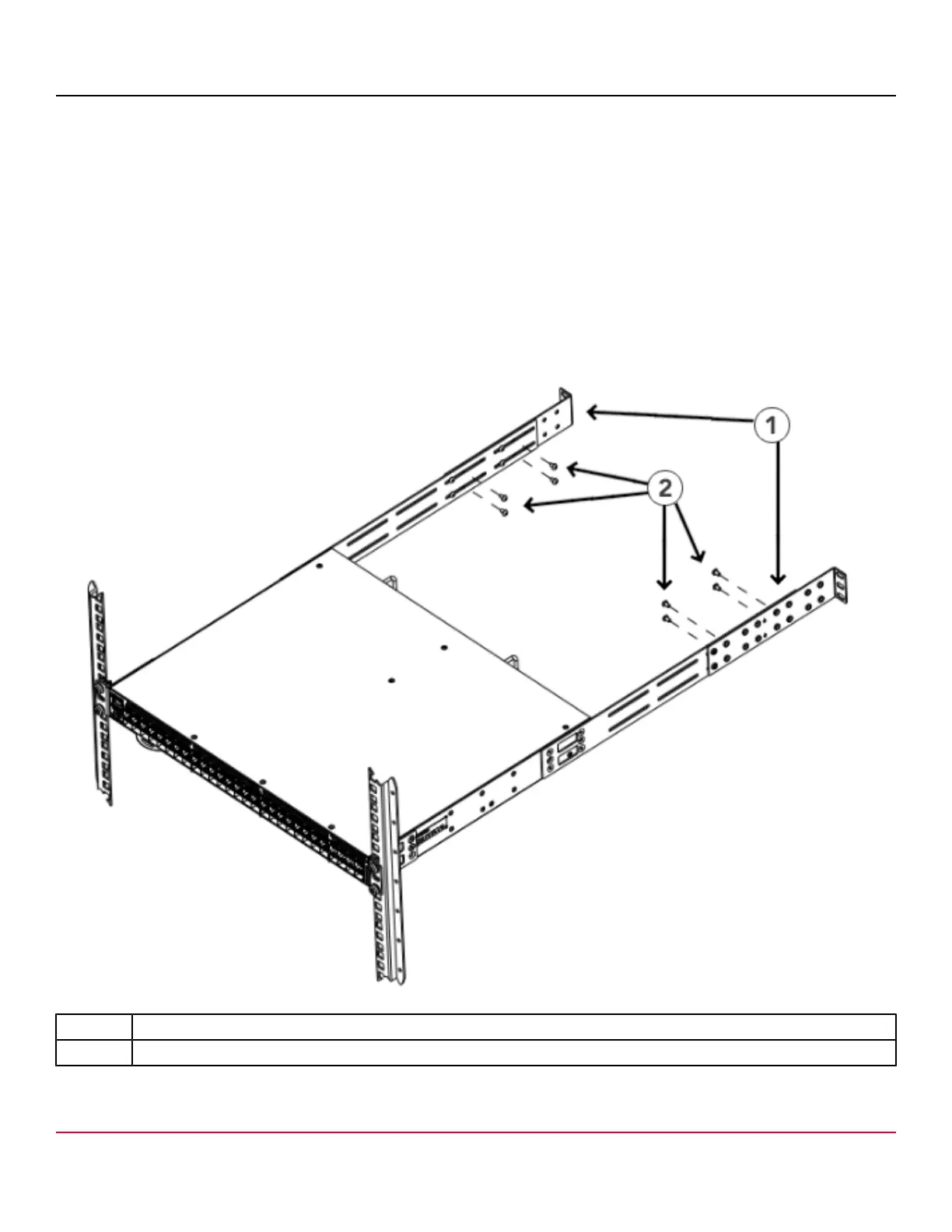
Perform the following steps to attach the rear brackets to the extensions. You can use short or long rear brackets for this
task, depending on the depth of your rack.
1. Select the proper length rear bracket for your rack depth.
2. Slide the right rear bracket onto the right extension bracket.
3. Attach the brackets using four 6-32 x 1/4-in. panhead screws. If possible, leave at least one empty vertical pair of
holes between the screws for better support.
4. Repeat Step 2 and 3 to attach the left rear bracket to the left extension bracket.
5. Adjust the brackets to the rack depth and tighten all 6-32 x 1/4-in. screws to a torque of 10 cm-kg (9 in.-lb).
Figure 10: Attaching the Rear Brackets to the Extensions
1. Rear Brackets
2. Screws, 6-32 x 1/4-in. Panhead Phillips
7850-Install-IG101
28



 To Next Page