7850-Install-IG101 Installation Guide
Brocade
®
7850 Extension Switch Hardware Installation Guide
Attaching the Rear Brackets to the Rack
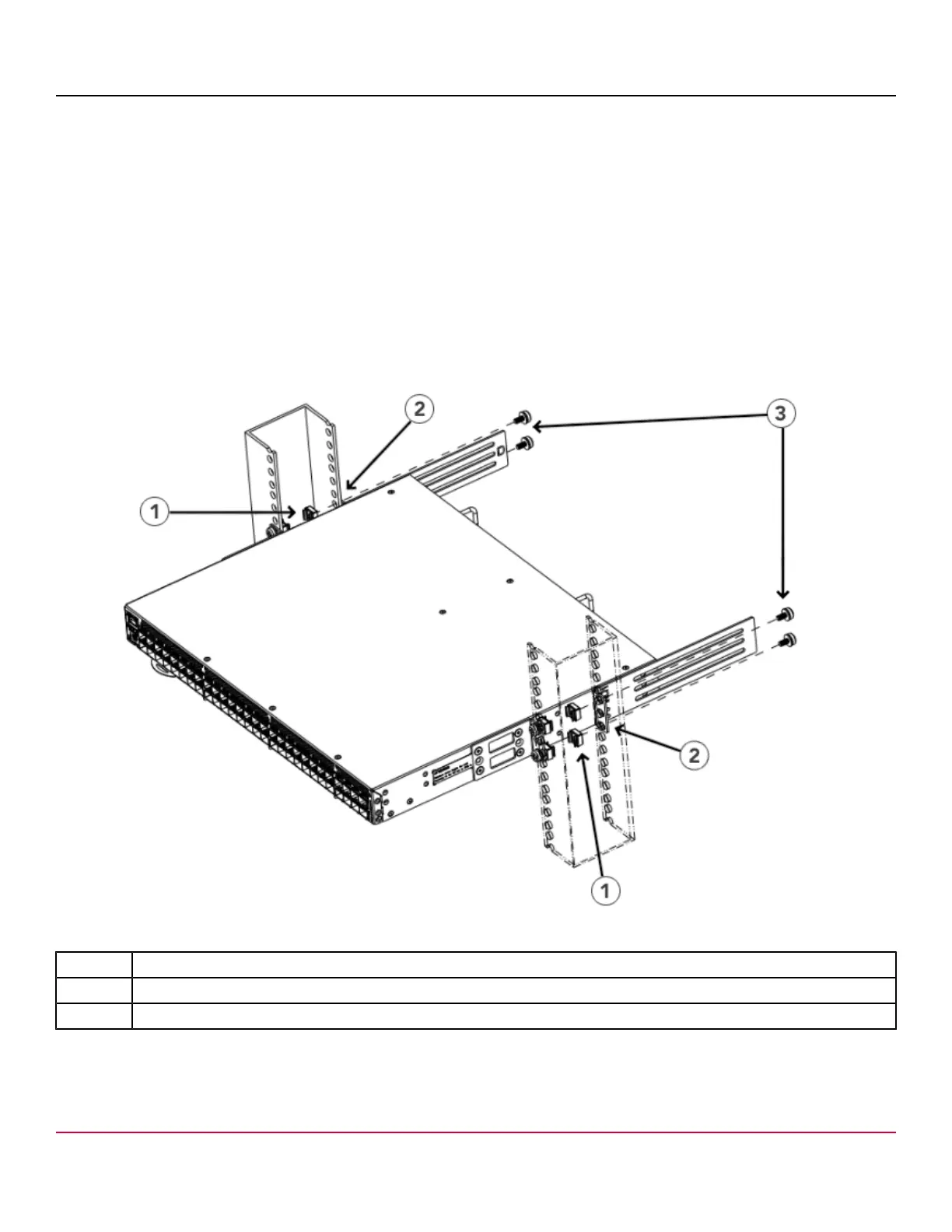
Perform the following steps to attach the rear brackets to the rack:
1. Select the proper length bracket for your post width. If your posts are 3 in. to 5 in. wide, use the brackets marked 3-5
INCH. If your posts are 5 in. to 6 in. wide, use the brackets marked 5-6 INCH.
2. Position the right rear bracket in the right rear of the device. Whether you are using the 3-5 INCH or the 5-6 INCH
bracket, the rear end of the bracket will be flush with the back of the device.
3. Attach the brackets to the right rack upright using two 10-32 x 5/8-in. panhead screws and two retainer nuts.
4. Repeat Step 2 and Step 3 to attach the left rear bracket to the left rack upright.
5. Tighten all 10-32 x 5/8-in. screws to a torque of 29 cm-kg (25 in.-lb).
Figure 25: Attaching the Rear Brackets to the Rack
1. Retainer Nuts, 10-32
2. Rear Brackets (Right and Left)
3. Screws, 10-32 x 5/8-in. Panhead Phillips
7850-Install-IG101
46



 To Next Page