69
13
13
This P-touch can be powered by the AC adapter (included) or the rechargeable Li-ion battery (optional:
PA-BT-4000LI). Use the power source appropriate for your intended use.
With the rechargeable Li-ion battery installed, you can use the P-touch in locations that do not have AC
power.
The battery is recharged by the AC adapter when the battery and the battery base are attached to the
P-touch.
Installing the Rechargeable Li-ion Battery 13
a Disconnect the AC adapter and then attach the battery base (optional: PA-BB-003) to the P-touch. For
more information about attaching the battery base, see its instruction manual.
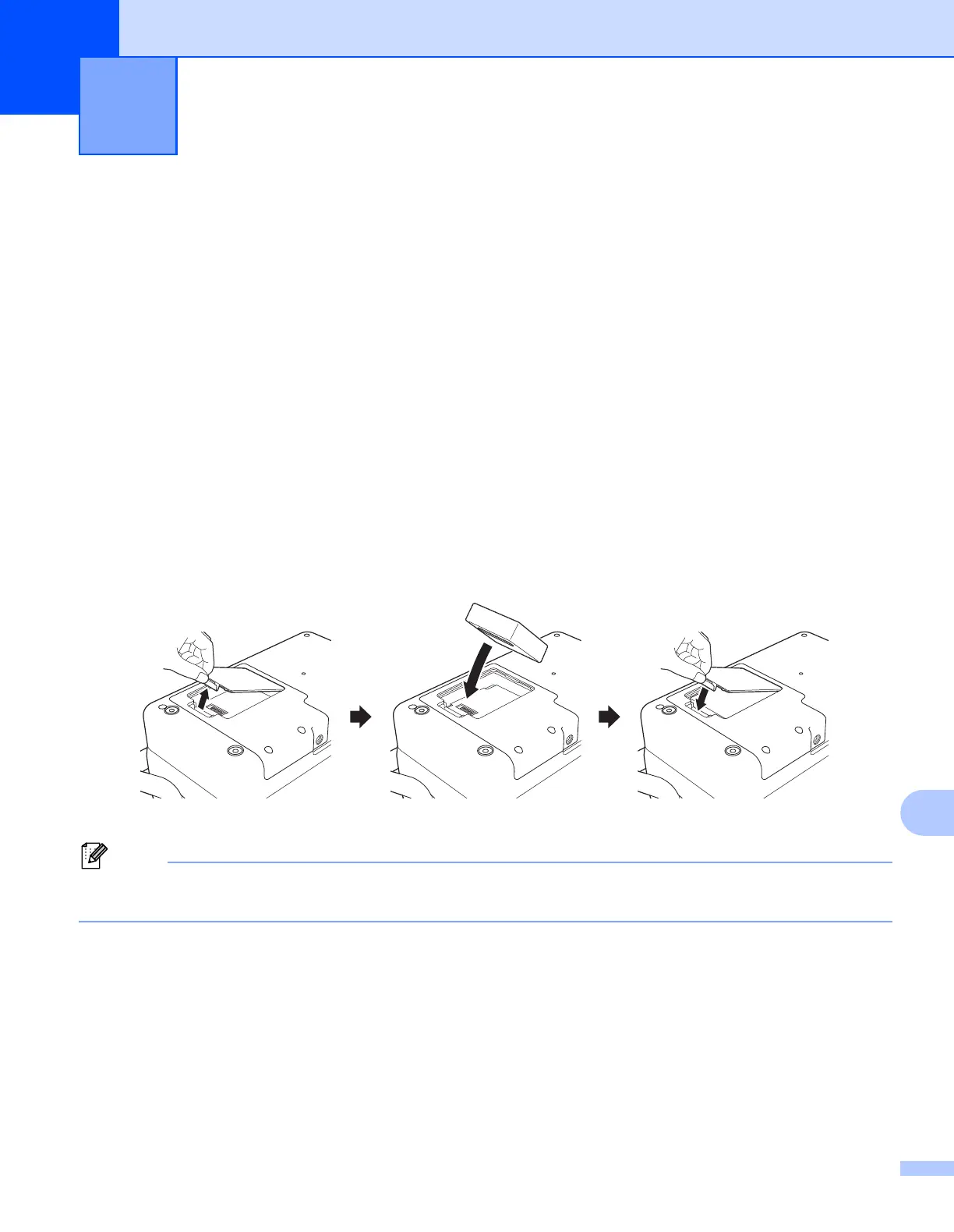
b Open the battery cover on the bottom of the P-touch.
c Insert the battery into the battery compartment.
d Close the battery cover.
The voltage supplied by the rechargeable Li-ion battery fluctuates. The printing speed may also fluctuate
depending on the voltage.
Using the Rechargeable Li-ion
Battery/Battery Base (Optional:
PA-BT-4000LI/PA-BB-003)
13












 To Next Page