Troubleshooting
79
14
LED Indicators 14
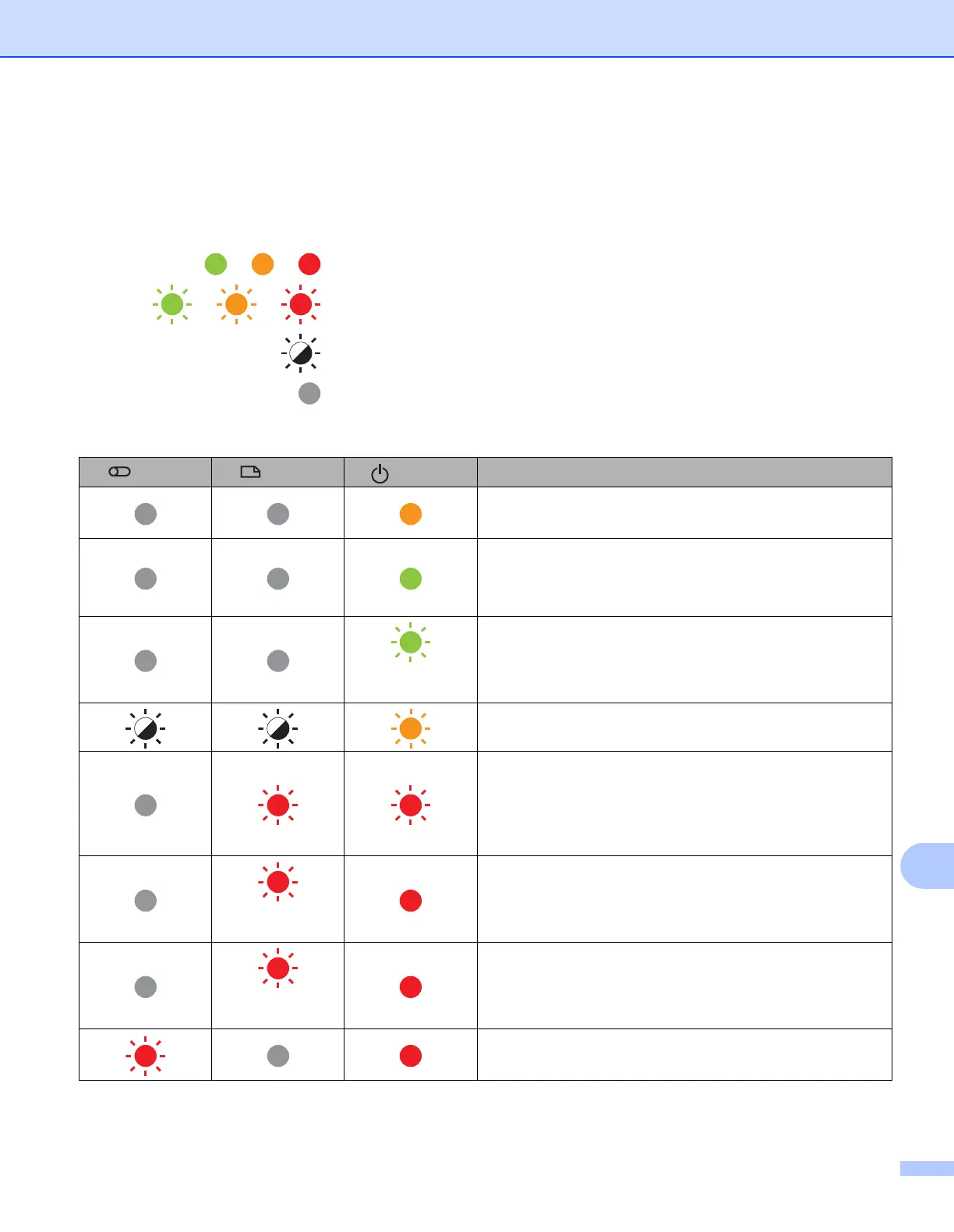
The indicators light and flash to indicate the P-touch status. The symbols used in this section explain the
meaning of the different indicator colours and patterns:
or or
Indicator is lit in the colour shown
or or
Indicator is flashing in the colour shown
Indicator can be off, lit or flashing in any colour
Indicator is off
Tube, Label, Power indicator
(Tube)
(Label)
(Power)
Condition
Power is turning off
Top cover open
Idle mode
Initialising mode
Tape feed and cutting mode
(1 time in 1
second)
Transferring data
Now cooling
System error 1
System error 2
System error 3
i Turn the P-touch off and on again.
(1 time in 1
second)
USB host power supply excessive voltage error
i Connect compatible AC Adapter.
(1 time in 2
seconds)
Label holder error
i Remove the tape cassette and reinstall it correctly.
Tube holder error
i Remove the tube and reinstall it correctly.












 To Next Page