DUO LOOP enabling/disabling
MATRIX CUBE - 44 -
DUO LOOP enabling/disabling
This function allows you to either enable or disable the DUO LOOP function, i.e. the function that
allows adjusting the yarn tension on TS55 sensors in order to keep it consistent with the yarn
tension on DIAPER FEEDER devices, corresponding to the tension value programmed on
TENSION SET POINT parameter (please refer to the “Style Programming” paragraph).
If the function is disabled, then the only reference tension is the one on DIAPER FEEDER devices;
in this case you are kindly recommended to reload the style with a lower value of TENSION SET
POINT.
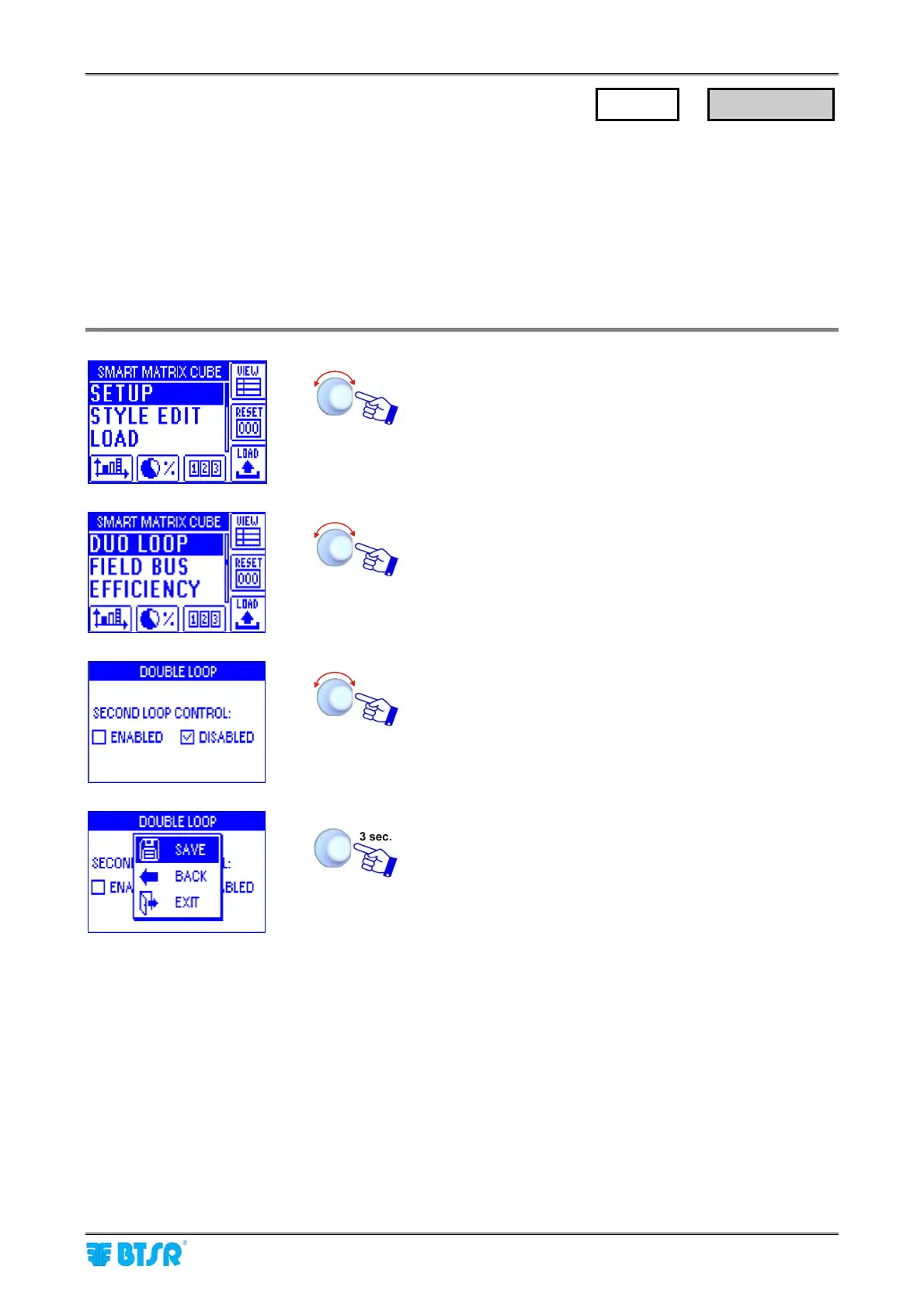
Enter the SETUP menu.
Select DUO LOOP.
Select ENABLED (function enabled) or DISABLED
(function disabled).
SAVE to save the configuration,
BACK to return to the previous screen without saving,
EXIT to return to menu.
SETUP
→
DUO LOOP











 To Next Page