Keycode Setting
MATRIX CUBE - 47 -
Keycode Setting
This function allows you to configure the user names and access passwords (KEY CODE) to the menus and
other options of SMART MATRIX CUBE system.
The first user ADMIN (Administrator) is set by default and cannot be deleted. The ADMIN user has the
access rights to all menus and system options.
This function allows you to create new users, to associate an identification password to each user and to
configure the list of accessible menus and options; it also allows you to remove (clear) users and to change
the list of accessible menus and options.
You cannot set two users with the same name or with the same password!
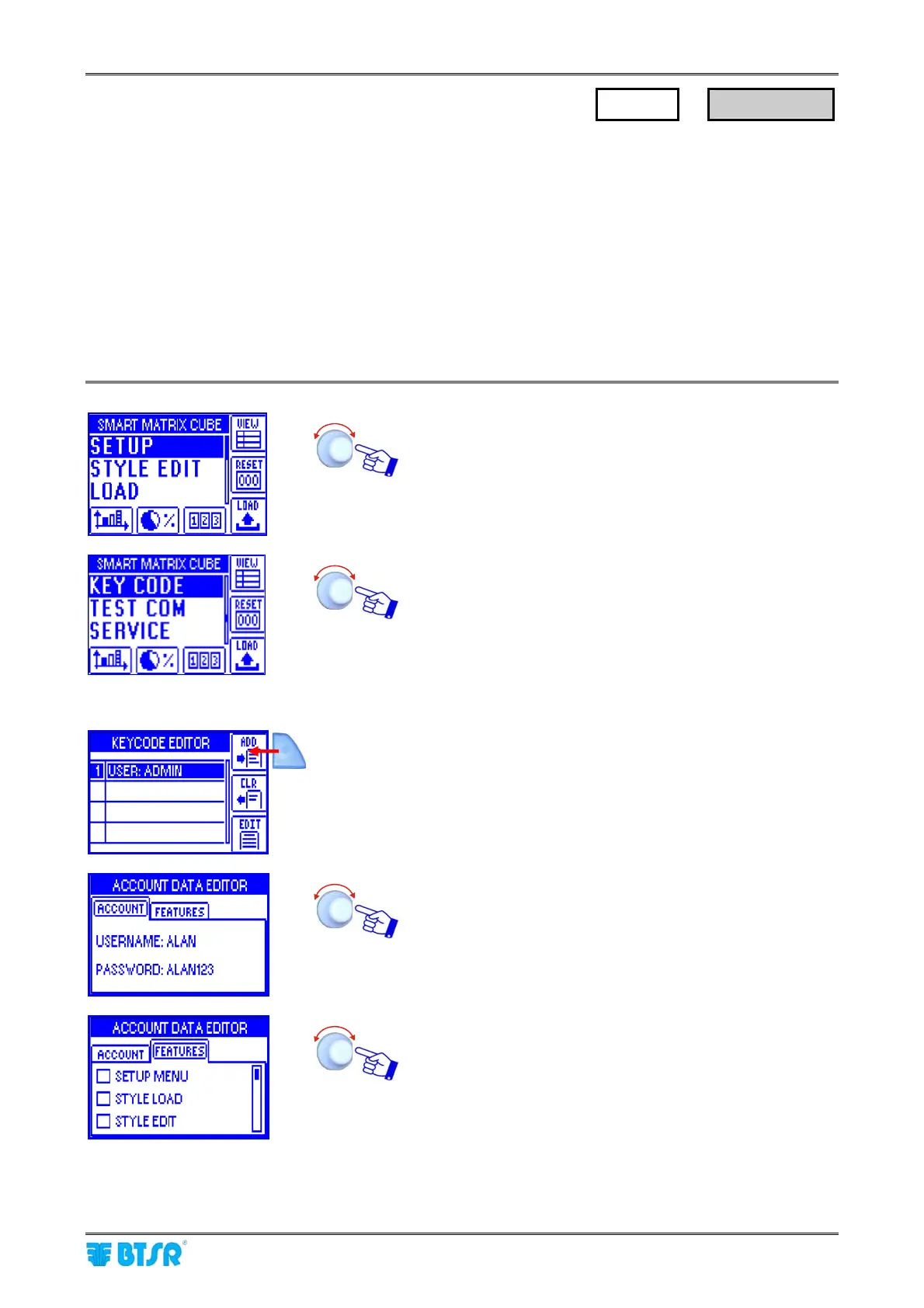
Enter the SETUP menu.
Select KEY CODE.
Add New User
Press the indicated button to add a new user.
Set the new user name (e.g. ALAN) and password (e.g.
ALAN123) in the ACCOUNT (*) windows.
Select the menus (SETUP, STYLE LOAD, STYLE EDIT)
and options (MEASURE, ERROR COUNTERS,
EFFICIENCY and KEYCODE), available to the new user.
(*) User name and password can be set character by character turning the selector and clicking to confirm
(you may set numeric and alphabetic characters).
SETUP
→
KEY CODE











 To Next Page