Configuration of I/O Signals on SM-DIN and SMART MATRIX CUBE
MATRIX CUBE - 42 -
Configuration of I/O Signals on SM-DIN and SMART MATRIX
CUBE
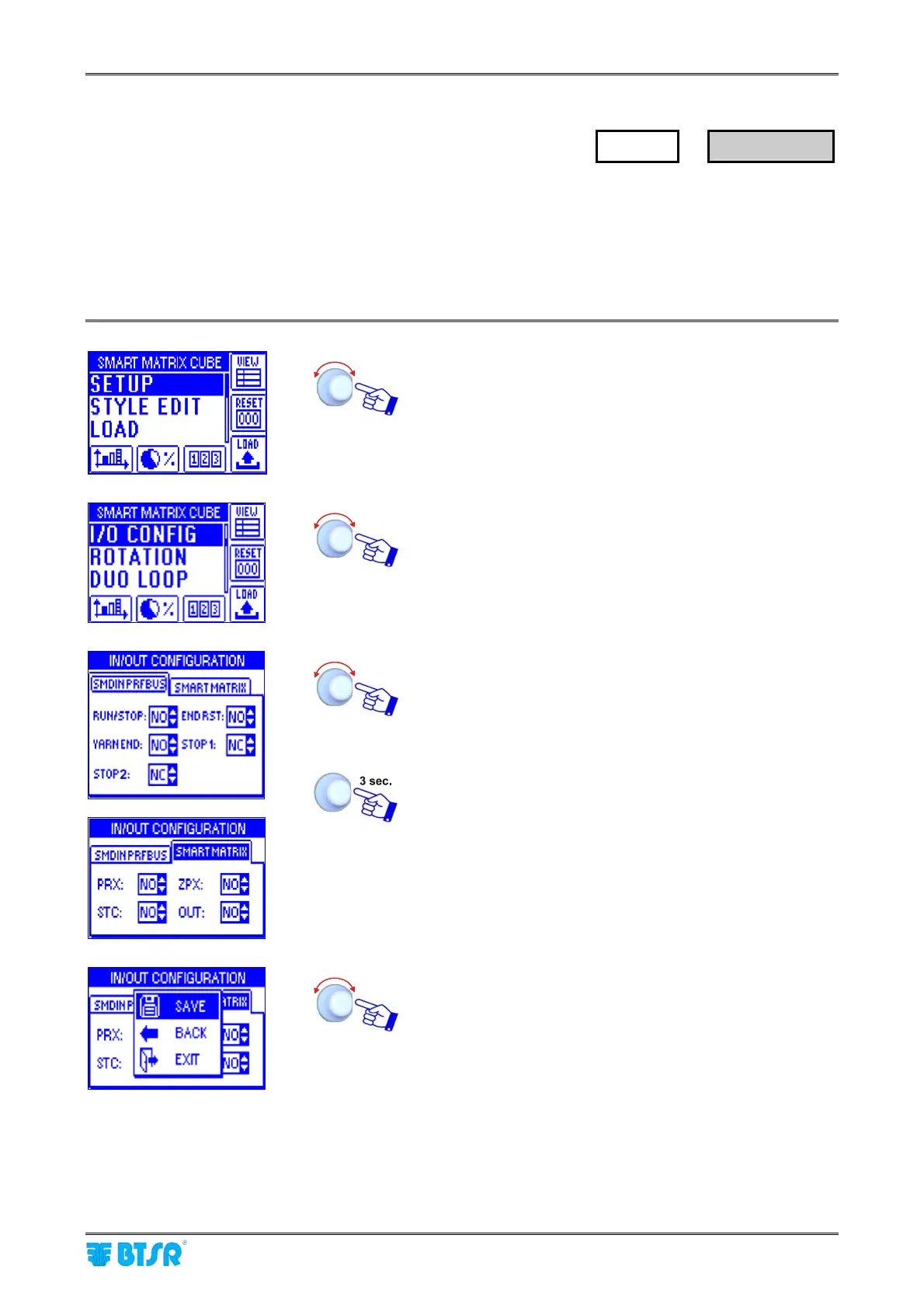
This function allows you to configure the input signals (PRX, ZPX, STC) and the relay output (OUT) of
SMART MATRIX CUBE terminal, as Normally Open (NO) or Normally Closed (NC) contacts
It also allows you to configure the RUN/STOP, END RST, YARN END and STOP 1/STOP 2 signals on the
SM-DIN/DUOLOOP Board, as Normally Open (NO) or Normally Closed (NC) contacts.
For more details about the I/O signals configurable with this function, please refer to Section 1.
Enter the SETUP menu.
Select I/O CONFIG.
Configure the signals RUN/STOP, END RST ,YARN END
and STOP 1/STOP 2 within the SMDIN DUOLOOP
window, the input signals (PRX, ZPX, STC) and the relay
output OUT within the SMART MATRIX window, as
Normally Open (NO) or Normally Closed (NC) contacts.
To activate the save function.
SAVE to save the configuration,
BACK to return to the previous screen without saving,
EXIT to return to menu.
SETUP
→
I/O CONFIG











 To Next Page