SMART MATRIX CUBE Operation
MATRIX CUBE - 33 -
2.3 Immediate Function Activation through the SMART
MATRIX CUBE Buttons
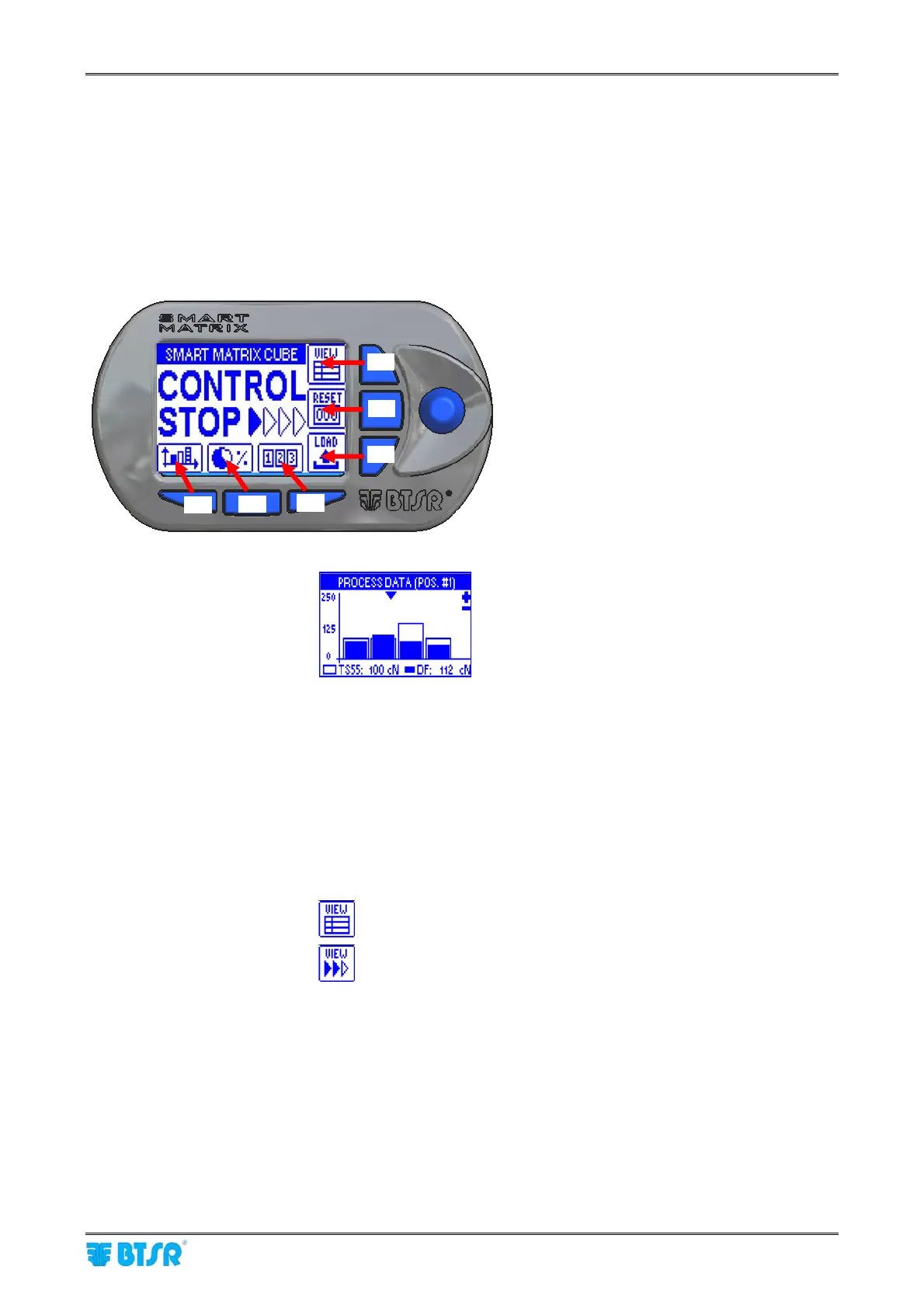
The 6 blue buttons (B1 ~ B6) allow you to directly activate some system functions without passing through
the menu items. Such functions are indicated by the icons associated with the buttons, as shown on the
following figure.
The detailed explanation of the various functions will be provided on next paragraphs.
The following examples are only provided to summarize the Button → Function association.
Within some configuration/parameter setting functions, the B1 ~ B6 buttons may also perform a “shortcut”
function, which will be explained each time.
Immediate function activation buttons.
B1 = Histograms:
B2 = Efficiency Data: It allows viewing the production efficiency values.
B3 = Error Counters: It allows viewing and/or clearing the error counters.
B4 = Choice of VIEW mode
It allows choosing (alternately) the information to be shown on SMART
MATRIX CUBE terminal screen.
It activates DIAPER FEEDER device status view
It activates the CONTROL screen view
B5 = Anomaly Reset It allows resetting some anomaly conditions.
B6 = Load Function It allows the immediate activation of style loading function.
B4
B5
B6
B3
B2
B1











 To Next Page