44
• The following format types are supported: FAT32 (recommended for connecting to computers), EXT3 (recom-
mended for sharing with other LinkStations), XFS (recommended for adding additional external storage to a
LinkStation), NTFS (cannot format from Settings), and HFS+ (read-only, cannot format from Settings).
Erase Data on the LinkStation Completely
Under some circumstances, data from formatted drives can be recovered. The disk erasure process in this section does
a much more thorough job of erasing data. This procedure is recommended for removing all data from a drive in a way
that makes it nearly impossible to recover with current tools. All data on the drives is completely erased. The LinkStation
will then be in the following state:
• All drives in JBOD mode
• An empty shared folder on each erased drive
• All settings returned to their default values
• All logs deleted
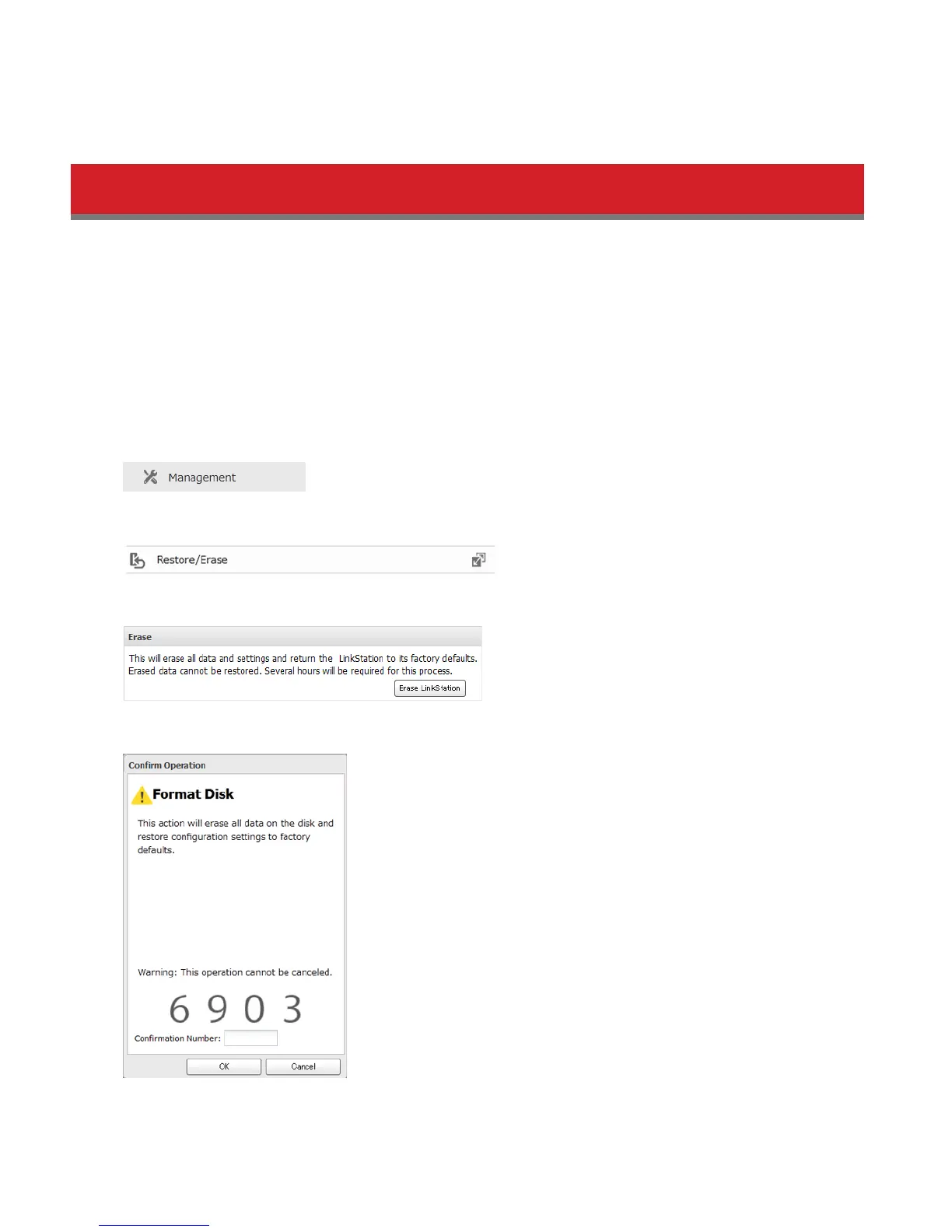
1 In Advanced Settings, click Management.
2 Select Restore/Erase.
3 Click Erase LinkStation.
4 The “Confirm Operation” screen will open. Enter the displayed number, then click OK.
5 All data on the LinkStation will be permanently erased.















 To Next Page