72
Timer 2: Selected day of the week Wednesday 7:30-22:00
Timer 3: Not used
On days other than Wednesday, normal operation begins at 9:00 and the unit goes into sleep mode at 18:00. On
Wednesday, normal operation begins at 7:30 and the unit goes into sleep mode at 22:00.
• To turn on the LinkStation before the wake-up time when it is in sleep mode, press the function button.
UPS (Uninterruptible Power Supply)
If a UPS (sold separately) is attached, the LinkStation can be automatically shut down for protecting data in the event of
a power outage.
1 Plug the power cable of the UPS to a wall socket.
2 Connect the AC cable of the LinkStation to the UPS.
3 Connect the UPS and LinkStation using a USB cable or serial cable.
4 Turn on the UPS, then the LinkStation.
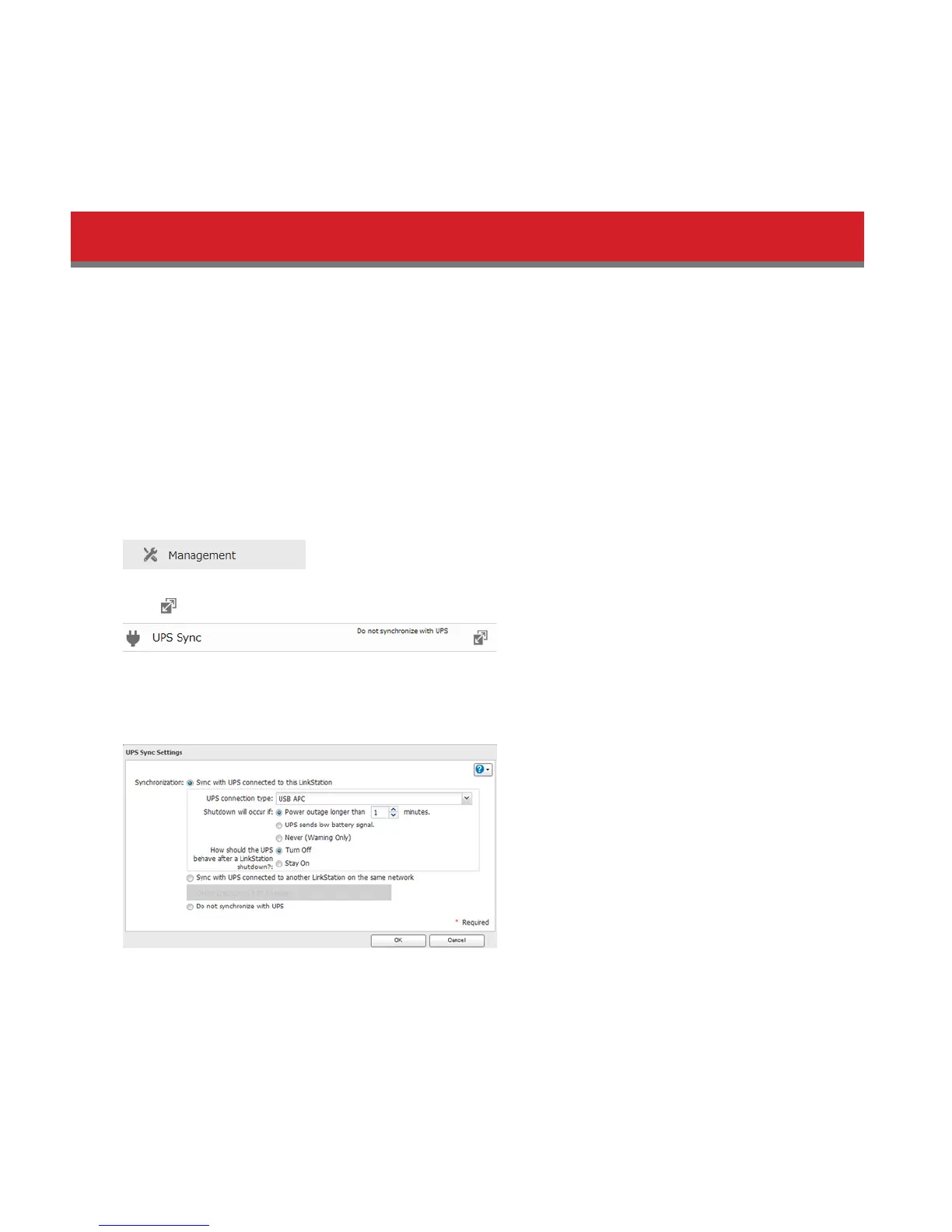
5 In Advanced Settings, click Management.
6 Click to the right of “UPS Sync”.
7 Click Edit.
8 Configure the desired settings, then click OK.
Notes:
• If the LinkStation is connected directly to a UPS, select “Sync with UPS connected to this LinkStation”. If a differ-
ent LinkStation is connected to the UPS, select “Sync with UPS connected to another LinkStation on the same
network”. After making this selection, enter the IP address of the LinkStation that will be the sync source in “Other
LinkStation’s IP Address”.
• When the LinkStation is rebooted after an automatic shutdown due to a power outage or other power supply
problem, verify that the power supply has been restored. If the LinkStation is turned on while it is still running on















 To Next Page