39
Adjustment and functions
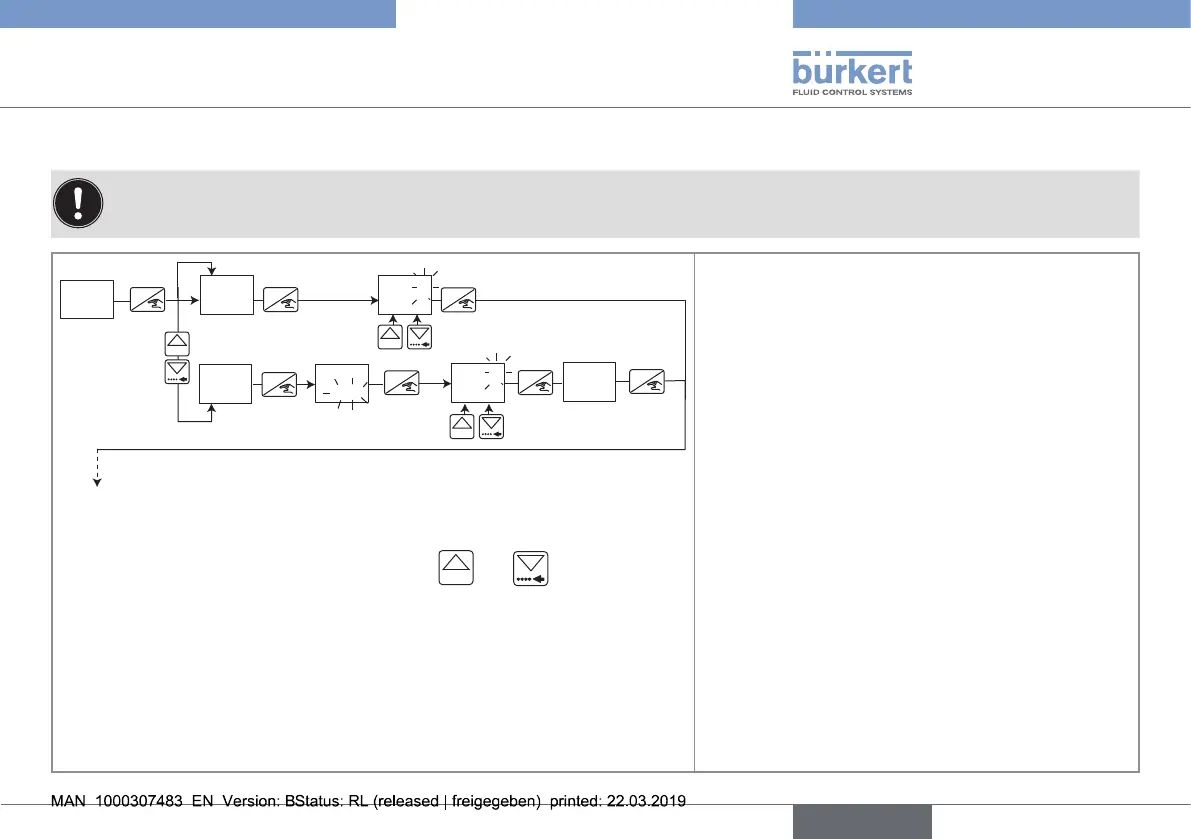
9.5.2. Entering the K-factor or having it determined by Teach-In
During the whole Teach-In procedure, the outputs are frozen to the status they had at the start of the Teach-In.
ENTER
0......9
ENTER
ENTER
ENTER
ENTER
ENTER
ENTER
0......9
0......9
*
*
KFAC
NO
TEAC
YES
TEAC
49.03
KFAC
TEAC
200.0
VOL
49.03
KFAC
To function OUT
* to move the decimal point, simultaneously press keys
0......9
and
• Entering the K-factor of the sensor-fitting used:
→ select "NO TEAC",
→ press key "ENTER",
→ In the KFAC parameter, enter the K-factor of the
sensor-fitting used, in pulse/litre (value between
0.001 and 9999). Find the K-factor within the Oper-
ating Instructions of the sensor-fitting.
• Determining the K-factor by means of a Teach-In
procedure:
→ install the device in series with a valve, for instance,
then
→ fill a tank with x litres capacity (200 litres for
example).
→ select "YES TEAC",
→ press key "ENTER",
→ open the valve: message "TEAC" blinks.
→ when the tank if full, press again key "ENTER".
→ enter the volume of liquid that has passed through
the circuit (in the unit displayed alternately with the
message "VOL"): the device calculates the K-factor
and displays it.
English
Type 8032 - SE32



 To Next Page