EasyManua.ls Logo

Burkert 8228 ELEMENT - Using the Navigation Button

Burkert 8228 ELEMENT
74 pages
Print Icon
To Next Page IconTo Next Page
To Previous Page IconTo Previous Page
Loading...
34
Operating and commissioning
Type 8228
Configuration level
This level comprises 5 menus:
Menu title Relevant icon
"Param": see chap. 9.11
This is
when the
device is be-
ing parame-
tered............
....................
"Calib": see chap. 9.12
"Diagnostic": see chap. 9.13
"Test": see chap. 9.14
"Info": see chap. 9.15
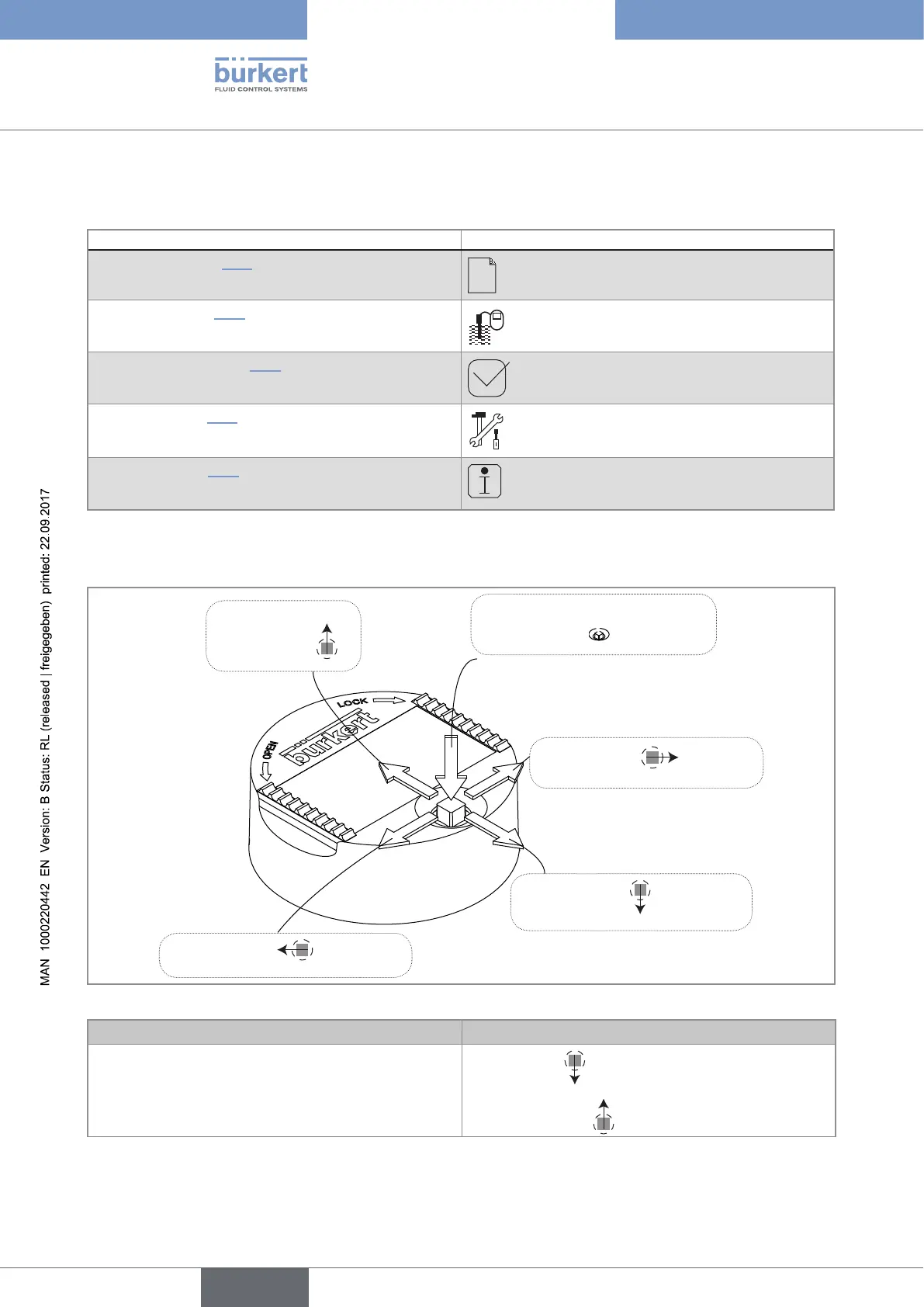
9.3 Using the navigation button
Symbolised by in
this manual
Symbolised by
in this
manual
Symbolised by in this
manual
Symbolised by in this
manual
Symbolised by in this
manual
Fig. 29: Using the navigation button
You want to... Press...
...browse in the Process level
next screen:
previous screen:
English

Table of Contents

Related product manuals