59
Start-up
ATTENTION!
Breakageofthepneumaticconnectionpiecesduetorotationalimpact.
▶ When unscrewing and screwing in the body casing or transparent cap, do not hold the actuator of the
process valve but the basic housing.
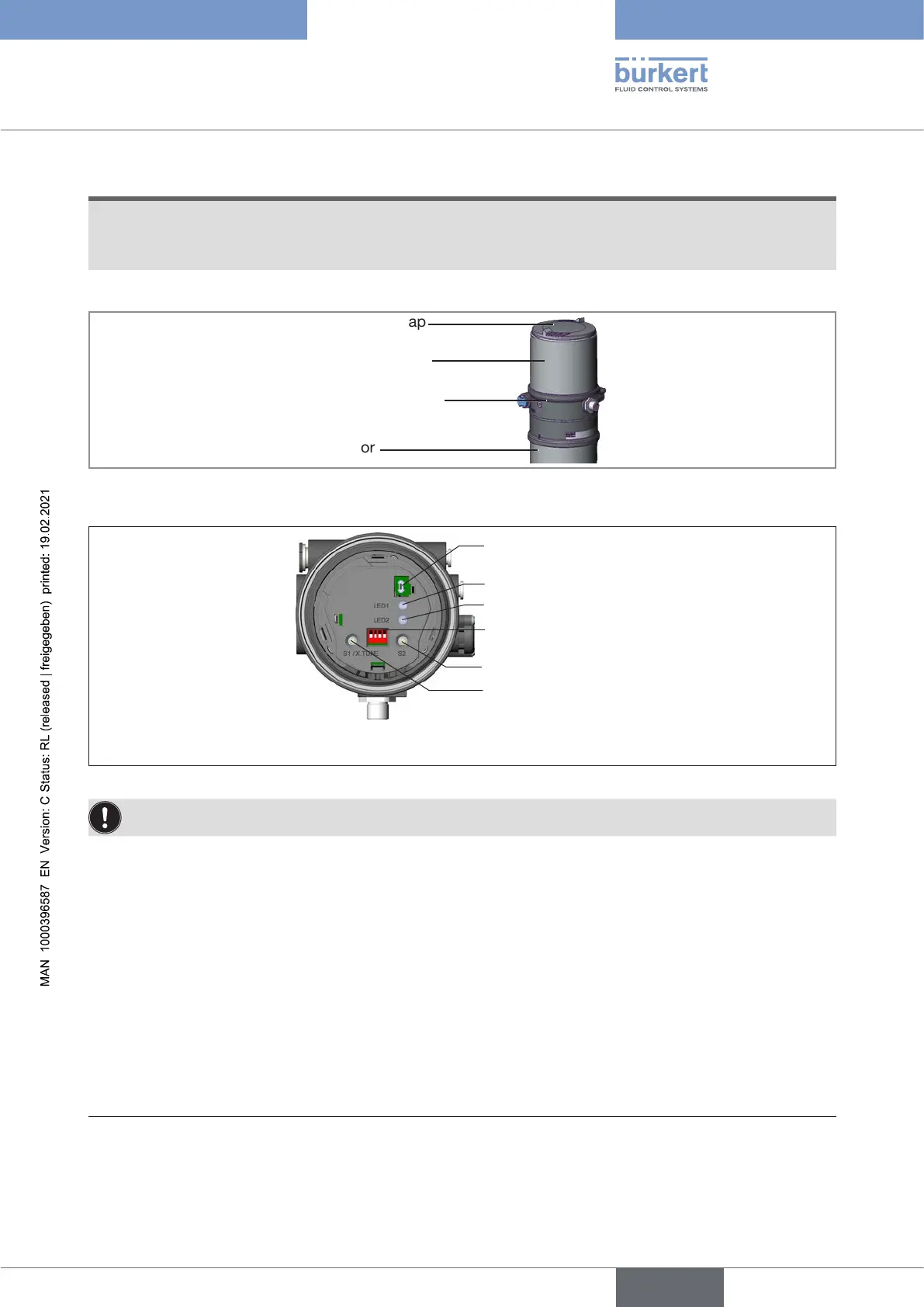
→ To operate the DIP switches, unscrew the transparent cap
Body casing
Basic housing
Actuator
Transparent cap
Figure 42: Open positioner
1 2 3 4
ON DIP
Communications
interface
LED 1
LED 2
DIP Switches
Button 1
Button 2
Figure 43: Automatic adjustment X.TUNE
TorunX.TUNE,thepositionermustbeintheAUTOMATICoperatingstatus(DIPswitch4=OFF).
→ Start the X.TUNE by pressing button 1
26)
for 5 s.
LED2ashesat5Hz.ThedeviceisintheNAMURstatusfunctioncheck,LED1lightsorange.
If the X.TUNE is successfully completed, the NAMUR status is reset again. The changes are automatically
transferred to the memory (EEPROM) provided the X.TUNE function is successful.
When LED 1 lights red after X.TUNE:
→ Execute X.TUNE again.
→ Perform a device restart if necessary.
26) The X.TUNE can also be started via communications software.
english
Type 8694 REV.2



 To Next Page