34
Control and display elements
7.5.1.3 NAMUR mode
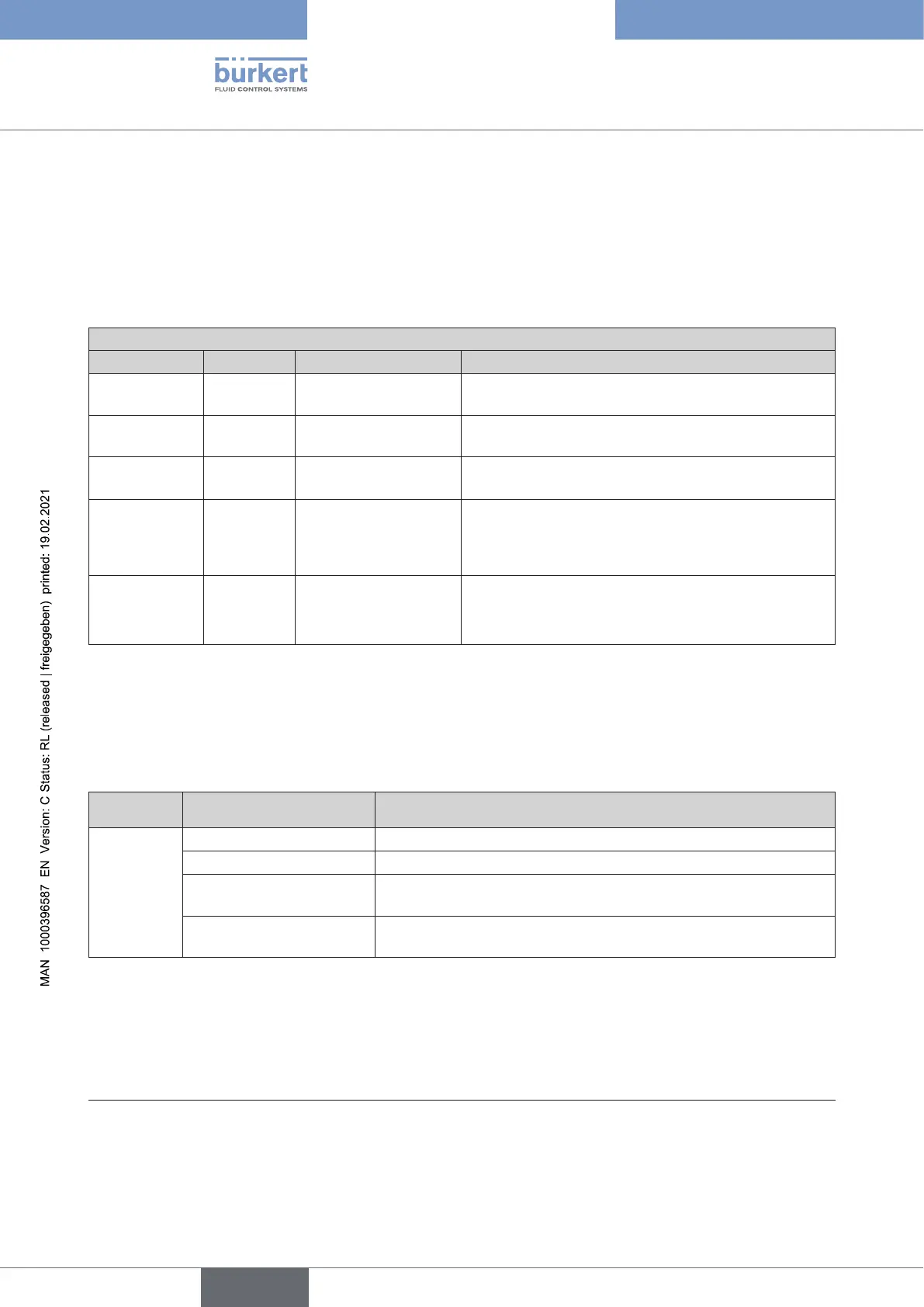
The device status LED show the device status.
The display elements change color in accordance with NAMUR NE 107.
If several device statuses exist simultaneously, the device status with the highest priority is displayed. The
priority is determined by the severity of the deviation from controlled operation (red LED = failure = highest
priority).
StatusdisplayinaccordancewithNE107,edition2006-06-12
Color Colorcode Status Description
Red 5 Outage, error or
malfunction
Normal operation is not possible due to a mal-
function in the device or on its peripheral equipment.
Orange 4 Function check Work is being carried out on the device; normal ope-
ration is therefore temporarily not possible
Yellow 3
Outofspecication Ambient conditions or process conditions for the
deviceareoutsidethespeciedarea.
Blue 2 Maintenance required The device is in normal operation, although a
functionisbrieyrestricted.
→Service device.
Green 1 Diagnostics active Device is operating perfectly. Status changes are
indicatedindierentcolors.
Messagesaretransmittedviaaeldbusifconnected.
Table 13: Description of the colors
7.5.2 Status LED, green
LED 2 (green) indicates the following:
Color Status Description
Green is not lit IO-Link communication inactive
20)
ashes IO-Link communication active
20)
asheswith5Hz Feedback during pressing button 1 (start X.TUNE) or button 1+2
(device restart) > 5 s
asheswith10Hz Feedback during pressing button 1+2 (reset to factory settings)
>30s
Table 14: LED 2, green
20) Only IO-Link variant.
english
Type 8694 REV.2



 To Next Page