69
Operation and function
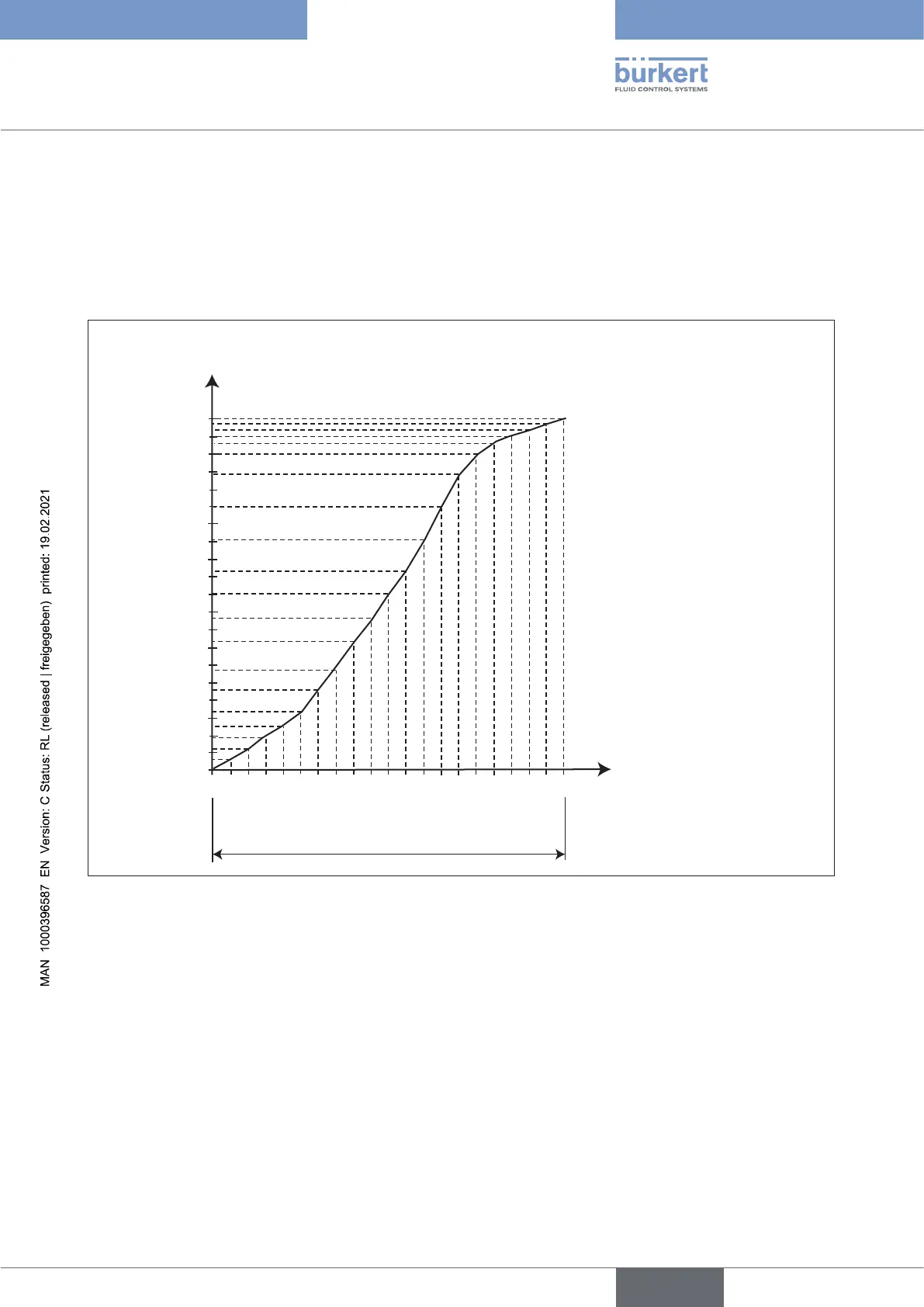
Enteringthefreelyprogrammablecharacteristic
Thecharacteristicisdenedby21nodesdistributeduniformlyoverthepositionset-pointvaluesrangingfrom
0 – 100%. They are spaced at intervals of 5%. A freely selectable stroke (adjustment range 0 – 100%) is assigned
toeachnode.Thedierencebetweenthestrokevaluesoftwoadjacentnodesmustnotbegreaterthan20%.
Exampleofaprogrammedcharacteristic
Valve stroke [&]
Unit signal [%]
10
20
30
40
50
60
70
80
90
100
10 20 30 40 50 60 70 80 90 100
0
4 – 20 mA
0 – 20 mA
Figure 50: Example of a programmed characteristic
16.1.4 INPUT -
Enter the standard signal
Under this menu option, enter the unit signal used for the set-point value.
Factory setting: 4 – 20 mA, 4-wire
Further settings: 4 – 20 mA, 3-wire
0 – 20 mA, 4-wire
0 – 20 mA, 3-wire
english
Type 8694 REV.2



 To Next Page