Programmable HV Power Supply
Revision 19
n
CAEN
T o o l s f o r D i sc o v e r y
2.5 Rear panel connections
2.5.1 HV Channel Output
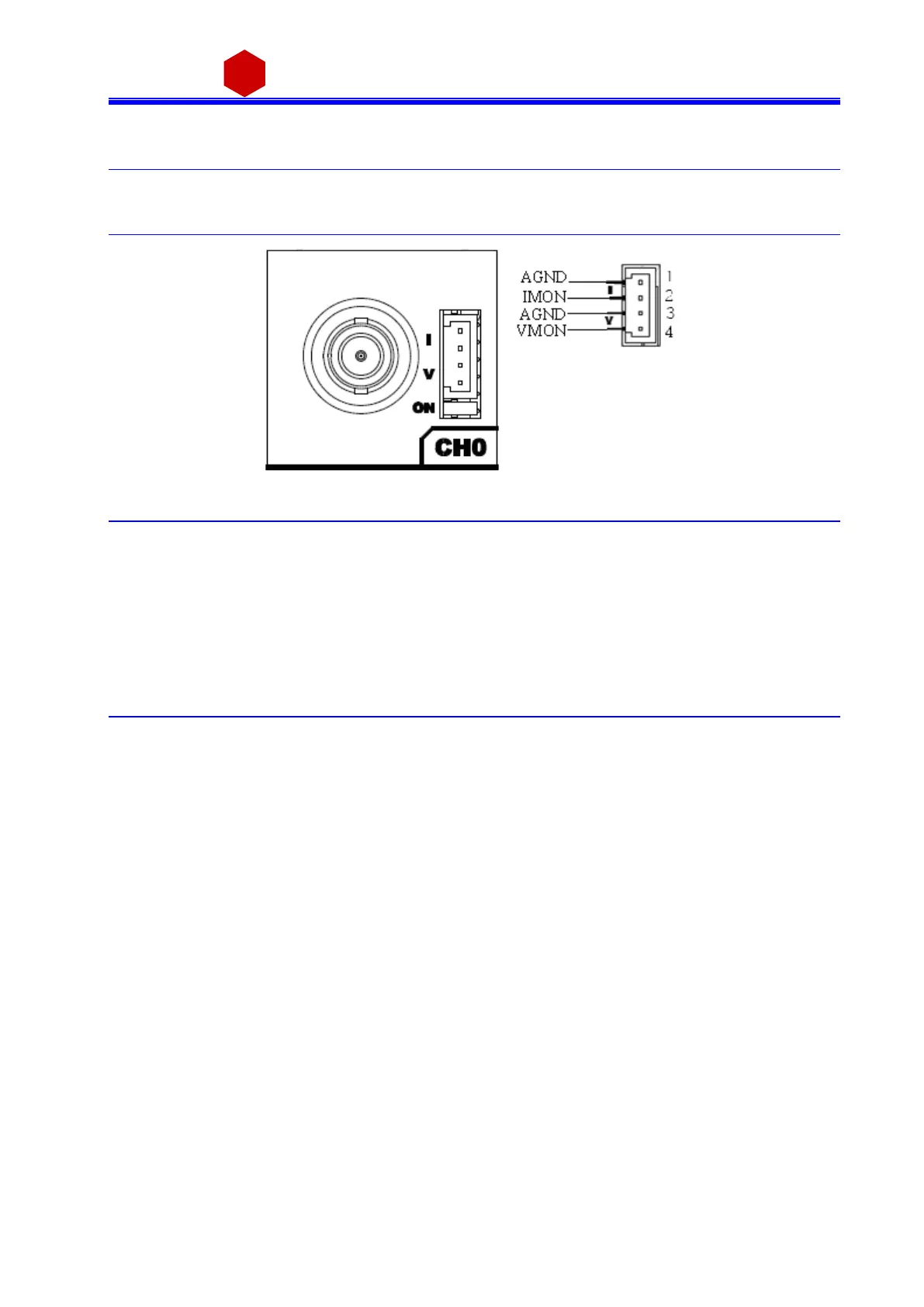
Fig. 2.11: HV Channel panel and test point electrical scheme
The test points allow to monitor the Channel Output Voltage and Current a ccording to the following conversion:
VMON: Voltage level (1V = 1.5 kV ±1% readout; s a me pol arity as cha nnel)
IMON high range: Voltage l evel (1V = 66 µA ±3% rea dout; positive, 0÷5 V range )
IMON low range: Voltage level (1V = 6.6 µA ±3% readout; positi ve, 0÷5 V range )
2.6 Imon Zoom
Imon Zoom is an optional feature that allows to monitor the channel current with an i ncreased resolution (10x)
in the 0 – 30 µA range; i f the Imon Zoom is installed, by s electing Imon Range = LOW (s ee § 3.1.2), the output
current i s monitored with 0.5nA resolution (instead of 5 nA), in the 0 – 30 µA range. It i s importa nt to notice
tha t, i f Imon Range = LOW i s s elected, and the channel draws a current larger than 30 µA, then Overcurrent i s
si gnalled.



 To Next Page