Programmable HV Power Supply
Revision 19
n
CAEN
T o o l s f o r D i sc o v e r y
3.2.3 Channel settings
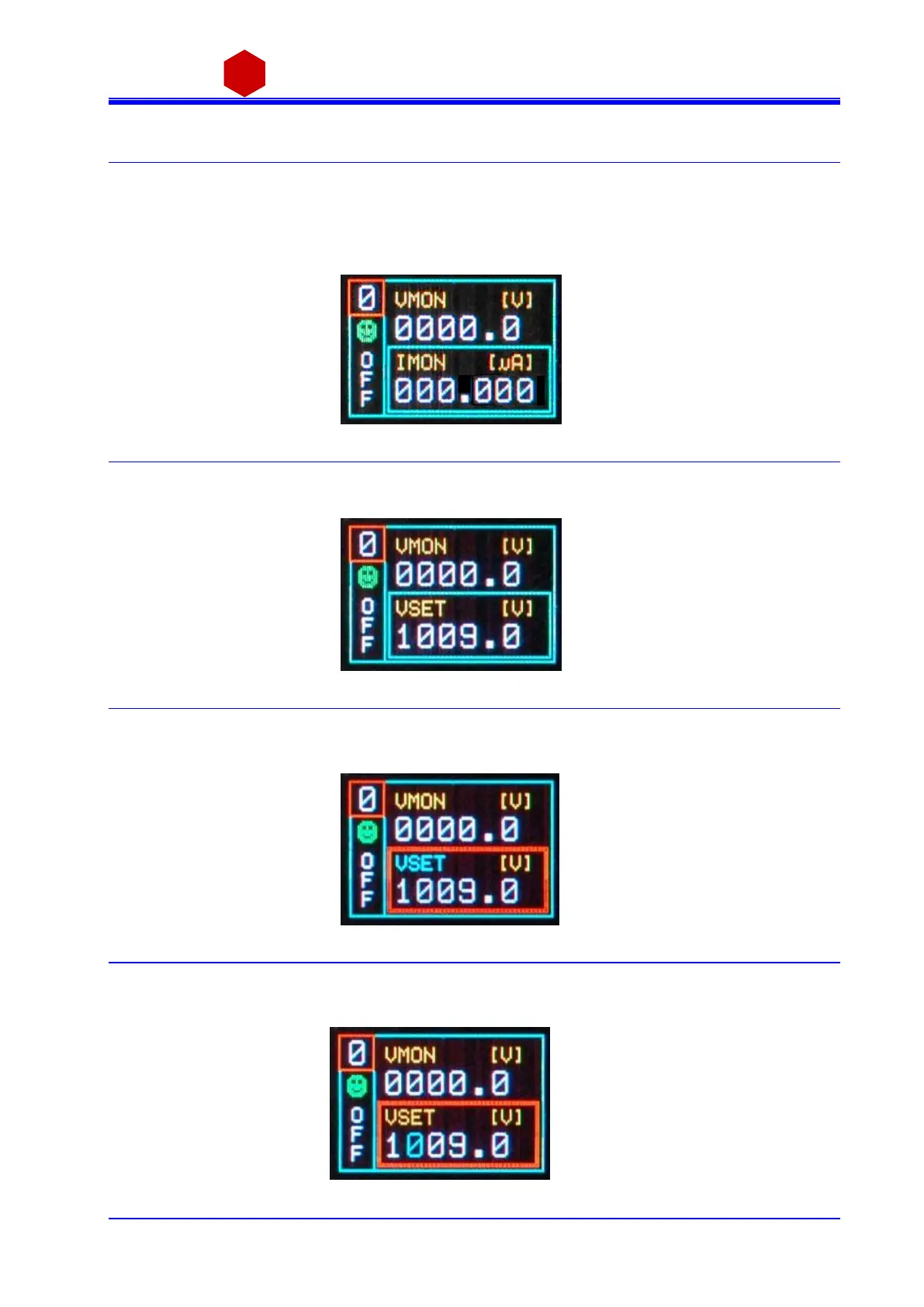
In order to operate Output Channel s ettings :
Turn the TUNE ROTARY SWITCH until the channel number to be s et is di splayed in the left upper row (for
example Channel 0)
Push the TUNE ROTARY SWITCH: at this point the frame of the left upper row (channel number) becomes red
and the cha nnel is selected
Fig. 3.8: Channel settings edit screen
Turn the TUNE ROTARY SWITCH until the parameter to be set (for example VSET) is displayed in the right l ower
row
Fig. 3.9: Channel VSET select screen
Push the TUNE ROTARY SWITCH: at this point the parameter i s selected, i ts frame is s hown in red and i ts na me
in bl ue; it i s now pos s ibl e to cha nge the parameters value
Fig. 3.10: Channel VSET access screen
Turn the TUNE ROTARY SWITCH until the value digit to be edi ted is s hown in bl ue, the parameter name in
yell ow
Fig. 3.11: Channel VSET digit selection screen



 To Next Page