50 TYPE R Radio Production System Fixing Bracket Assembly Instructions
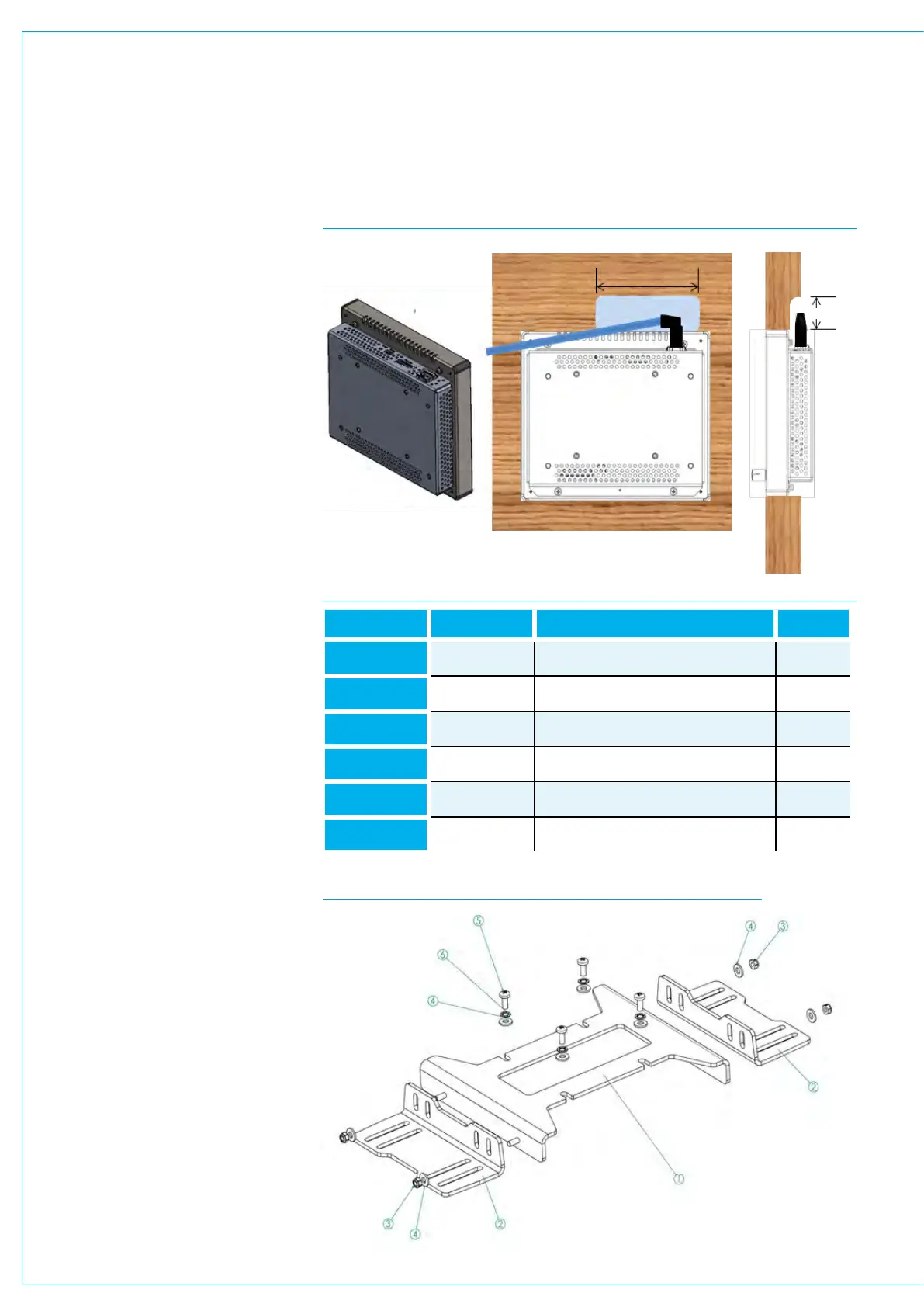
Assembly - See Fig 4, 5 &6
Tools required (not supplied)
7mm adjustable/spanner/wrench open
ended.
PZ2 screw driver/ bit.
4 x Wood screws.
Saw.
Mounting Procedure
Mark out and cut hole in desk surface
to accommodate SSP 181mm (7.1in) x
157mm (6.2in).
Ensure sufficient clearance for
brackets (item 2) from any other
items on the underside of desk
and cable protrusion from RJ45
connector..
Loosely attach under desk brackets
(Item 2) to bracket (Item 1) with 4 x M4
nuts (Item 3) and washers (Item 4) as
required for desk thickness, mounting
options a), b), c) or d). Refer to Fig 2 & 3.
Align holes in bracket (Item 1) with SSP
and attach stand using 4 x M4 screws
(Item 5) with washers (Items 4 & 6). Note
plain washer should be nearest bracket.
As shown Fig 6.
Set Panel ID (as once fitted it may
be difficult to do so) and offer up the
SSP through the hole in desk from the
underside.
Fitting to desk/surface
Fix brackets (item2) to underside of desk
with 4 screws (not supplied) suitable for
desk surface.
Push up SSP from underside until SSP
is flush with surface and tighten 4 x M4
nuts (Item 3).
Do not over tighten. Typically 1Nm.
Be aware of desk top thicknesses
greater than 20mm. These will
require a rebate approx. 100mm x
50mm to allow clearance for RJ45
connector and finger access as
shown in. Fig 4.
FIG 5 SUPPLIED PARTS TABLE
FIG 6 LSP BRACKET MOUNT & UNDER DESK BRACKETS
Item Number Part Number Description Quantity
1 730-032 SSP Bracket Recess Mount 1
2 730-033 Under Desk Bracket 2
3 360-124 Nut M4 Nyloc 4
4
370-007 Washer M4 Plain 8
5 350-043 M4x10mm Pozi Pan 4
6 370-008 Washer M4 Internal Lock 4
FIG 4 FITTING TO DESK/SURFACE
100mm
50mmRear View


 To Next Page