73
AUDIO I/O CONNECTIONS
There are a number of ways to get Audio in and out of a Type R system. In addition to the audio I/O in the core, there are
3 optional I/O boxes carrying both Analogue inputs and outputs and AES digital inputs and outputs.
All the Type R audio I/O with the exception of the Headphone outputs is connected via 25 way ‘D’ type female connectors
on the boxes using the AES59/Tascam® standard with a parallel set of connectors on RJ45 each carrying a pair of
analogue inputs or outputs or an AES input or output port.
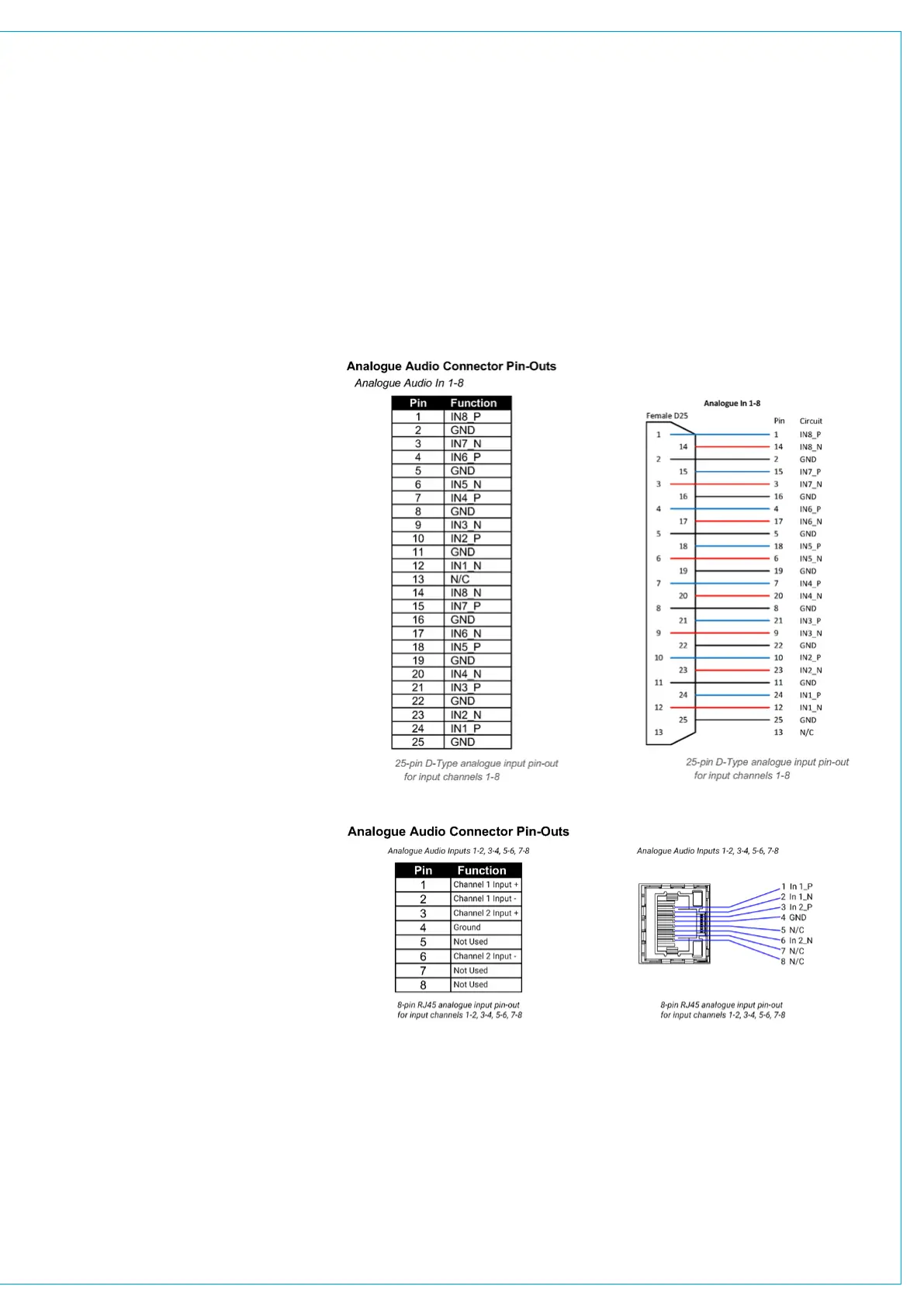
Analogue Audio In 25 way ‘D’ type
Connector
This connector is used for 8 x balanced
Mic/Line inputs. Note that there are
8 x 48v indicator LEDs to show when
phantom power is being applied to each
input to this connector
The pinout for analogue inputs 9-16
on the AD6502 Analogue I/O Box is
identical to the 1-8 pinout, i.e. 1=9, 2=10
etc.
This connector appears on the UR6500
Core Box, AD6501 Combo I/O Box
and the AD6502 Analogue I/O Box
and conforms to the AES59/Tascam®
standard.
Analogue Audio In RJ45 type
Connector
This connector is used for 2 x balanced
Mic/Line inputs.
The pinout for analogue inputs 3-4, 5-6
and 7-8 is identical to the 1-2 pinout, i.e.
1=3, 2=4 etc.
This connector appears on the UR6500
Core Box, AD6501 Combo I/O Box and
the AD6502 Analogue I/O Box and
conforms to the StudioHub+ standard
pin-out.
All cabling using this RJ45 connector
type for audio must be CAT5e or CAT6
shielded twisted pair (STP).


 To Next Page