25
Box type /Core AoIP port IP address & Subnet mask**
Primary core
Connect Server
Pri (I/F 5) 192.168.30.100/24
Sec (I/F 6) 192.168.31.100/24
Combo AoIP - Pri 192.168.30.1/24
AoIP - Sec 192.168.31.1/24
Analogue AoIP - Pri 192.168.30.2/24
AoIP - Sec 192.168.31.2/24
AES AoIP - Pri 192.168.30.3/24
AoIP - Sec 192.168.31.3/24
Primary Core AoIP1 AoIP 1 - Pri 192.168.30.4/24
AoIP 1 - Sec 192.168.31.4/24
Secondary Core AoIP2 AoIP 2 - Pri 192.168.30.64/24
AoIP 2 - Sec 192.168.31.64/24
IO BOX & CORE AOIP NETWORK INTERFACE SETTINGS
The default IO box and core AoIP network interface
settings are shown in the table above right:
All IO box, core AoIP network interfaces and Connect
server AoIP interfaces must have unique IP addresses,
so if multiple AoIP devices in the same IO box type or
multiple cores need to be connected, it is essential that
all IP addresses are reconfigured accordingly first.
Important: Currently, the IP addresses and
subnet masks assigned to the core’s Connect
server are fixed. It will be possible to edit these
settings from software release v1.2.
Until then, all AoIP devices which are to be
discovered and controlled by Connect must
reside in the 192.168.30/24 (Primary) and
192.168.31/24 (Secondary) subnets.
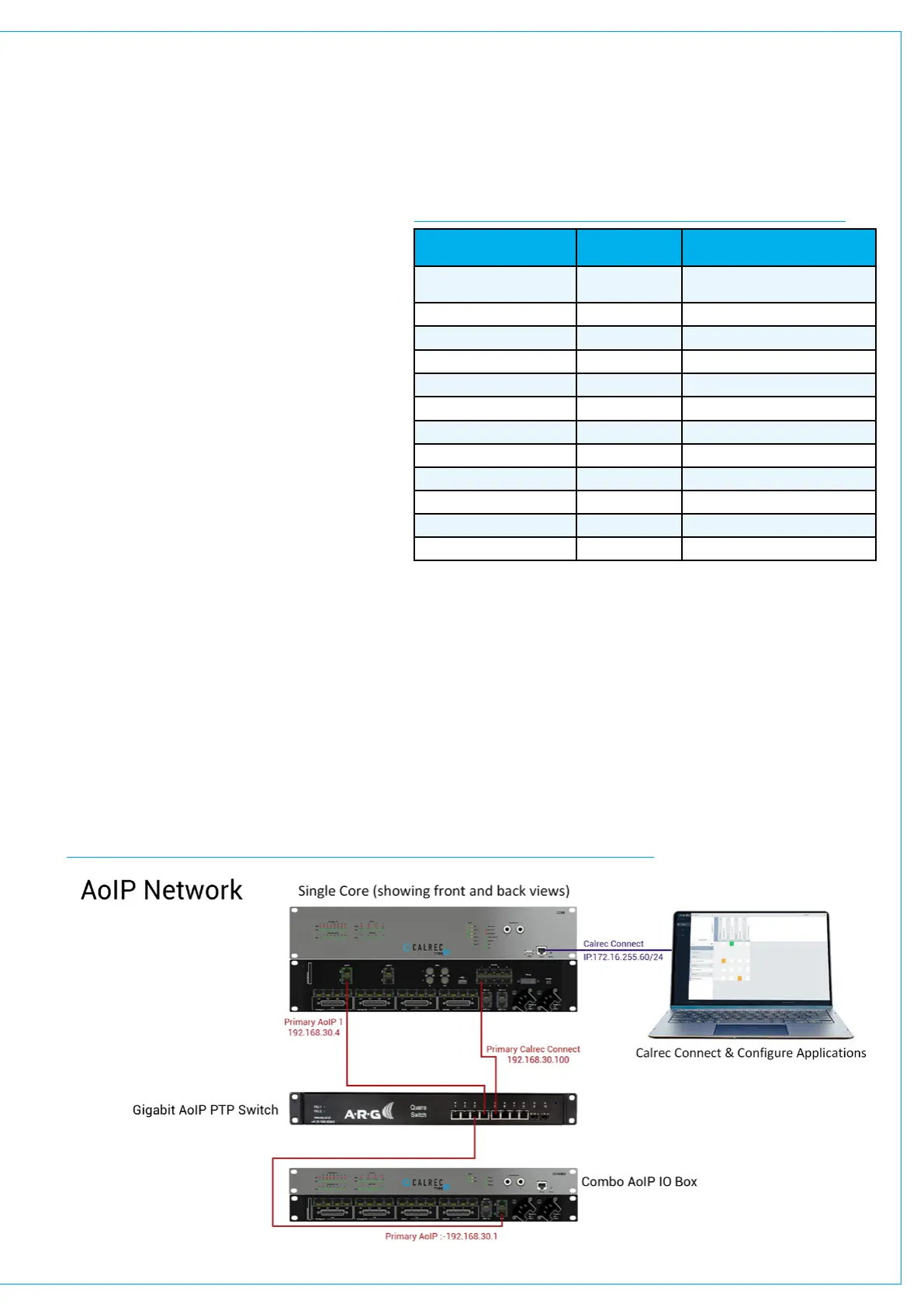
1. Connect the audio network switch(es) to interfaces 5 (& 6) on the rear of the core (marked “Surface”) ,
Then follow the steps given below to configure each AoIP interface in an IO box or core:
2. Connect the Pri & Sec AoIP interfaces on the rear of the IO box or core, to your network switch or switches.
Note: Follow the suggested switch port connections given for your network switch(es) in the corresponding Network
Device document if unsure (see section 5).
Note: PTP aware switches are recommended, but are not necessary for small AoIP networks
Note: Connect one IO box / device or core at a time to avoid IP address conflicts.
EXAMPLE OF CONNECTING A COMBO AOIP BOX TO THE CORE VIA AN AOIP SWITCH
14. CONNECT AUDIO SWITCH AND AOIP PORTS TO THE CORE


 To Next Page