164
You can customize the Picture Styles. You can change or adjust the
parameter settings of Picture Styles such as [Strength], [Fineness], or
[Threshold] for [Sharpness] as well as [Contrast] and other
parameters from the default settings. To see the resulting effects, take
test shots. To customize [Monochrome], see page 166.
1
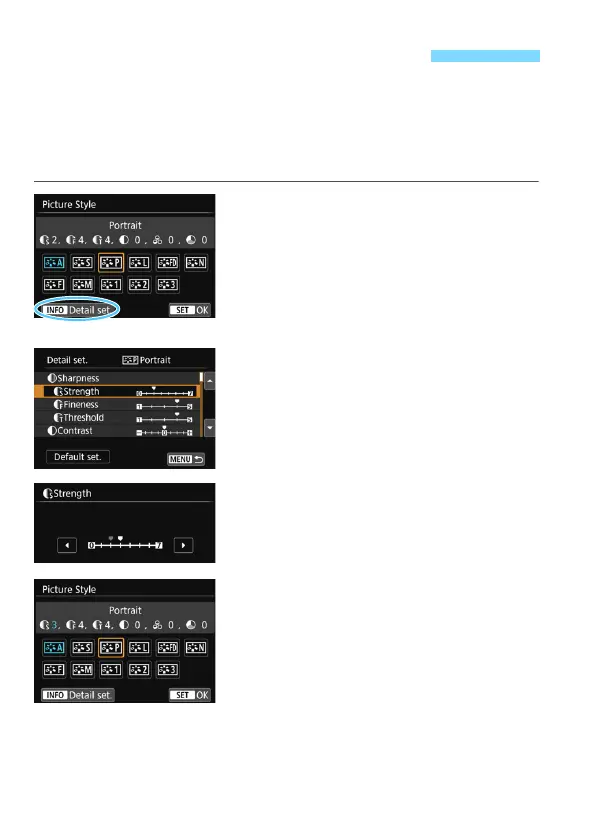
Press the <XA> button.
The Picture Style selection screen will
appear.
2
Select a Picture Style.
Select a Picture Style, then press
<B> button.
3
Select a parameter.
Select the parameter (such as
[Strength] of [Sharpness]) to be set,
then press <0>.
See page 165 for settings and effects.
4
Set the parameter.
Press the <Y> <Z> keys to adjust
the effect of the parameter, then
press <0>.
Press the <M> button to save the
adjusted parameter settings. The
Picture Style selection screen will
reappear.
The value of parameter settings
different from the default will be
displayed in blue.
A Customizing a Picture StyleN



 To Next Page