203
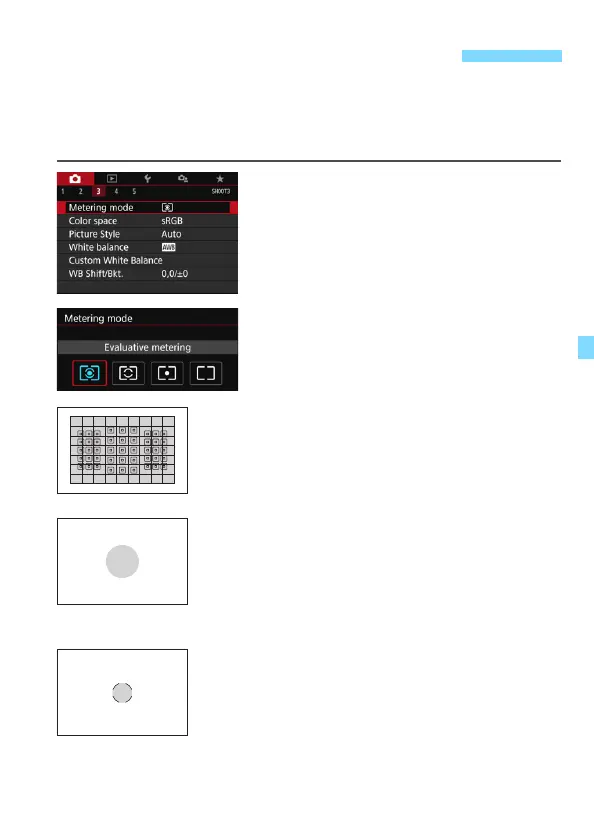
Four methods (metering modes) to measure the subject’s brightness are
provided. Normally, evaluative metering is recommended. In Basic Zone
modes, evaluative metering is set automatically. (In the <
8:
x
> and
<
v:
X
> modes, center-weighted average metering is set.)
1
Select [Metering mode].
Under the [z3] tab, select [Metering
mode], then press <0>.
2
Set the metering mode.
Select the desired metering mode,
then press <0>.
q Evaluative metering
General-purpose metering mode suited even
for backlit subjects. The camera adjusts the
exposure automatically to suit the scene.
w Partial metering
Effective where there are much brighter lights
around the subject due to backlight, etc. The
gray area in the left figure is approximately
where the brightness is metered to obtain the
standard exposure.
r Spot metering
Effective when metering a specific part of the
subject or scene. The gray area in the left figure
is approximately where the brightness is
metered to obtain the standard exposure. This
metering mode is for advanced users.
q Changing the Metering ModeN



 To Next Page