358
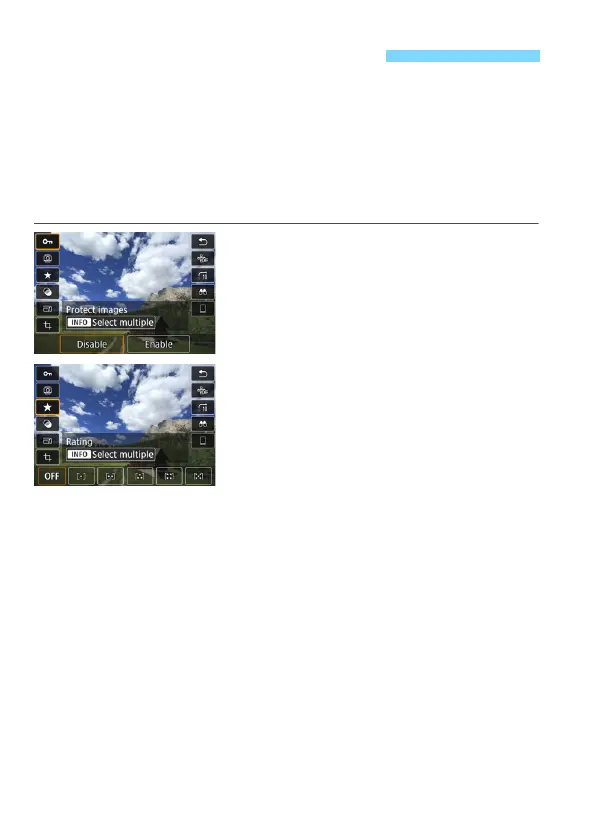
During playback, you can press the <Q> button to set the following:
[J: Protect images], [b: Rotate image], [9: Rating], [U: Creative
filters], [S: Resize (JPEG images only)], [N: Cropping], [T: AF point
display], [e: Image jump w/6], [t: Image search], and [q: Send
images to smartphone*].
For movies, only the functions in bold above can be set.
* Not selectable if [Wi-Fi] under [51: Wireless communication settings] is set
to [Disable].
1
Press the <Q> button.
During image playback, press the
<Q> button.
The Quick Control options will
appear.
2
Select an item and set it.
Press the <W> <X> keys to select a
function.
The name and setting of the selected
function are displayed at the bottom
of the screen.
Press the <Y> <Z> keys to set the
function.
For Protect images (p.372) and
Rating (p.353), press <B> to
select multiple images.
For Creative filters (p.392), Resize
(p.395), Cropping (p.397), Image
search (p.356), and Send images to
smartphone, press <0> and set the
function.
Image jump w/6: To set Jump
images by the specified number or
Rating (p.353), press <B>.
To cancel, press the <M> button.
3
Exit the setting.
Press the <Q> button to exit Quick
Control.
Q Quick Control for Playback


 To Next Page