409
You can assign frequently-used functions to camera buttons or dials
according to your preferences for easy operations.
1
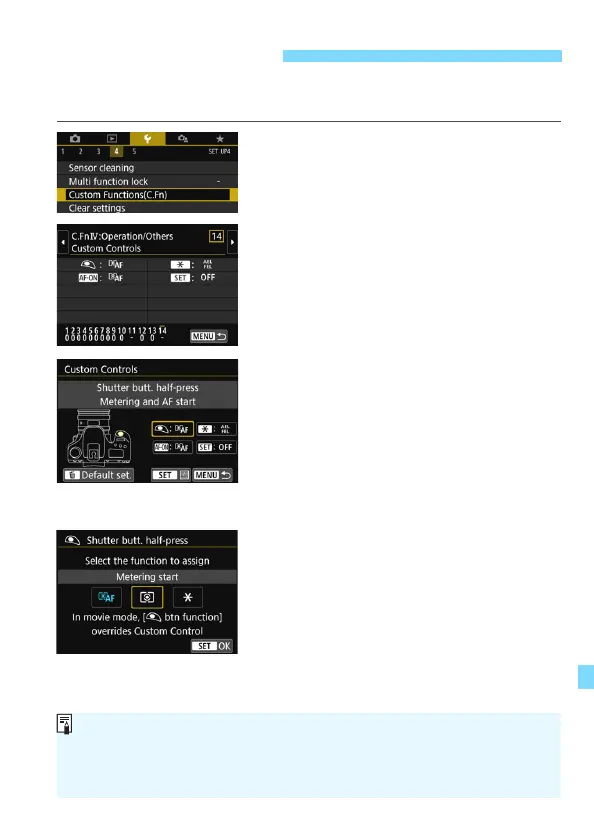
Select [Custom Functions(C.Fn)].
Under the [54] tab, select [Custom
Functions(C.Fn)], then press <0>.
2
Select [14: Custom Controls].
The Custom Controls setting screen
will appear.
3
Select a camera button or dial.
Select a camera button or dial, then
press <0>.
The name of the camera control and
the assignable functions will be
displayed.
The diagram on the left will show the
location of the selected button or dial.
4
Assign a function.
Select a function, then press <0>.
5
Exit the setting.
When you press <0> to exit the
setting, the screen in step 3 will
reappear.
Press the <M> button to exit.
Custom ControlsN
With the screen in step 3 displayed, you can press the <L> button to revert
the Custom Control settings to their defaults. Note that the [14: Custom
Controls] settings will remain unchanged even if you select [Clear all
Custom Func. (C.Fn)] under [54: Clear settings].



 To Next Page