166
Shooting With the Built-in Flash
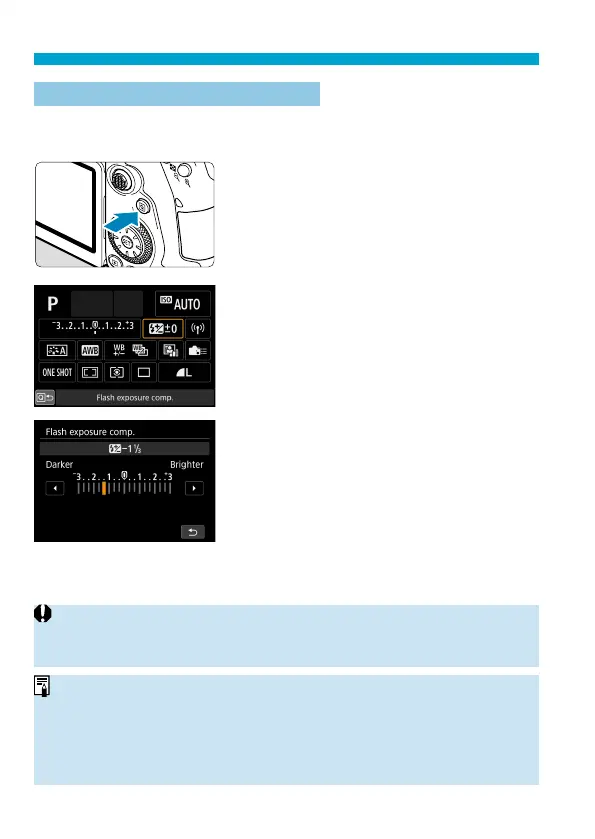
Flash Exposure Compensation
M
Just as exposure compensation is adjustable, you can also adjust fl ash
output of the built-in fl ash.
1
Press the <Q> button.
2
Select [y].
3
Set the compensation amount.
To make fl ash exposure brighter, set the
compensation amount toward [Brighter]
(positive compensation), or to make it
darker, set it toward [Darker] (negative
compensation).
After you are fi nished shooting, follow
steps 1–3 to return the compensation
amount to zero.
o
When [
z
: Auto Lighting Optimizer] (
=
218) is set to any setting other
than [Disable], images may still look bright even if negative compensation is
set.
o
The exposure compensation amount will remain in eff ect even after you set
the power switch to <
2
>.
o
You can also set fl ash exposure compensation with [Built-in fl ash settings]
in [
z
: Flash control] (
=
168).
o
The camera can also be used to set the external Speedlite’s fl a
sh exposure
compensation in the same way as with the built-in fl ash.



 To Next Page