338
Movie Playback
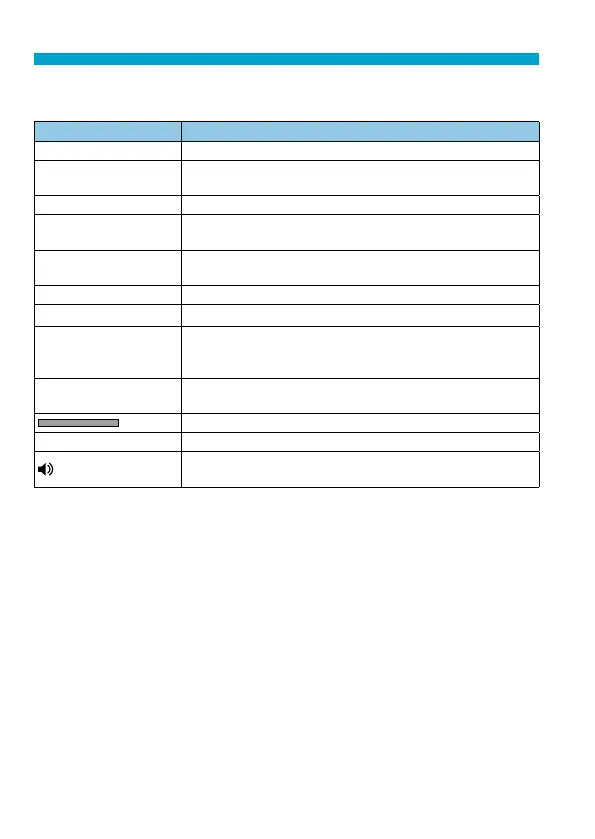
Movie Playback Panel
Item Playback Operations
7
Play Pressing <
0
> toggles between playback and stop.
8
Slow motion
Adjusts the slow motion speed with the <
5
> dial. The slow
motion speed is indicated on the upper right of the screen.
T
Skip backward Skips backward 4 sec. each time you press <
0
>.
3
Previous frame
Displays the previous frame each time you press <
0
>.
Holding <
0
> down will rewind the movie.
6
Next frame
Plays the movie frame-by-frame each time you press <
0
>.
Holding <
0
> down will fast forward the movie.
v
Skip forward Skips forward 4 sec. each time you press <
0
>.
X
Edit
Displays the editing screen (
=
340).
I
Frame Grab
Available when you play 4K or 4K time-lapse movies.
Enables you to extract the current frame and save it as a
JPEG still image (
=
342).
y
Background music
Plays back a movie with the selected background music
(
=
376).
Playback position
mm’ ss” Playback time (minutes:seconds)
Volume
Use the <
W
> <
X
> keys to adjust the speaker volume
(
=
337).


 To Next Page