375
Editing Video Snapshot Albums
Option Description
T
Rearrange video
snapshots
Turn the <
5
> dial to select a video snapshot to move, then
press <
0
>. Turn the <
5
> dial to move it, then press <
0
>.
L
Remove video
snapshot
Turn the <
5
> dial to select a video snapshot to delete, then
press <
0
>. Selected video snapshots are labeled [
L
]. To clear
the selection and remove [
L
], press <
0
> again.
7
Play video
snapshot
Turn the <
5
> dial to select a video snapshot to play, then press
<
0
>. Use the <
W
> <
X
> keys to adjust the volume.
4
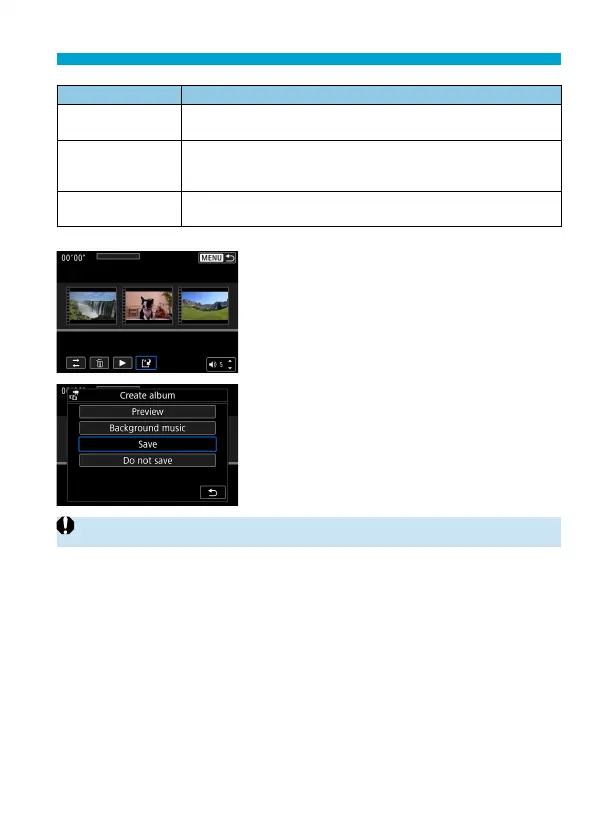
Finish editing.
Press the <
M
> button when you are
fi nished editing.
Select [
W
] (Finish editing).
5
Save the image.
To play an album with background
music, use [Background music] to
select the music (
=
376).
To check your editing, select [Preview].
Selecting [Save] saves the edited album
as a new album.
o
Video snapshot albums can only be edited once.


 To Next Page