EasyManua.ls Logo

Canon EOS 90D - Page 38

Canon EOS 90D
646 pages
Print Icon
To Next Page IconTo Next Page
To Previous Page IconTo Previous Page
Loading...
38
Part Names
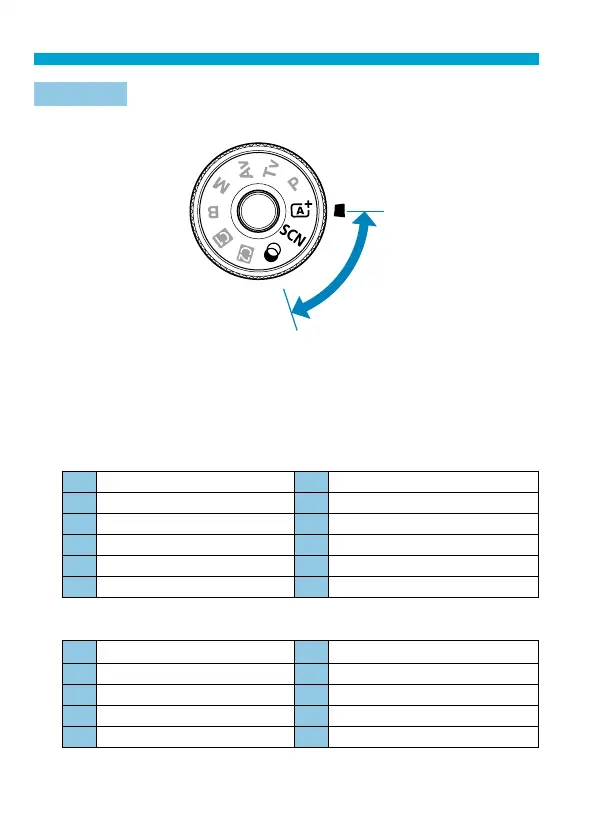
Mode Dial
Turn the Mode dial while holding down the lock-release button in the center.
(1)
(1) Basic Zone
All you do is press the shutter button. The camera sets everything to suit the
subject or scene for shooting.
A
: Scene Intelligent Auto (
=
76)
8
: Special scene (
=
84)
2
Portrait (
=
86)
4
Close-up (
=
93)
q
Group Photo (
=
87)
P
Food (
=
94)
3
Landscape (
=
88)
y
Candlelight (
=
95)
5
Sports (
=
89)
6
Night Portrait (
=
96)
C
Kids (
=
90)
F
Handheld Night Scene (
=
97)
r
Panning (
=
91)
G
HDR Backlight Control (
=
98)
U
: Creative fi lters (
=
103)
I
Grainy B/W (
=
105)
c
Miniature eff ect (
=
106)
W
Soft focus (
=
105)
A
HDR art standard (
=
106)
X
Fish-eye eff ect (
=
105)
B
HDR art vivid (
=
106)
Z
Water painting eff ect (
=
105)
C
HDR art bold (
=
106)
H
Toy camera eff ect (
=
105)
D
HDR art embossed (
=
106)

Table of Contents

Related product manuals