623
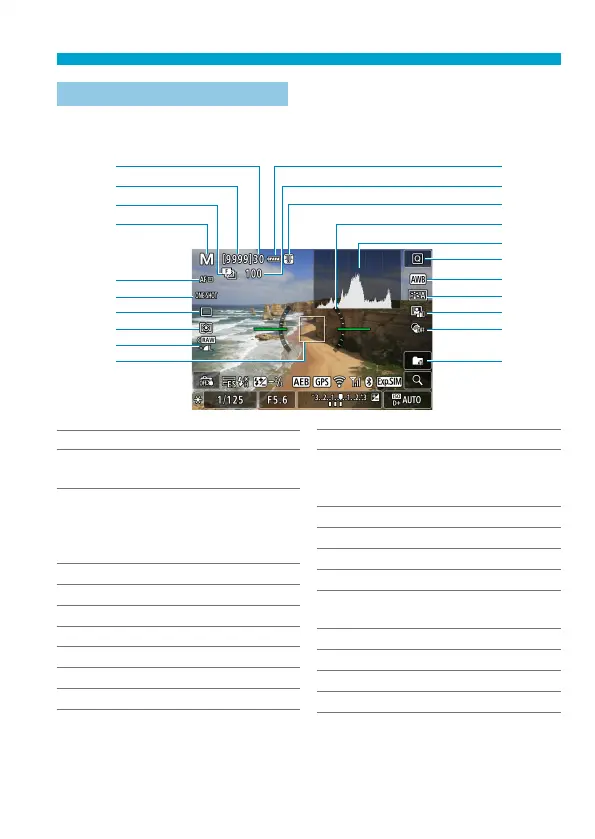
Information Display
Live View Shooting Screen
Each time you press the <
B
> button, the information display will change.
The display will show only the settings currently applied.
(1)
(2)
(3)
(4)
(5)
(6)
(7)
(8)
(9)
(10)
(11)
(12)
(13)
(14)
(15)
(16)
(17)
(18)
(19)
(20)
(21)
(1) Maximum burst
(2) Possible shots/Sec. until
self-timer shoots
(3) Focus bracketing/HDR/Multiple
exposures/Multi Shot Noise
Reduction/Bulb timer/Interval
timer
(4) Shooting mode/Scene icon
(5) AF method
(6) AF operation
(7) Drive mode
(8) Metering mode
(9) Image quality
(10) AF point (1-point AF)
(11) Battery level
(12) No. of shots left for focus
bracketing/multiple exposures/
interval timer
(13) Temperature warning
(14) Electronic level
(15) Histogram
(16) Quick Control button
(17) White balance/White balance
correction
(18) Picture Style
(19) Auto Lighting Optimizer
(20) Creative fi lters
(21) Create folder



 To Next Page