1-2
Starting up Digital Photo Professional
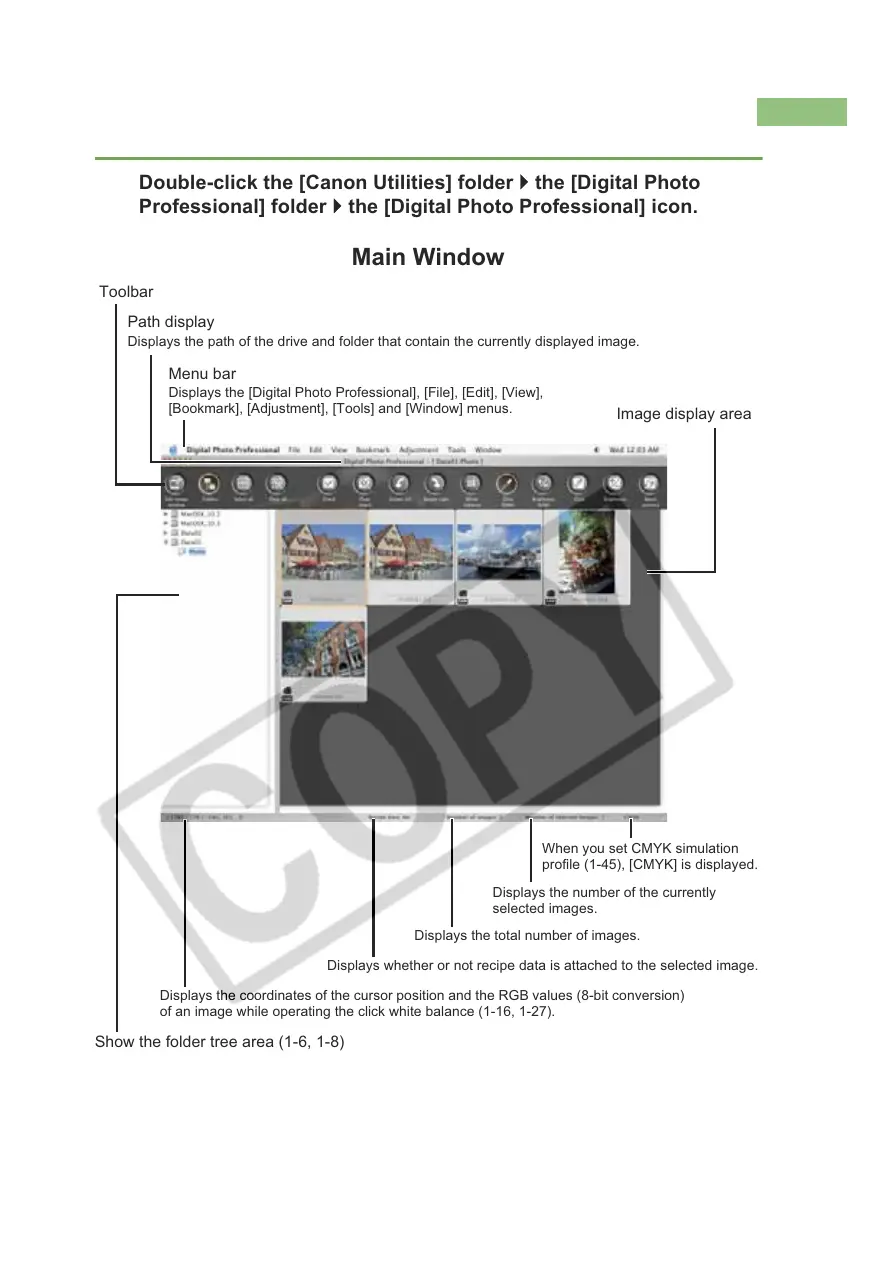
Main Window
Double-click the [Canon Utilities] folder ` the [Digital Photo
Professional] folder ` the [Digital Photo Professional] icon.
Toolbar
Path display
Displays the path of the drive and folder that contain the currently displayed image.
Menu bar
Displays the [Digital Photo Professional], [File], [Edit], [View],
[Bookmark], [Adjustment], [Tools] and [Window] menus.
Image display area
O To quit Digital Photo Professional, select [Digital Photo Professional] menu ` [Quit
Digital Photo Professional].
Displays the coordinates of the cursor position and the RGB values (8-bit conversion)
of an image while operating the click white balance (1-16, 1-27).
Displays the total number of images.
Displays the number of the currently
selected images.
Displays whether or not recipe data is attached to the selected image.
Show the folder tree area (1-6, 1-8)
When you set CMYK simulation
profile (1-45), [CMYK] is displayed.














 To Next Page