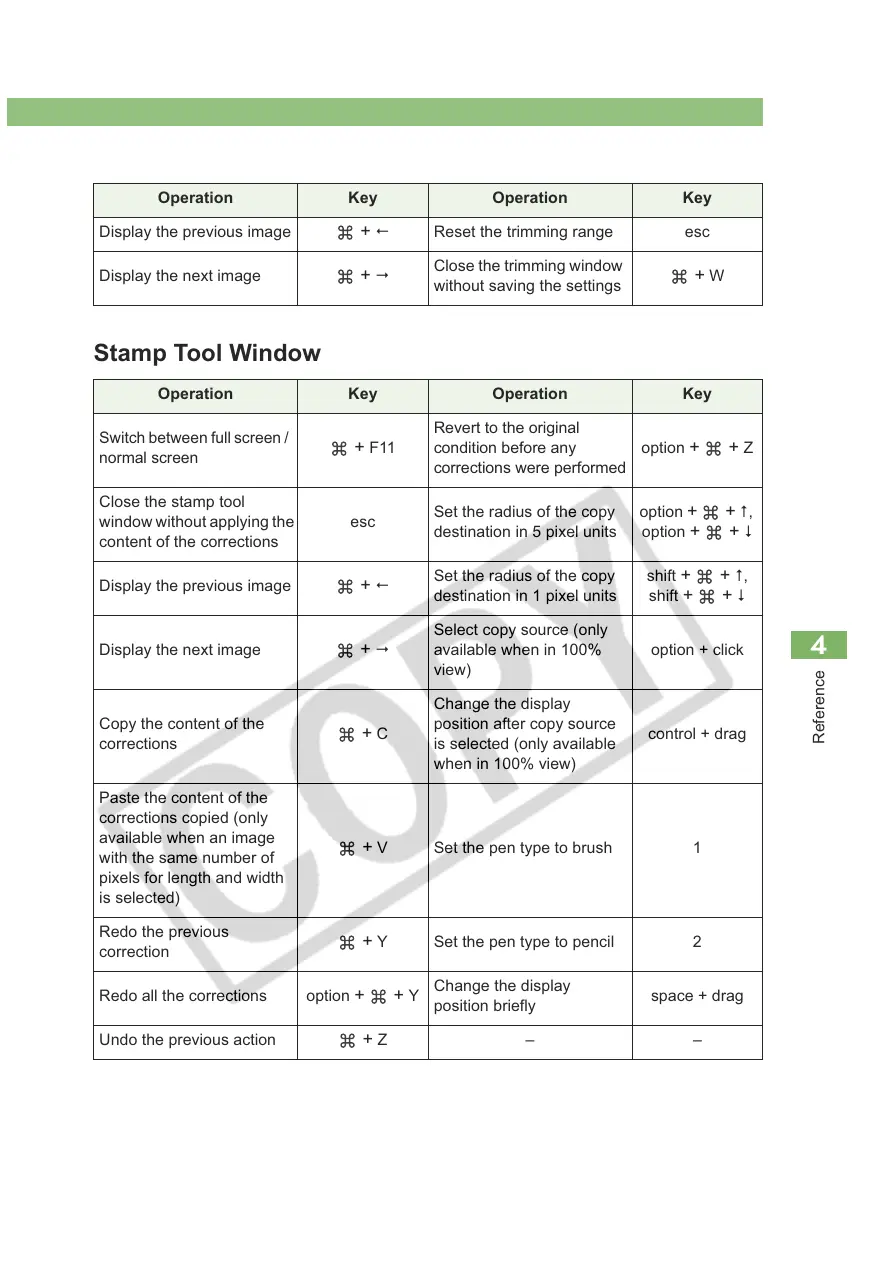
Shortcut Key List
4-7
4
Reference
Trimming Window
Stamp Tool Window
Operation Key Operation Key
Display the previous image
+ Reset the trimming range esc
Display the next image
+
Close the trimming window
without saving the settings
+ W
Operation Key Operation Key
Switch between full screen /
normal screen
+ F11
Revert to the original
condition before any
corrections were performed
option ++ Z
Close the stamp tool
window without applying the
content of the corrections
esc
Set the radius of the copy
destination in 5 pixel units
option
++,
option
++
Display the previous image
+
Set the radius of the copy
destination in 1 pixel units
shift
++,
shift
++
Display the next image
+
Select copy source (only
available when in 100%
view)
option + click
Copy the content of the
corrections
+ C
Change the display
position after copy source
is selected (only available
when in 100% view)
control + drag
Paste the content of the
corrections copied (only
available when an image
with the same number of
pixels for length and width
is selected)
+ V Set the pen type to brush 1
Redo the previous
correction
+ Y Set the pen type to pencil 2
Redo all the corrections option
++ Y
Change the display
position briefly
space + drag
Undo the previous action
+ Z– –














 To Next Page