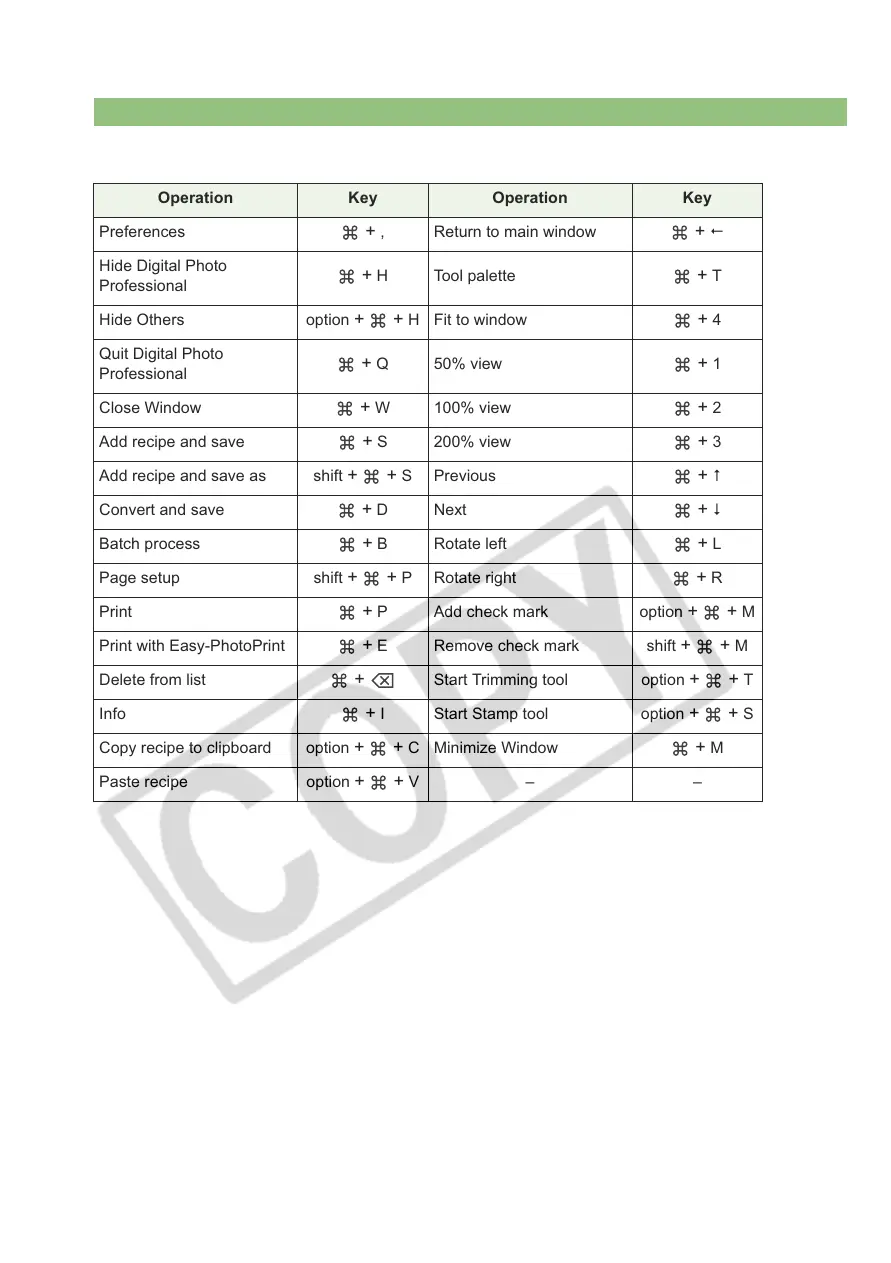
Shortcut Key List
4-6
Edit Image Window
Operation Key Operation Key
Preferences
+ , Return to main window +
Hide Digital Photo
Professional
+ H Tool palette + T
Hide Others option
++ H Fit to window + 4
Quit Digital Photo
Professional
+ Q 50% view + 1
Close Window
+ W 100% view + 2
Add recipe and save
+ S 200% view + 3
Add recipe and save as shift
++ S Previous +
Convert and save
+ DNext +
Batch process
+ B Rotate left + L
Page setup shift
++ P Rotate right + R
Print
+ P Add check mark option ++ M
Print with Easy-PhotoPrint
+ E Remove check mark shift ++ M
Delete from list
+ Start Trimming tool option ++ T
Info
+ I Start Stamp tool option ++ S
Copy recipe to clipboard option
++ C Minimize Window + M
Paste recipe option ++ V– –














 To Next Page