2
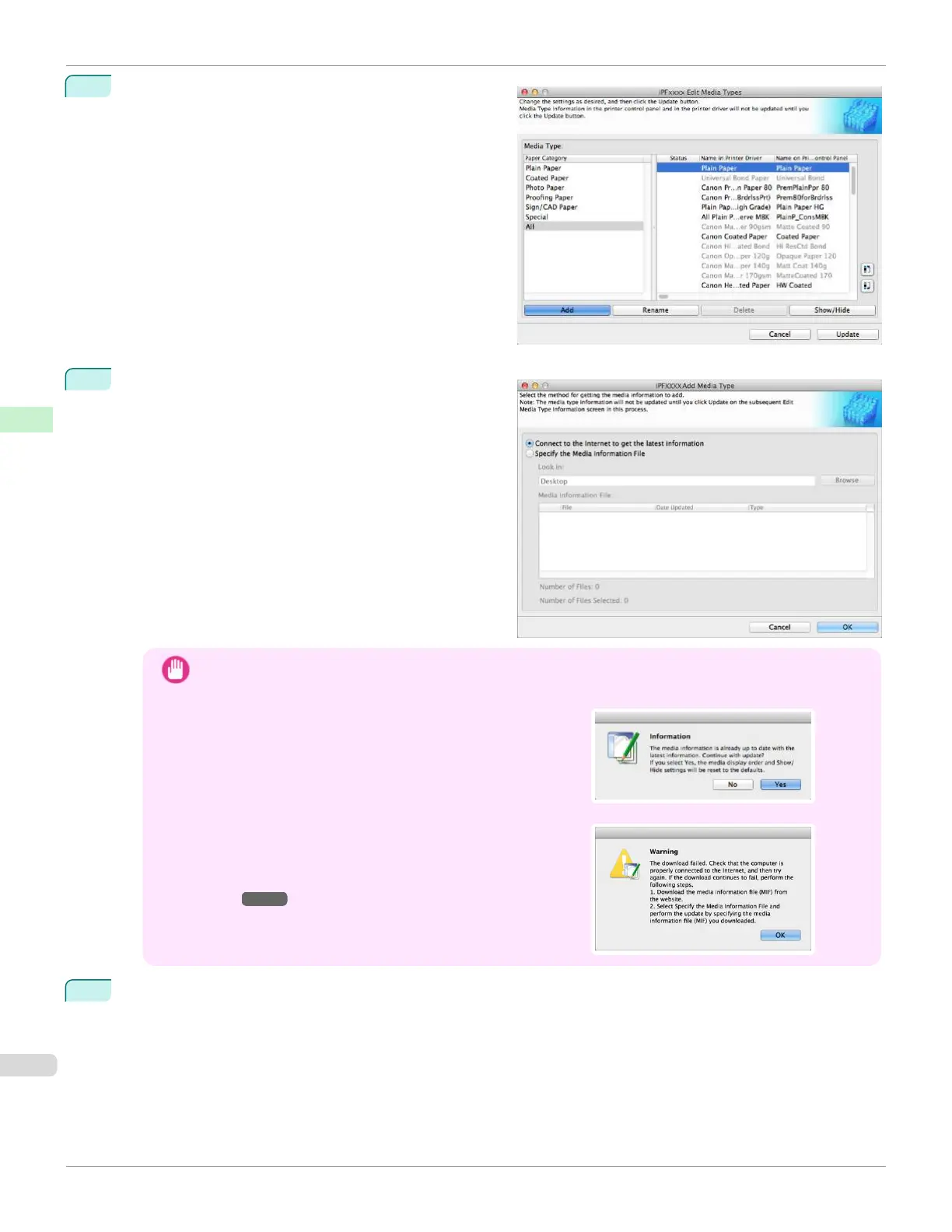
The Edit Media Types dialog box is displayed.
Click the Add button.
3
Make sure that Connect to the Internet to get the lat-
est information is selected, and then click the OK but-
ton.
Important
•
When you update the media information, the paper display order and Show/Hide settings return to their de-
fault values.
•
If the message on the right is displayed at this time, the lat-
est media information is already applied to your printer driv-
er. There is normally no need to update.
To exit without updating, click the No button. To continue
with the update, click the Yes button.
•
If the message on the right is displayed, the media informa-
tion file cannot be downloaded automatically from the Inter-
net. Configure the settings by referring to If the Media Infor-
mation File Does Not Download Automatically From the Inter-
net ➔P.424 .
4
Click OK when the confirmation message is displayed.
Adding Media Types
iPF670
User's Guide
Handling and Use of Paper Media Configuration Tool (Mac OS)
422













 To Next Page