Collating Copies/Prints
3-31
3
Basic Copying and Mail Box Features
Collating Copies/Prints
The Finisher modes can be selected to collate the outputs in various ways, either by pages or
copy/print sets.
IMPORTANT
The Finisher modes cannot be set if envelopes, transparencies, tracing paper, or labels is selected.
NOTE
For instructions on using optional Finisher-S1, see Chapter 3, "Optional Equipment," in the Reference
Guide.
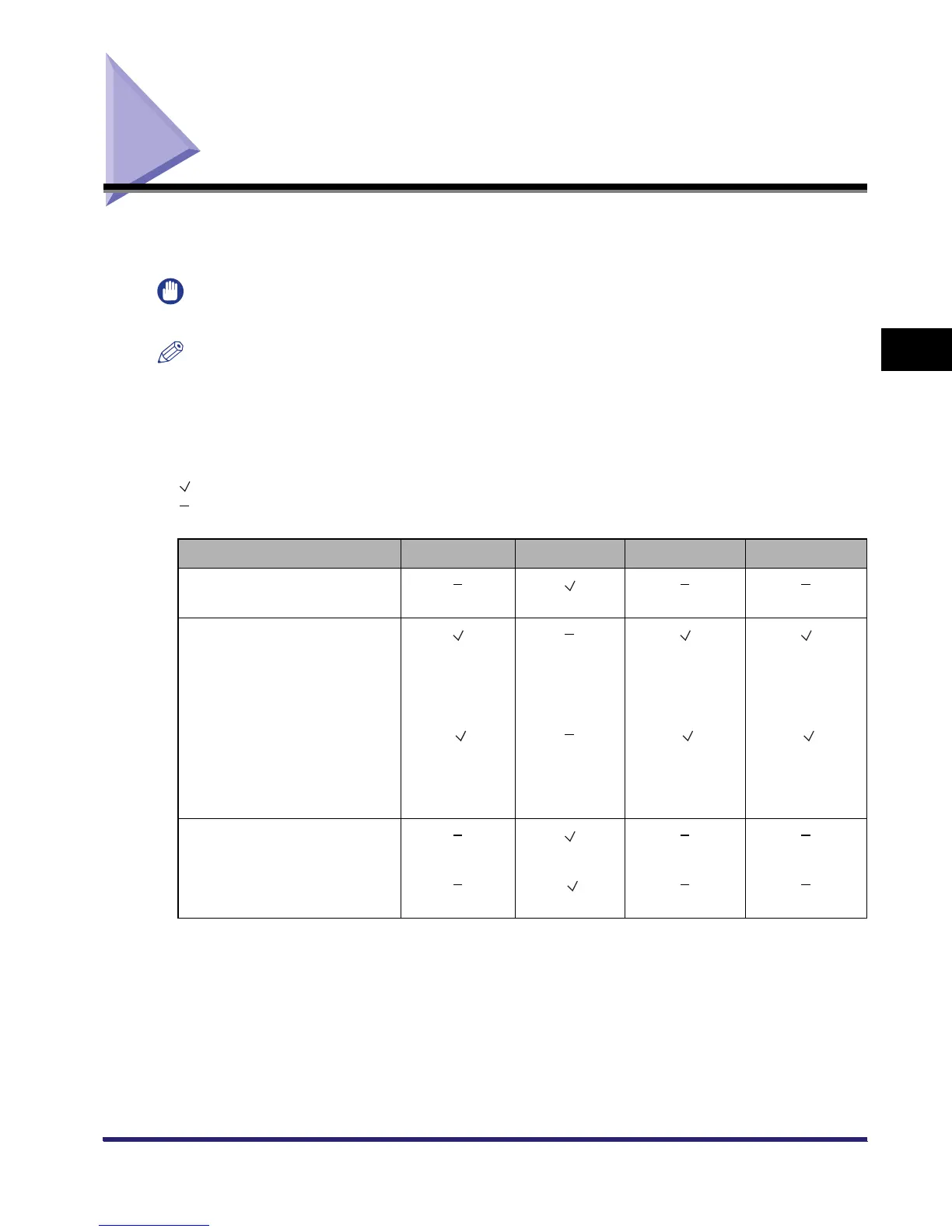
■ The table below shows all the finishing features that are available with each
different optional unit, and the paper sizes that can be used.
: Available
: Unavailable
Optional Unit Offset Rotate Staple Hole Punch
None
A4, A4R
Finisher-S1
A3, A4, A4R A3, A4R
(30 sheets);
A4
(50 sheets)
(Finisher-S1 + Puncher Unit-Q1
+ Copy Tray-J1)
(
A3, A4, A4R)
() (
A3, A4R
(30 sheets);
A4
(50sheets) )
(
A3, A4, A4R)
Inner 2 Way Tray-D1
A4, A4R
(Inner 2 Way Tray-D1+ Copy
Tray - J 1 )
() (
A4, A4R)
() ()



 To Next Page