Frame Erase
4-44
4
Special Copying and Mail Box Features
NOTE
•
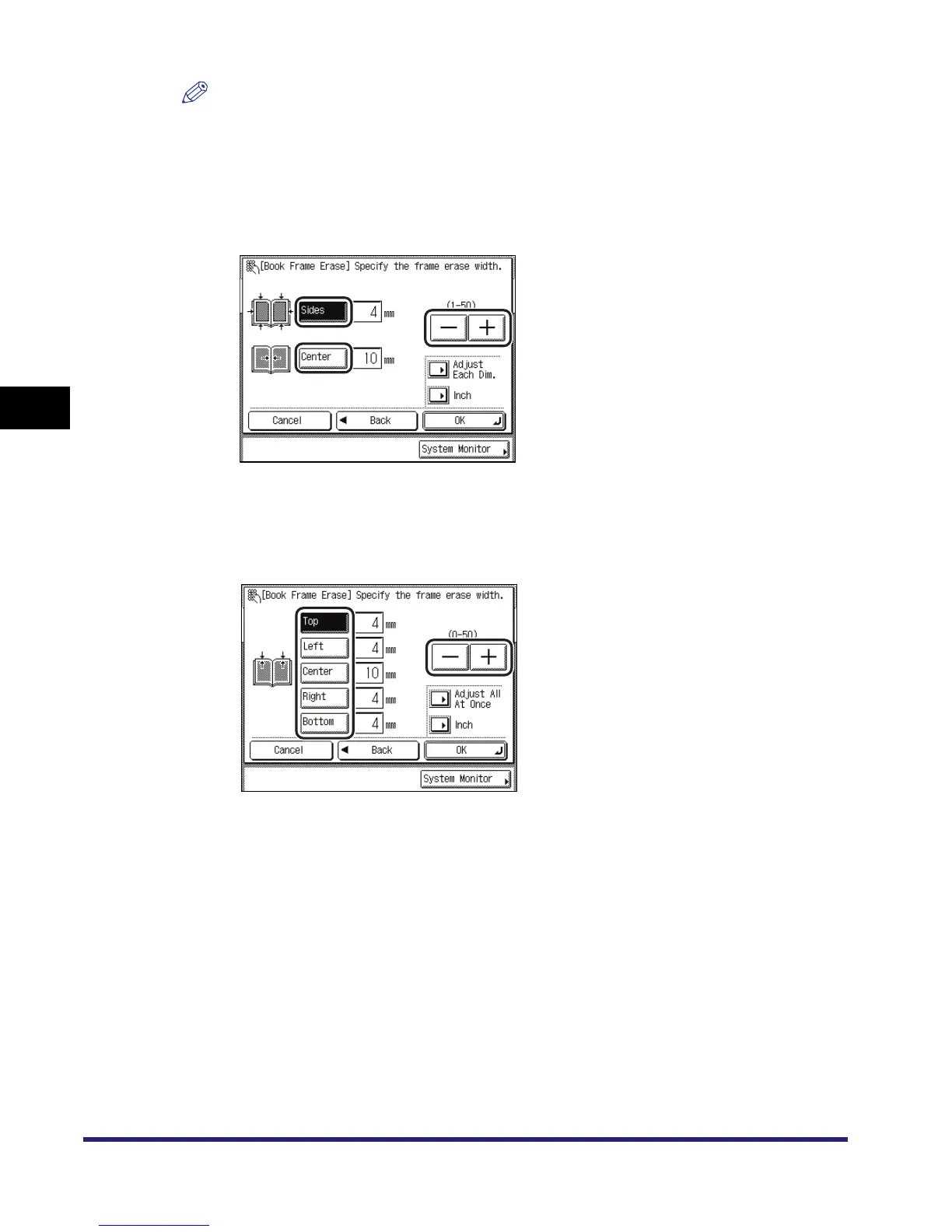
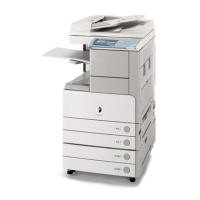
The default settings are '10 mm' for [Center] and '4 mm' for [Top], [Left], [Right], and [Bottom].
The maximum book frame erase width that you can set is '50 mm'.
•
For instructions on entering values in inches, see Chapter 2, "Basic Operations" in the Reference
Guide.
● If you want to set the same width for all four borders:
❑ Press [Sides] and [Center] ➞ press [-] or [+] to set their respective frame erase widths.
● If you want to set the top, left, centre, right, and bottom widths independently:
❑ Press [Adjust Each Dim.].
❑ Select the desired frame erase borders ➞ press [-] or [+] to set their respective frame erase
widths.
To return to the screen for setting the same width for all four borders, press [Adjust All At
Once].
5
Press [OK].
The selected mode is set.


 To Next Page