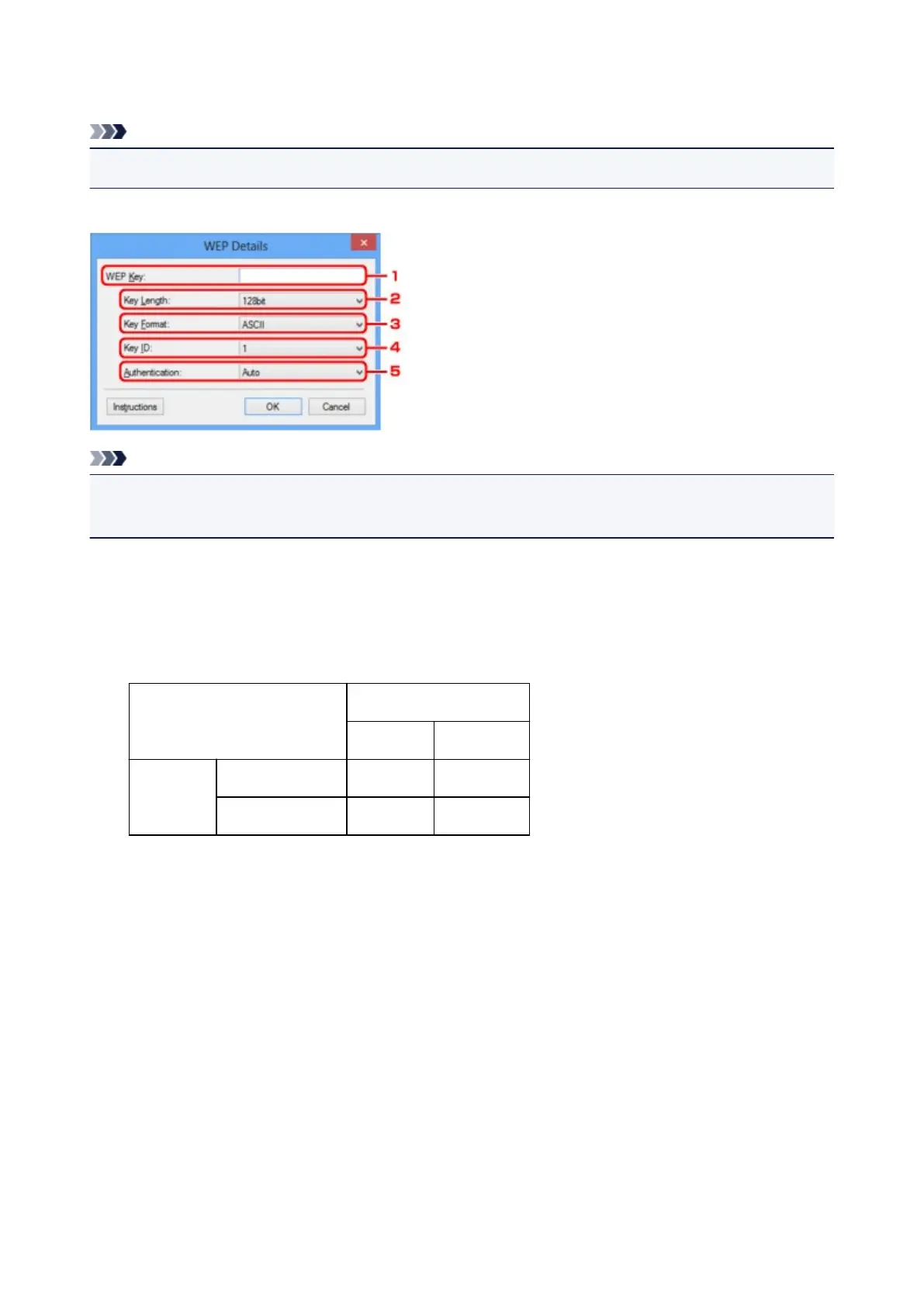
WEP Details Screen
Note
• This screen is not available depending on the printer you are using.
Specify the printer WEP settings.
Note
• When changing the password (WEP key) of the printer, the same change must be made to the
password (WEP key) of the access point.
1.
WEP Key:
Enter the same key as the one set to the access point.
The number of characters and character type that can be entered differ depending on the combination of
the key length and key format.
Key Length
64bit 128bit
Key Format ASCII 5 characters 13 characters
Hexadecimal (
Hex)
10 digits 26 digits
2.
Key Length:
Select either 64bit or 128bit.
3. Key Format:
Select either ASCII or Hex.
4. Key ID:
Select the Key ID (index) set to the access point.
5. Authentication:
Select the authentication method to authenticate the printer's access to the access point.
Select Auto or Open System or Shared Key.
206













 To Next Page