22 Chapter 4 Setting Up the CS 3500
Installing the CS 3500 Desktop Holder
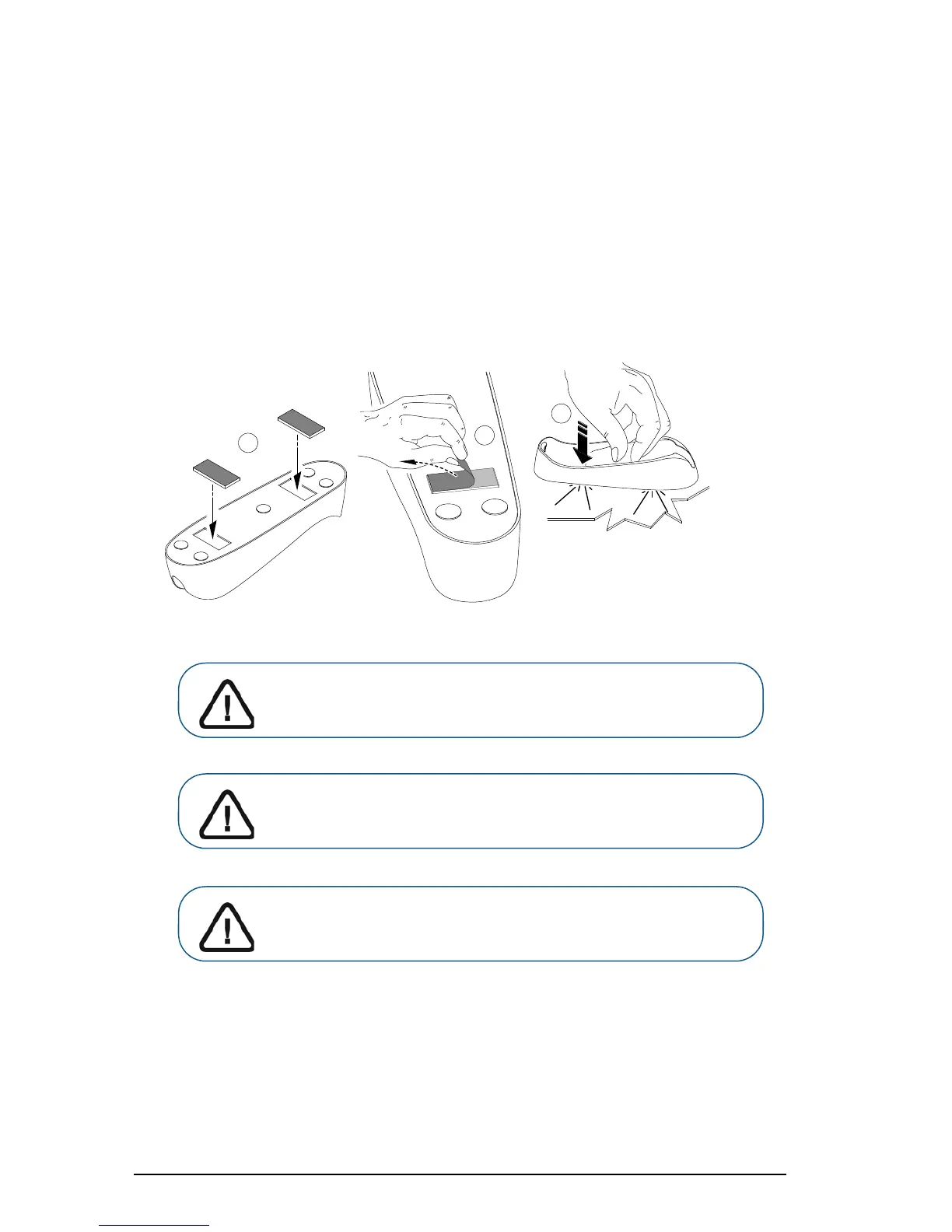
To install the CS 3500 desktop holder, follow these steps:
1 Select a clean surface area that you can access easily.
2 Clean the surface on which you are going to fasten the CS 3500 holder.
3 Attach the adhesive tape to the indentations in the holder (A).
4 Remove the adhesive tape protection (B).
5 Place the taped side of the CS 3500 holder on the clean surface (C) and press firmly several
times for correct adherence. The maximum adherence is obtained after two hours.
Important: Adhesive tape can lose its adherence capability due to
environmental and other factors. Check the adherence regularly to
ensure that it is secure.
Important: Carestream Health is not responsible for accidents or
damage involving the CS 3500 falling due to loosening of the
adhesive tape.











 To Next Page