CS 3500 User and Installation Guide (9H4853)_Ed07 3
2 CS 3500 Overview
The CS 3500 is designed to acquire 3D still images in the following modes:
• Lower jaw
• Upper jaw
• Buccal bite registration
CS 3500 Overview
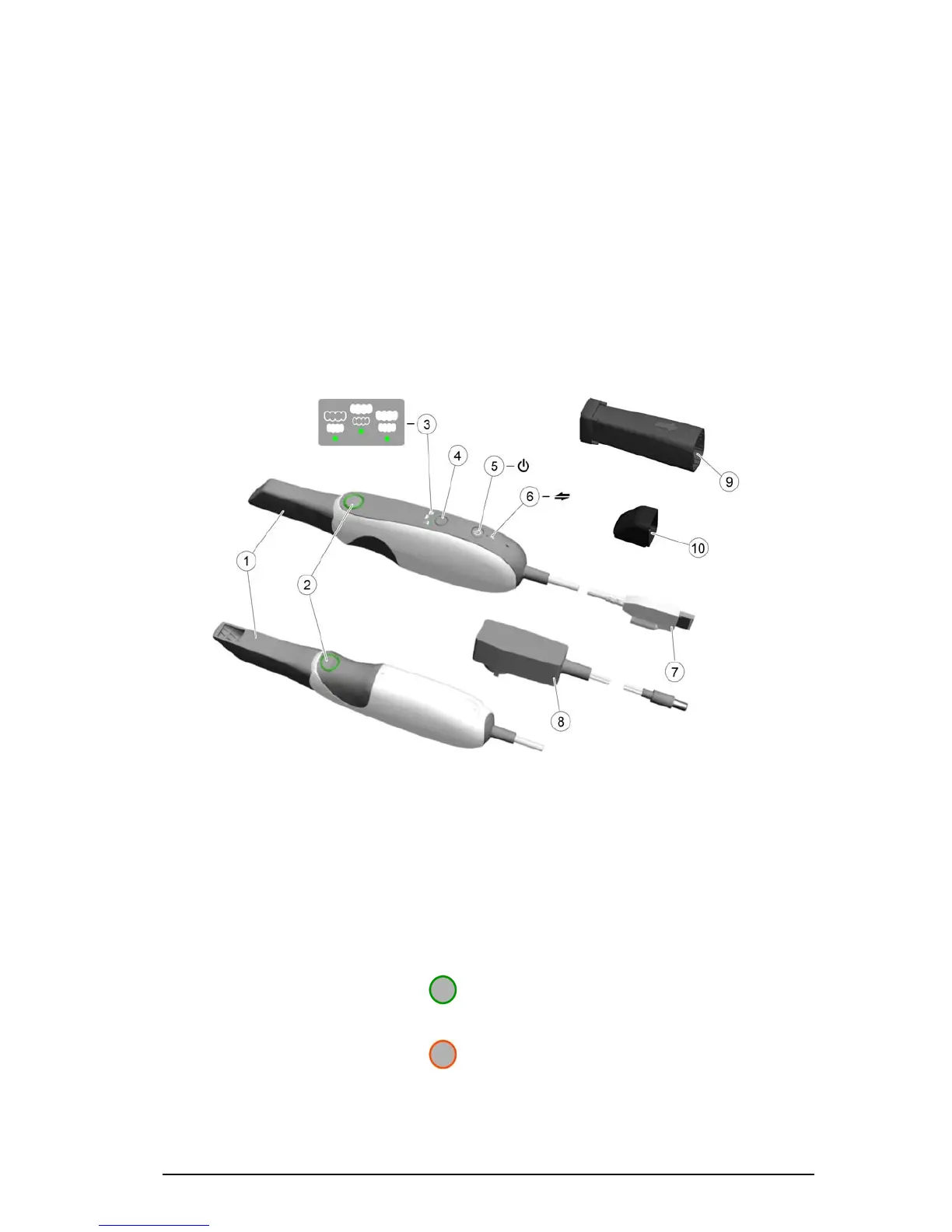
Figure 1 CS 3500 Components Overview
1 Reusable tip The tip can be installed facing upward or downward. Tips come in two
sizes: regular and small. Tips are autoclavable for up to 20 times.
2 Acquisition buttons Press to acquire a 3D image.
• The CS 3500 is in auto acquisition mode by default. When the CS
3500 is stable and the image is clear, the acquisition begins.
• To make a manual acquisition, press the acquisition button once to
acquire a single image. To keep the CS 3500 in manual acquisition
mode, deselect Auto Capture in the Preferences window. See
“Scanner Preferences” on page 15 for more information.
• When the guidance system is enabled in the Preferences window,
the LED ring surrounding the buttons changes color.
If you do not enable the guidance system, the LED ring always
displays in green.
-- Indicates an image was acquired correctly (Feedback
option).
-- Indicates there is a proper overlap, and you can make
an acquisition (Guide option).
-- Indicates an image was not acquired correctly
(Feedback option).
-- Indicates there is not enough overlap or the angle of the
CS 3500 is incorrect (Guide option).











 To Next Page