2–15 62-12259
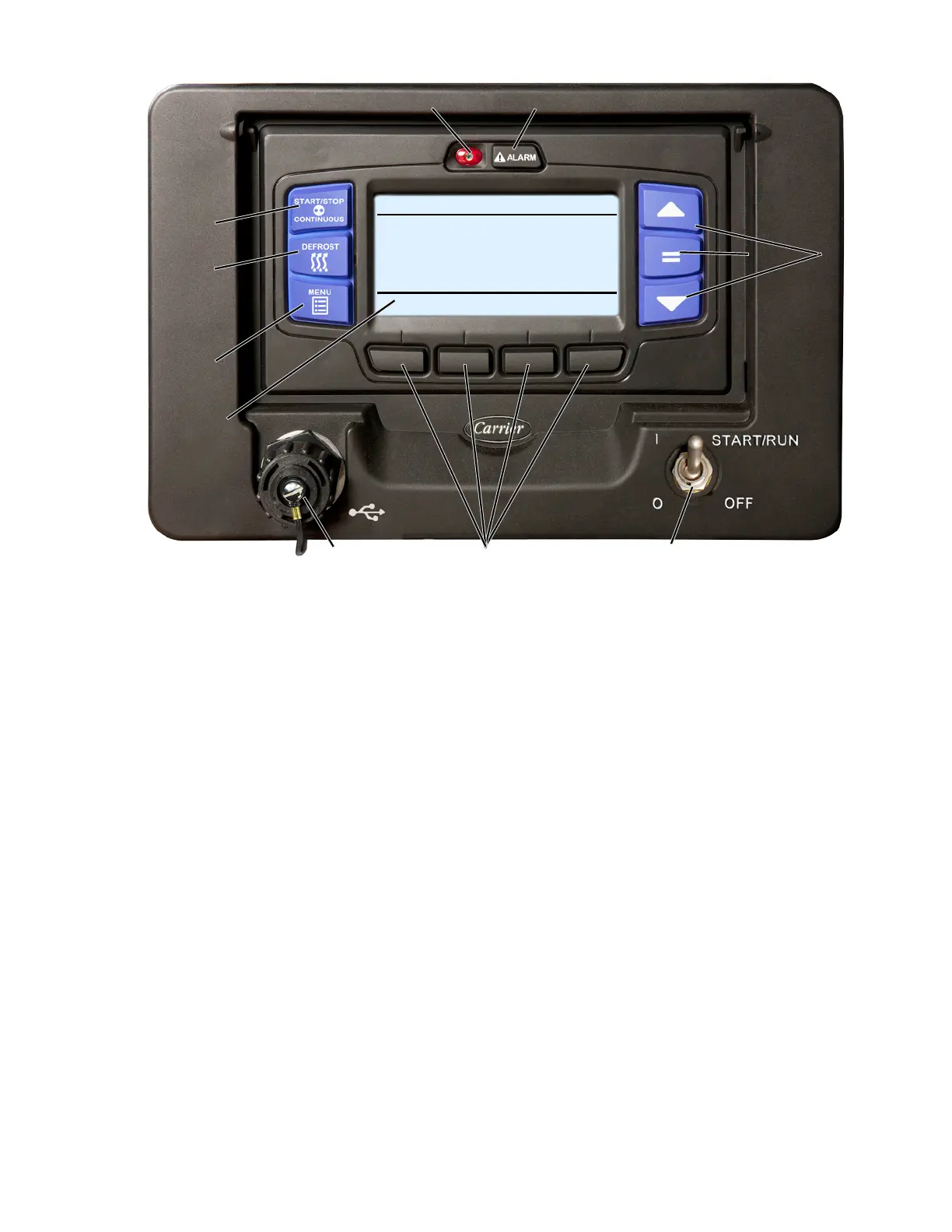
Figure 2.7 Display Module
1. Display Screen
2. MENU key
3. DEFROST key
4. START/STOP - CONTINUOUS Key
5. Alarm LED
6. Alarm Key
7. Arrow Keys
8. “=” (Select) Key
9. START/RUN-OFF Switch
10. Soft Keys
11. USB Interface Port
2.5.4.9 Display Module (DM)
Display
The APX Control System will display the refrigerated compartment temperature on the left and compart-
ment setpoint on the right. The APX Control System may be configured to display the setpoint in either
whole numbers or with tenths of a degree. The temperature description will be followed by a letter indicat-
ing the information is in degrees Fahrenheit (F) or degrees Centigrade (C).
Message Center
Messages generated by the control system are displayed in the MessageCenter. Details of the messages
are described in Section 6.
START/RUN-OFF Switch (SROS) - When placed in the START/RUN position, this switch provides power
to start the unit. The main microprocessor performs a self-test. Then setpoint and compartment tempera-
tures are displayed. To stop the unit, place the SROS in the OFF position.
4
3
2
11 10 9
7
8
6
5
1
START/STOP DIESEL COOL
BOX TEMPERATURE
o
F SETPOINT
o
F
STATUS OK
34.3
34










 To Next Page