Wiring for third party protocols
Carrier® ChillerVu™
(OPN-PSM-MPCXPE) Carrier Proprietary and Confidential CARRIER CORPORATION ©2017
Installation and Start-up Guide 31 All rights reserved
7 Under
Options controlling local serial lines
, enter the following settings:
Serial line to connect
to
Replace X with the computer's port number that the USB Link Kit cable is
connected to.
To find the port number, select
>
>
>
>
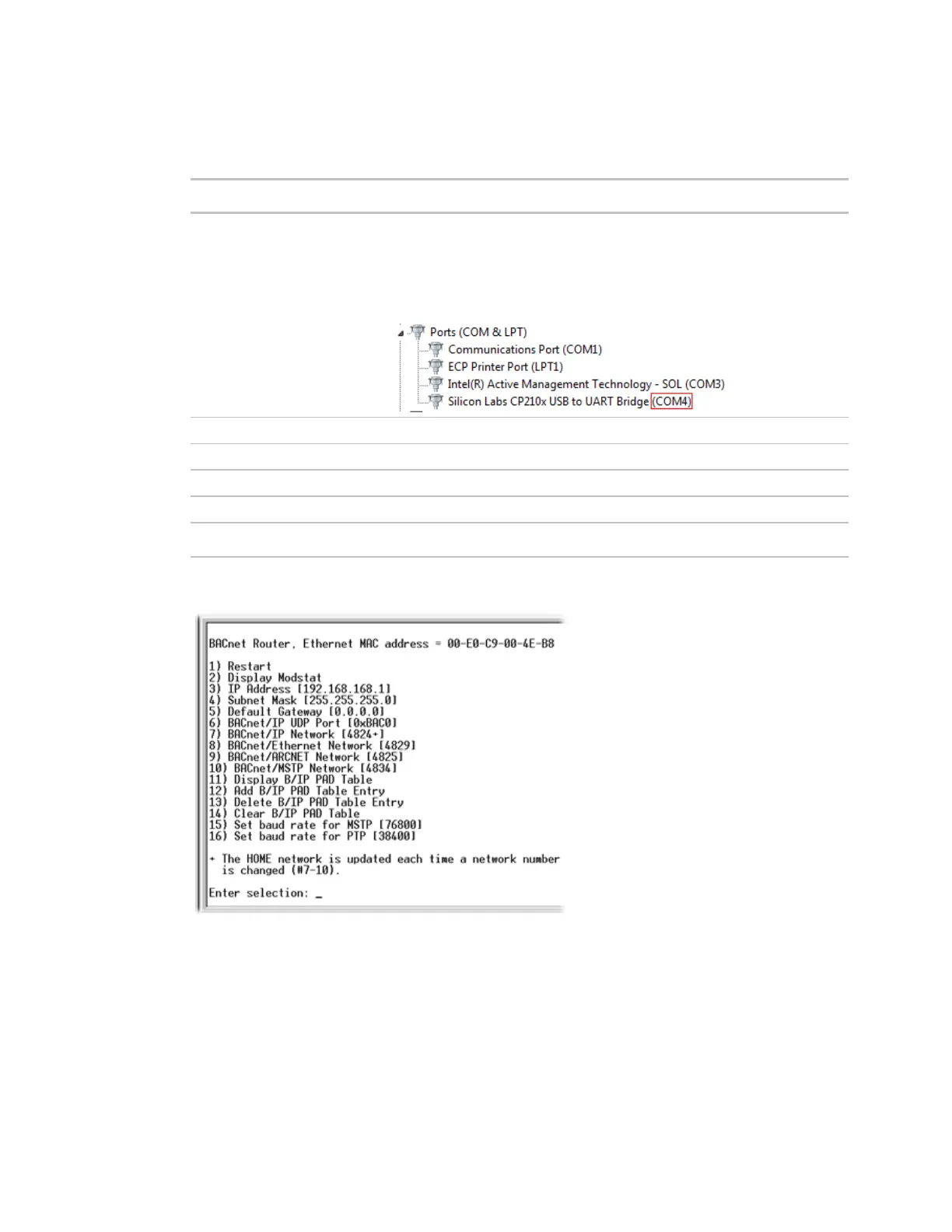
. The COM port number is beside
Silicon Labs CP210x USB to UART Bridge
.
115200
8
1
None
None
8 Click
. A window similar to the one below appears.
9 Type 3
and press
.
10 Type the IP address and press
.
11 Repeat steps 9 and 10 to enter the Subnet Mask and default Gateway.
12 Type 1, then press
to restart the controller.
13 When finished, set the Carrier® ChillerVu™'s
DIP switch to
to restore normal
functionality to the
port.
14 Turn the Carrier® ChillerVu™'s power
, then
.






 To Next Page