3-CONTROLSANDINSTRUMENTS
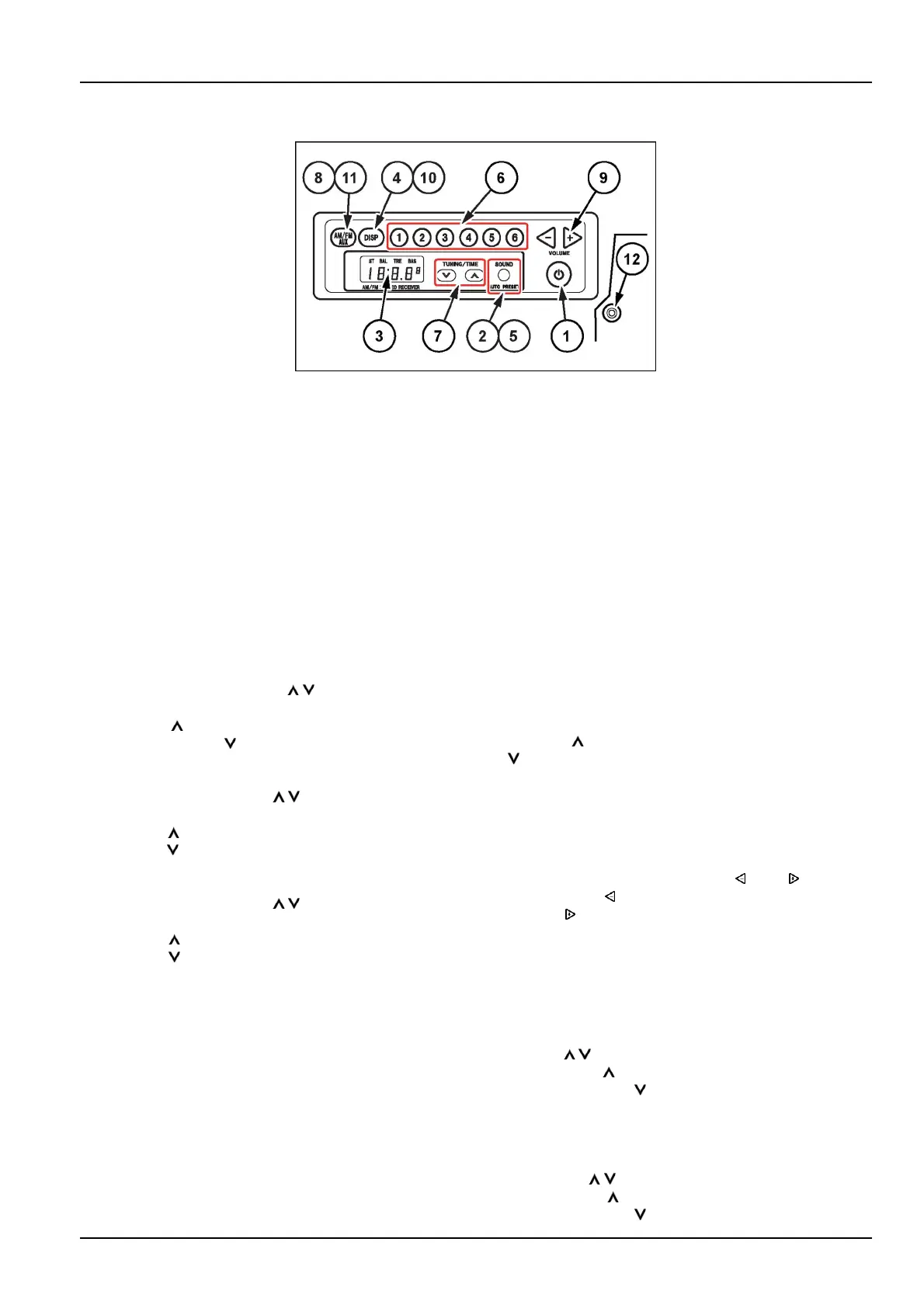
Cabradio
SMIL15CEXX531AB1
NOTICE:Donotletwatergetintothespeakercasesor
theradiotoavoidabreakdown.Keepthewindowclosed
whenitrainsandwhenwashingthemachine.Donotuse
benzene,paintthinneroranyothersolventtocleanthe
display.Wipeoffthewaterwithasoft,drycloth.Donot
trytodisassembletheradio.
1.Powerbutton(POWER)
Pushthe"POWER"buttontoturnontheradio.The
bandandthenthenthefrequencyaredisplayed.
Pushagainthe"POWER"buttontoturnofftheradio.
Theclockisdisplayed.
2.Soundadjustment(SOUND)
Pushthe"SOUND"buttontoswitchBAL→TRE→
BAS.
-InBALstate:pushthe
/tuningbutton(7)the
regulatethebalance.
Pushthe
UPbuttontoincreasetherightspeaker
volume;pushtheDOWNbuttontoincreasetheleft
speakervolume.Thevolumescanbeincreasedupto
thelevel7maximum.
-InTREstate:pushthe
/tuningbutton(7)toreg-
ulatethetreble.
PushtheUPbuttontoincreasethetrebleof1step;
pushtheDOWNbuttontodecreasethetrebleof1
step.Thetreblecanbeincreaseduptothelevel7
maximum.
-InBASstate:pushthe
/tuningbutton(7)toreg-
ulatethebass.
PushtheUPbuttontoincreasethebassof1step;
pushthe
DOWNbuttontodecreasethebassof1
step.Thetreblecanbeincreaseduptothelevel7
maximum.
Pushagainthe“SOUND”buttoninBASstatetoend
thesoundadjustment.
3.Displayunit
Thedisplayshowstheclock,radiofrequency,band
nameandoperationmode.
4.Clock/Frequencybutton(DISP)
Pushthe“DISP”buttontoshow:“Frequency”→
“Clock”→“Bandname”.
Eachpushchangesthevisualization.
Thedisplayreturnsautomaticallytothefrequencyvi-
sualizationifnobuttonispushedwithin1second.
5.Autostore(SOUND/AUTOPRESET)
Pushthebuttontostore6radiostationsinthememory
fortheselectedsignalband(FM1,FM2,AM).
6.Chooseofthepresetradiostations(PRESETSTA-
TION)
Pushthebutton(1-6)totunetheradiotothestored
stationontheselectedsignalband(FM1,FM2,AM).
Tostorearadiostationinthememory,tunetheradio
tothestationdesiredandholddownoneofthebutton
(1-6).
7.Tuningbutton(TUNE)
Pushandholdthe"TUNE"buttontotuneautomati-
callytheradiotothenextstation.T ostopthetuning,
releaseandpushagainthebutton.
Pushthe
buttontoincreasethefrequency;pushthe
buttontodecreasethefrequency.Holddowneither
buttontochangethefrequencycontinuously.
8.Modeswitchbutton(MODE)
PushthebuttontoswitchAM→FM1→FM2→AUX
→USB→BT .
9.Volumeadjustmentbuttons(VOL,VOL)
PushtheVOLbuttontodecreasethevolume;Push
theVOLbuttontoincreasethevolume.Holddown
eitherbuttontochangethevolumecontinuously.
10.Clockadjustment(DISP)
Toadjusttheclock,pushandholdthe"DISP"button
whentheclockisshownonthedisplay.
-Houradjustment
Withthehouronthedisplayashing,usethetuning
button
/toadjustthevalue.
PushtheUPbuttontoincreasethevalue.
PushtheDOWN
buttontodecreasethevalue.
Pressingthe“DISP”buttonshiftsfromhourtominute
adjustment.
-Minuteadjustment
Withtheminutesonthedisplayashing,usethetun-
ingbutton
/toadjustthevalue.
PushtheUP
buttontoincreasethevalue.
PushtheDOWNbuttontodecreasethevalue.
3-55













 To Next Page