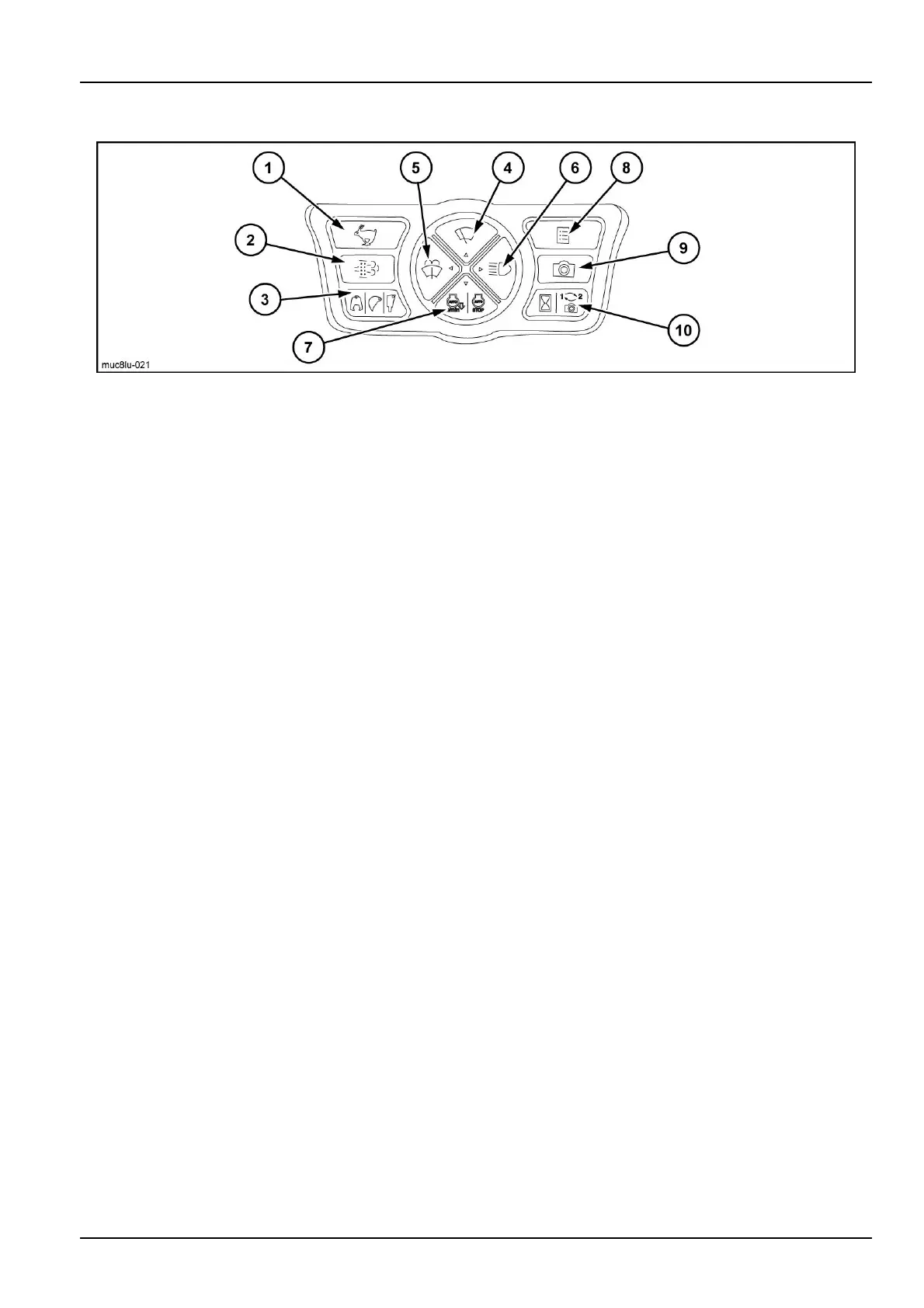
3-CONTROLSANDINSTRUMENTS
Monitorswitches
MUC8LU-0211
1.TRAVELSPEEDSELECTSWITCH
Pressthisbuttonswitchtoswitchthetravelspeed
fromlowspeed(I)(turtle)tohighspeed(II)(rabbit).
A"turtle"or"rabbit"isdisplayedonthemonitorscreen.
NOTICE:Performallchangestothetravelspeed
whilethemachineisstopped.Otherwise,thetravel
directionmaychange.
Lowspeed(I):"Turtle"0km/h(0.0mph)to3.4km/h
(2.1mph).
Usefortravelonsloped,unevenorsoftground.
Highspeed(II):"Rabbit"0km/h(0.0mph)to5.4km/h
(3.4mph).
Useongoodterrainthatishardandat.
NOTE:Whentheenginestarts,thelowspeedisselected
automatically.
NOTE:Ifthehydraulicpressuresystementersanover-
loadstatewhilethe2ndspeedisselectedonthemachine,
thespeedischangedautomaticallytothe1stspeed.As
soonasthehydraulicpressuresystemrecoversfromthe
overloadstate,thespeedreturnstothe2ndspeed.
2.DPD(DieselParticulateDiffuser)MANUALREGEN-
ERATIONSWITCH
PressthisswitchtostartDPDmanualregeneration.
Pressthisswitchifthe"PUSHDPDSWITCHTOAC-
TIVATE"messageappearsonthemonitor.(Referto
page3-36)
NOTICE:Thetemperatureofthemuferandexhaust
gasishighduringDPDregeneration.Becarefulof
burnsandre.
3.ATTACHMENTSELECTSWITCH
Whenusinganoptionalattachmentsuchasabreaker
orcrusher,pressthisswitchtoswitchtoasuitableow
andpressure.
Switchingtotheregisteredpatternsoccursifthe
switchispressed.(Refertopage4-27)
Theselectedattachmentisdisplayedonthemonitor
screen.
NOTICE:Beforechangingtheattachmenttype,stop
operationandsetthemachineinparkingposition.
4.FRONTWIPERSWITCH
Thisswitchhas3positions:"Off","Intermittent"and
"Continuous".
Whentheswitchispressedtooperatethewipersin-
termittently,(I)isdisplayedonthemonitor.
Whentheswitchispressedagaintooperatethe
wiperscontinuously,(II)isdisplayedonthemonitor.
Whentheswitchispressedagaintostopthewipers,
"Off"isdisplayedonthemonitor.
NOTICE:Donotoperatethewiperswhenthefront
glassisdry.Doingsocoulddamagethewipers.
5.FRONTGLASSWASHERSWITCH
Thefrontglasswasherandwipersoperatewhilethis
switchispressed,andtheystopwhentheswitchis
released.
NOTICE:Donotoperatethewasherwhenthereser-
voirisempty.Doingsocoulddamagetheelectric
pump.
6.WORKINGLIGHTSWITCH
Usethisswitchtoturntheworkinglightonoroff.
Whentheswitchispressed,theindicatorandthe
workinglightturnon.Pressagaintoturnthemoff.
7.ENGINEAUTOIDLINGANDAUTOSTOPSWITCH
Pressthisswitchtoswitchbetweennormalidling
(switchontherightsidecontrollever),autoidling,
andautostop.
Whenthisswitchispressed,anindicatorisdisplayed
onthemonitor.
•
Inautoidling,"AUTOn/min"isdisplayed,andinnormal
idling,thedisplayturnsoff.
If5sec.elapsewithoutanyoperationswhilethispo-
sitionisselected,theenginetransitionstotheidling
speed.(Thisintervalcanbelengthened.Consultyour
CASECONSTRUCTIONDealer.)
Whenapartsuchasthecontrolleverorpedalisoper-
ated,theenginereturnstoitsoriginalspeed.
•
Inautostop,"AUTOSTOP"isdisplayed.
-Enginespeedis1200RPMorless.
"Idling"state
3-23













 To Next Page