3-CONTROLSANDINSTRUMENTS
-If3min.elapsewiththegateleverclosedandwithout
changingtheenginespeed,"IDLESTOP"isdisplayed
onthemonitor.
-About10sec.after"IDLESTOP"isdisplayed,the
enginestops.
NOTICE:Toprotecttheengine,atleast3min.ofidling
isrequired.
NOTE:Torestarttheengine,rstsetthestarterswitch
keytoOFF,andthenstarttheengine.
•
Inautoidlingandautostop,"AUTOn/min"and"AUTO
STOP"aredisplayed.
NOTE:Iftheyarestillselectedwhentheengineis
stopped,theywillremainactivewhentheengineis
restarted.
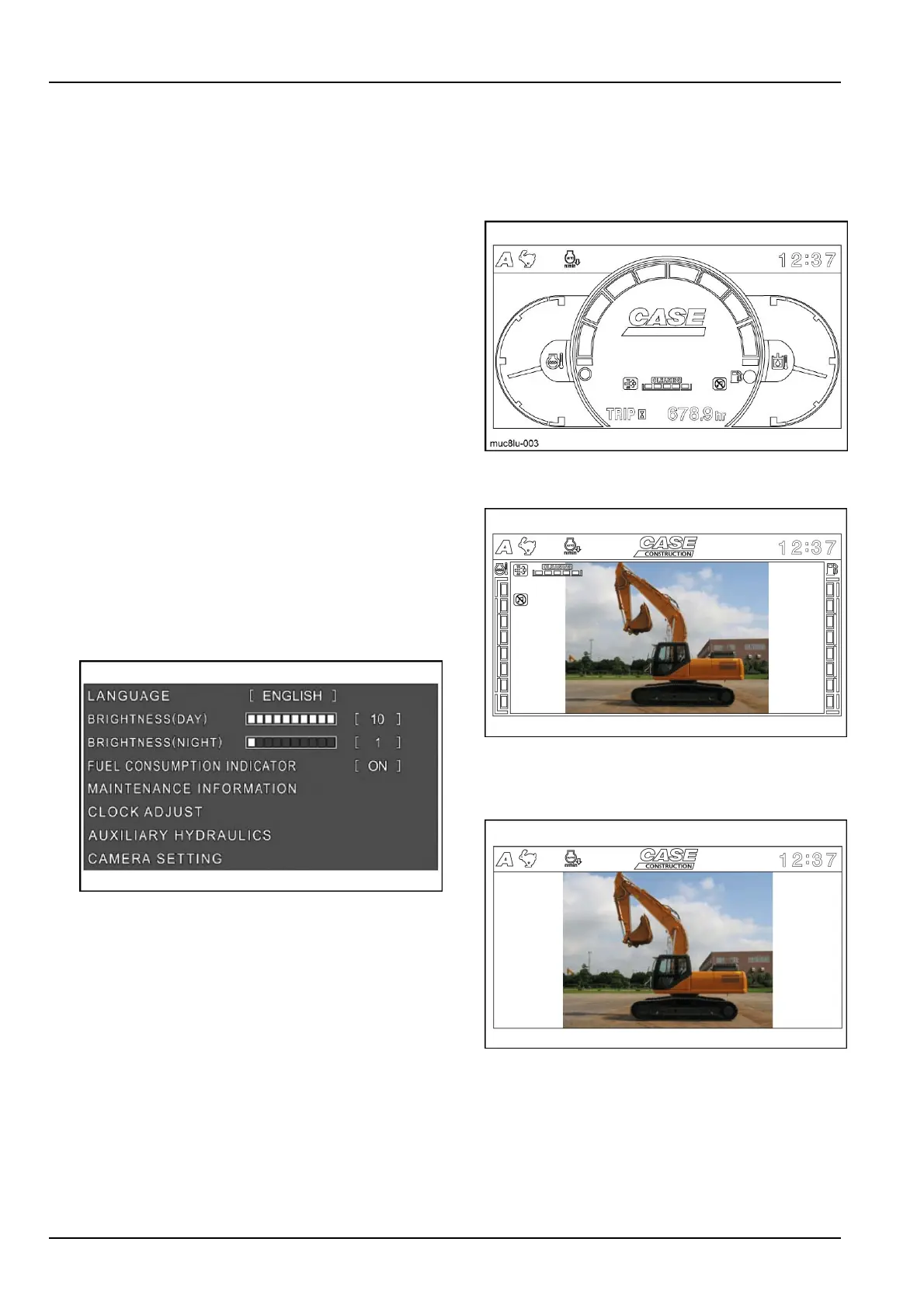
8.MENUSCREENDISPLAYSWITCH
Pressthisswitchtodisplaythemenuscreen.
Themenucontainsthefollowingitems.
LANGUAGE
BRIGHTNESS(DAY)
BRIGHTNESS(NIGHT)
FUELCONSUMPTIONINDICATOR
MAINTENANCEINFORMATION
CLOCKADJUST
AUXILIARYHYDRAULICS
CAMERASETTING
Usetheswitchshowninthediagramtoselectora
changeamenuitem.
MUC8LU-0262
Refertopage3-26foruse.
9.CAMERADISPLAYSWITCH
Pressthisbuttontoswitchbetweenthemachine
informationscreen,machineinformation+camera
jointdisplay,andcameraimageindependentdisplay
(mode,travelmode,clockandwarningonly).
MODE-1:Normalscreen
MUC8LU-0033
Machineinformationscreen
MODE-2:Camerascreen
SMIL15CEX0923AA4
10.MACHINEINFORMATION+CAMERAJOINTDIS-
PLAY
MODE-3:Camerascreenwithoutindicators
SMIL15CEX0924AA5
11.CAMERAIMAGEINDEPENDENTDISPLAY(mode,
travelmode,clockandwarningonly)
The3typesaboveareavailableforselection.
12.HOURMETERSELECT/BACKMONITORSELECT
SWITCH
Intheinformationscreen,hourmeterselectisen-
abled.
3-24













 To Next Page