3-CONTROLSANDINSTRUMENTS
MAINTENANCEINFORMATION
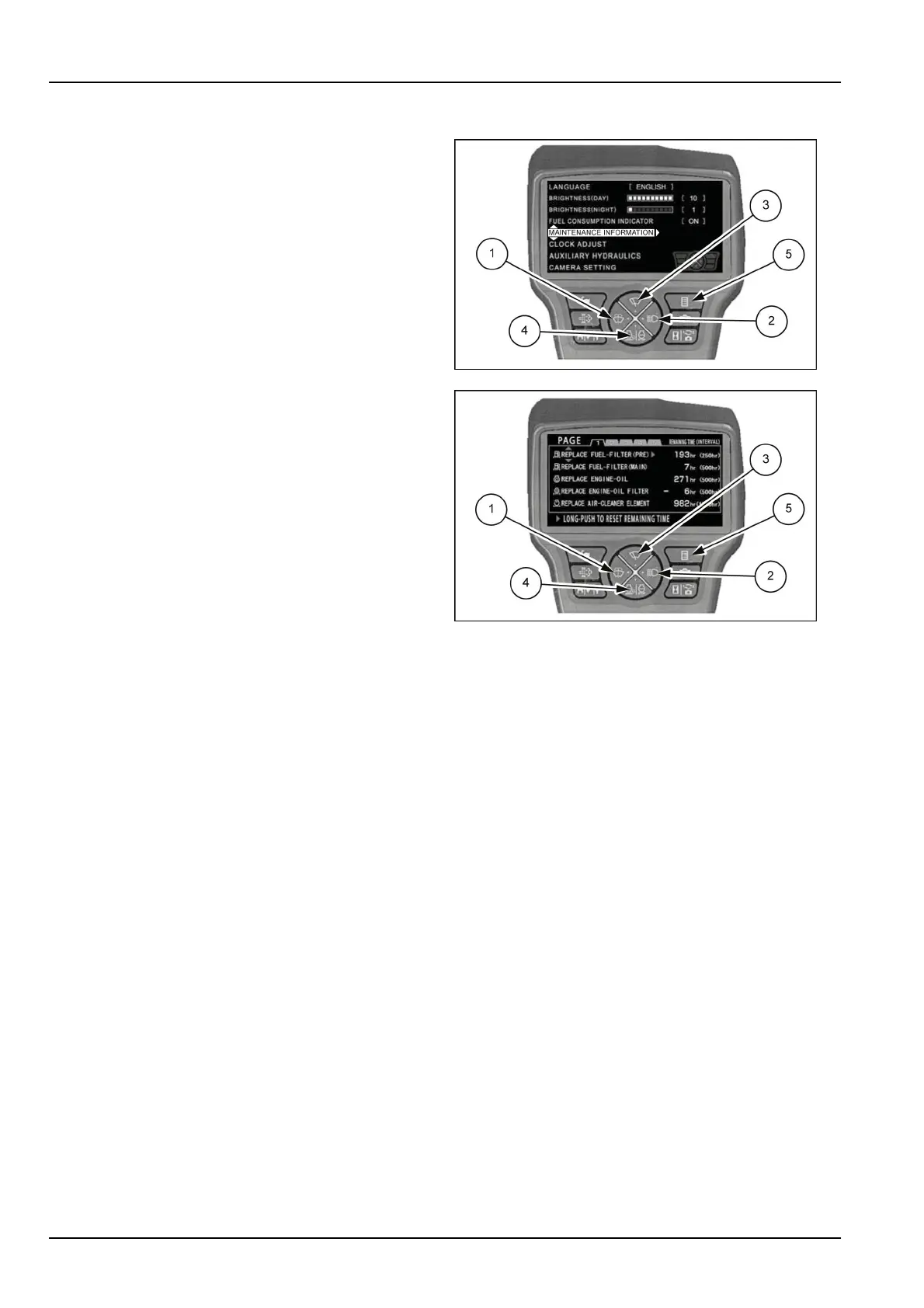
1.Pushbutton(3)or(4).
2.Selectitemof"MAINTENANCEINFORMATION".
3.Pushbutton(2).
4.Pushbutton(1)or(2).
5.Selectpageof1or2or3.
6.Performmaintenanceandresetthemaintenance
time.
1.Pushbutton(3)or(4).
2.Selectitem.
3.Long-pushonbutton(2)toresetremainingtime.
NOTE:Whenthemaintenancetimeisinthenearfu-
ture,theremainingtimedisplaysinyellow.
Whenthemaintenancetimehaspassed,theremain-
ingtimedisplaysinred.
7.If(5)ispressed,thedisplayreturnstothemenu
screen.
Ifitispressedonemoretime,thedisplayreturnsto
themachineinformationscreen.
SMIL15CEX0929AB6
SMIL15CEX0930AB7
3-28













 To Next Page