3-SETUP
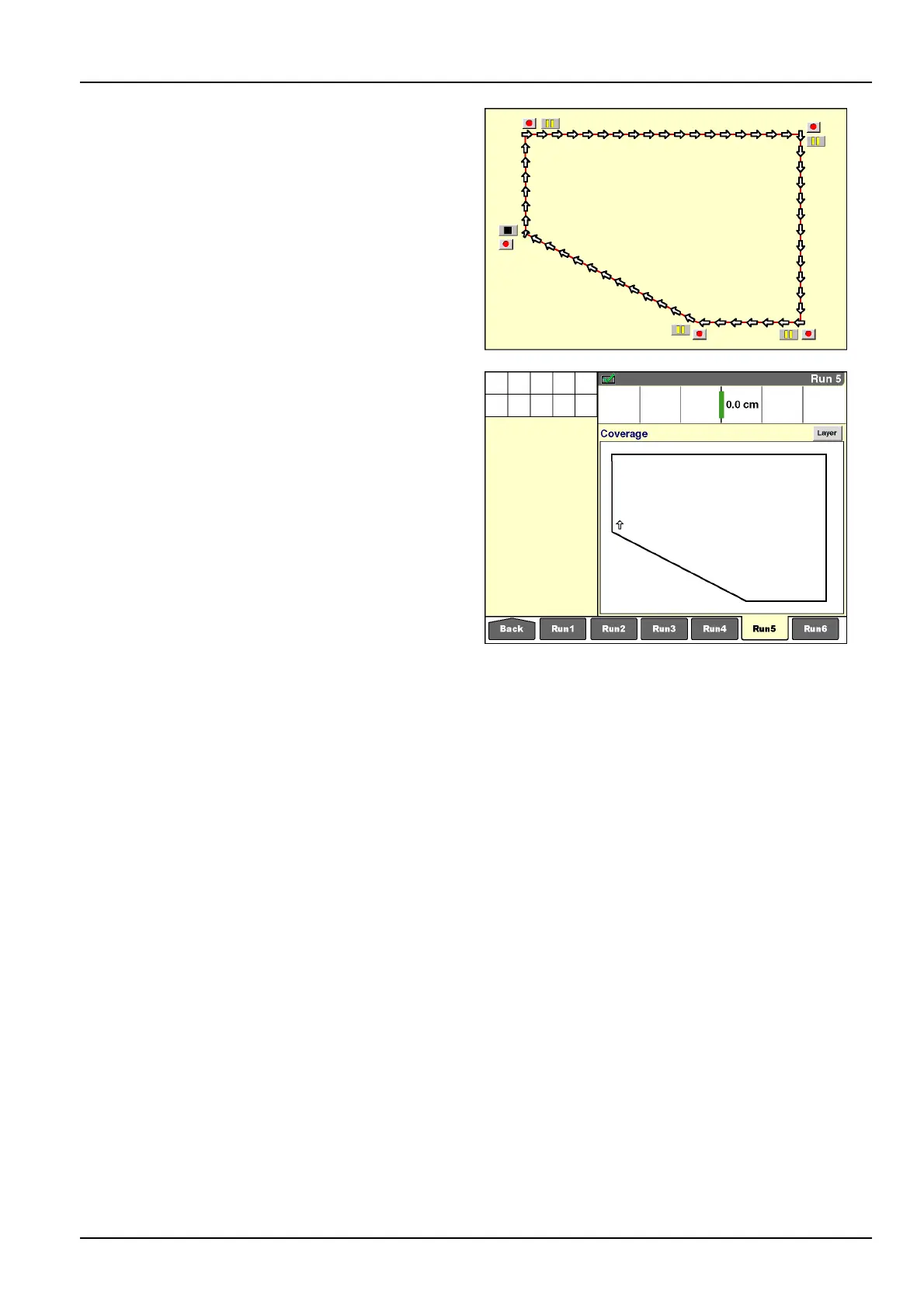
Theillustrationshowstherecordingofaeldwithstraight
bordersusingthe“Pause”button.Withthevehiclelo-
catedintheupperleft-handcorneroftheeld,theop-
eratorstartsrecordingandthenimmediatelypausesuntil
thevehiclearrivesatthenextcorneroftheeld.
NOTE:Apointisimmediatelyrecordedwhenthe“Record”
buttonispressedafterrecordinghasbeenpaused.
Atthenextcorner,theoperatorpressesthe“Record”but-
tonandthenthe“Pause”button;recordingispauseduntil
theoperatorpressesthe“Record”buttonatthenextcor-
neroftheeld.
NOTE:Themapdoesnotdrawtheboundarylinewhile
recordingispaused.Whenthenextcornerisrecorded,
themapupdatestodisplaythestraightboundaryline
recordedduringthepause.
Inthisfashion,aeldboundarymaybedenedasaseries
ofstraightlinesegmentsjoinedattheeldcorners.
NOTE:Usethe“Stop”buttontoclosetheboundaryafter
thenalcorneroftheeldispassed.
RCIL11DSP264BBG25
RCIL11DSP263BBG26
3-121



 To Next Page