3-SETUP
“Farm”and“Field”
Tothedisplayandthedesktopsoftware,afarmisalarge
geographicalentitythatiscomposedofsmallerentities
calledelds.Allcropproductiontasksoccurwithinaeld
thatisdenedbyGPScoordinates.
Assuch,allcropproductiontasksarelinkedtoaeld,and
theeldislinkedtoafarm.
Aeldcontainsonecroptypethisseason.Nextseason,
thesameeldmaycontainadifferentcroptype.Inareas
wheretwocropspergrowingseasonaretypical,thesame
eldmaycontaintwodifferentcroptypesinthesamesea-
son.
Thedisplayandthedesktopsoftwaretreattheeldasa
geographicalcontainerinwhichthecroptasksandpro-
ductiondataarerecordedforthisseason.Thosecrop
tasksandtheirproductionresultshavearelativelyshort
lifespanwhencomparedtothelifespanoftheeldand
farm,soeld,taskandcroptypeareindependent.
RCIL11DSP189BBG11
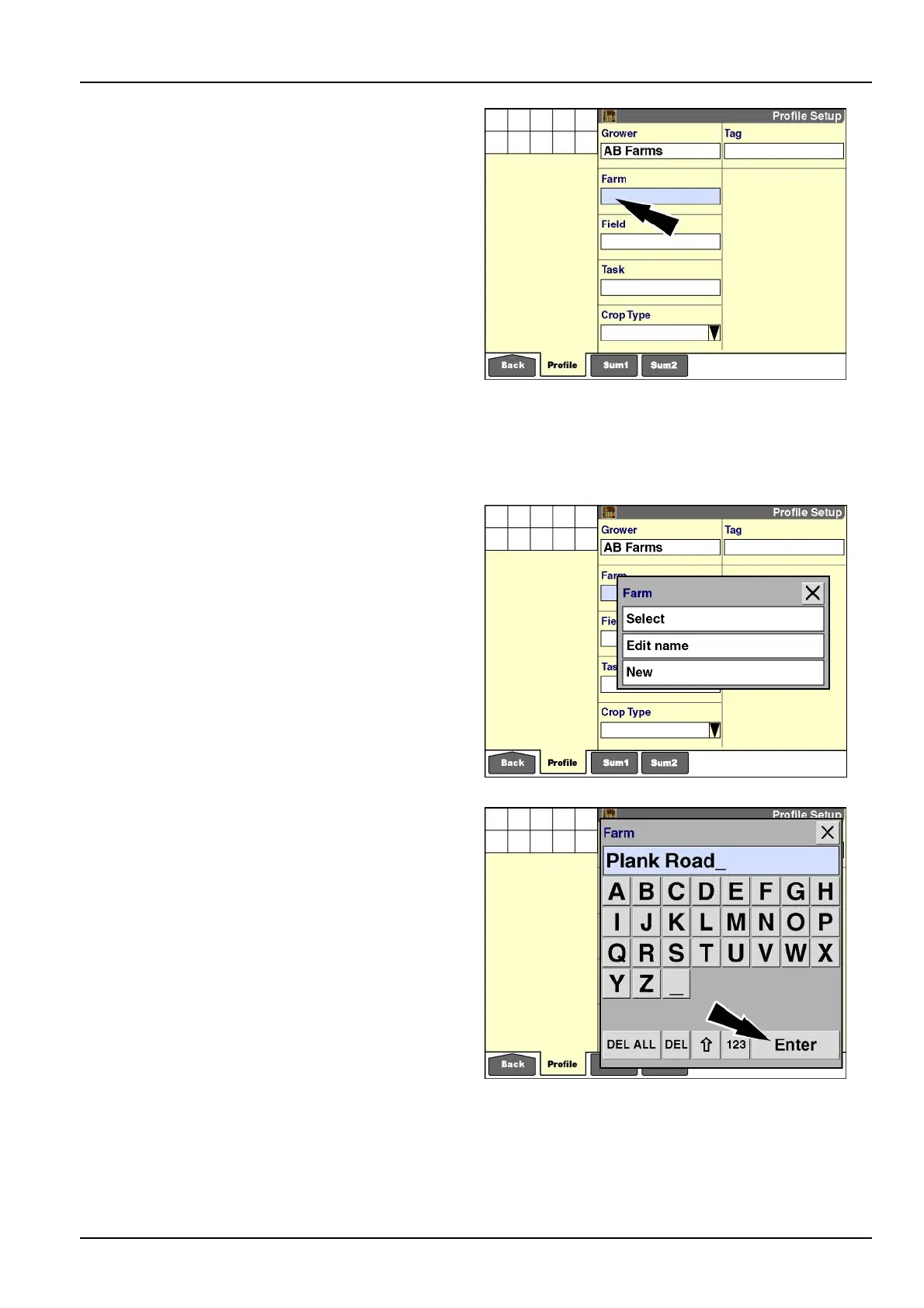
Thewindowoptionsforafarmarethesameasthosefor
agrower.
Press“Select”tochooseafarmfromtheuser-dened
listoffarms:
1.If“Select”ispressed,apop-upoptionswindowofcur-
rentfarms/eldsdisplays.
2.Presstherequiredfarm.Thescreenupdateswiththe
selectedfarm
RCIL11DSP191BBG12
Press“EditName”tochangethenameofafarm.
Press“New”toaddafarmtothecurrentlistoffarms.
1.If“EditName”or“New”ispressed,thealphanumeric
keypaddisplays.
2.Usethekeypadtocreateoreditthefarmname.
3.Pressthe“Enter”buttononthekeypadtosavethe
name.
RCIL11DSP193BBG13
3-5



 To Next Page