3-CONTROLSANDINSTRUMENTS
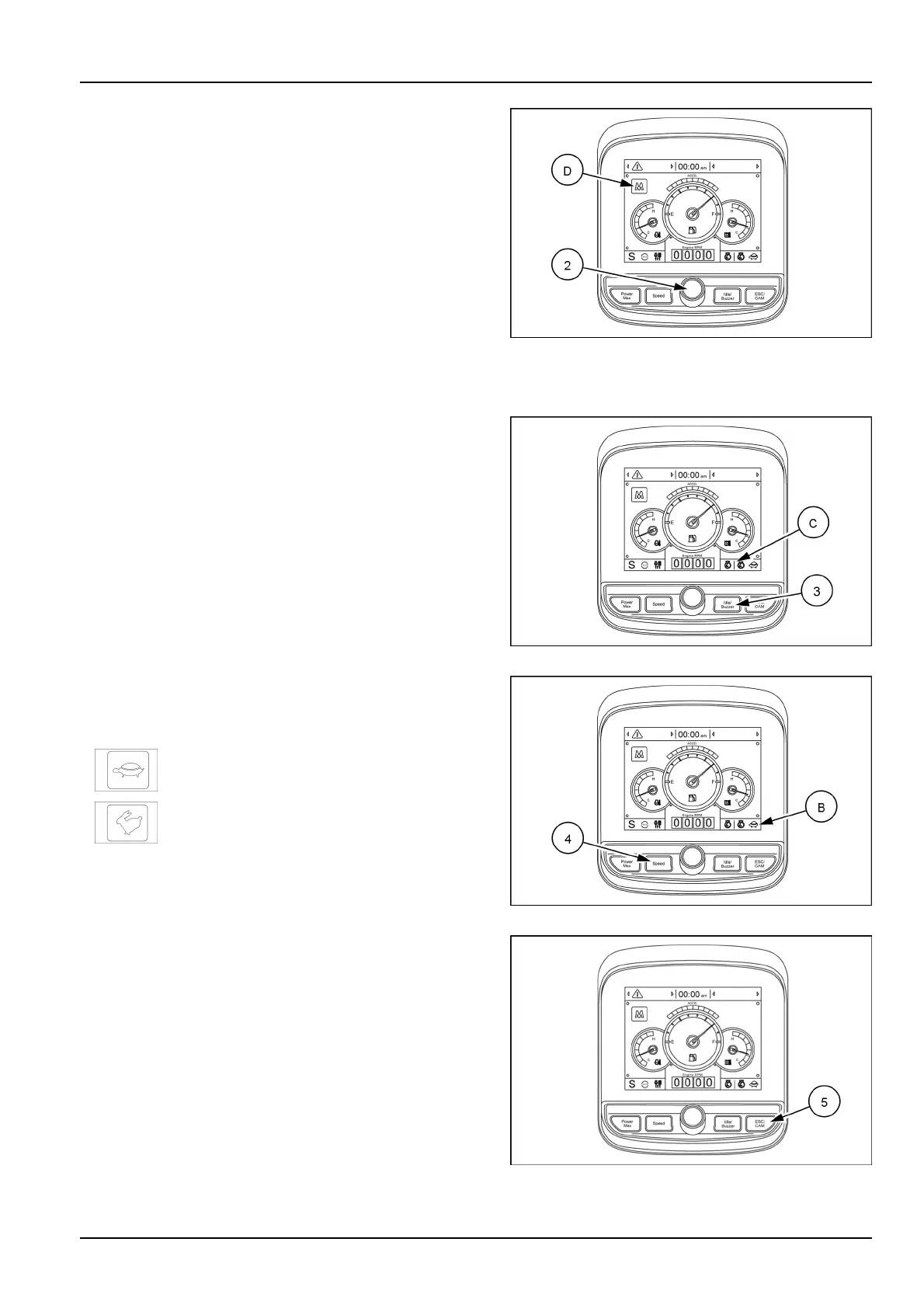
(2)Selectionknob
Thisknobisusedtoselectorchangethemenuandthe
inputvalue.
Knobpushing(ormainmenuquicktouchbutton(D)
pushing)
•
Long(morethan2s):returntotheoperationscreen
•
Medium(0.5–2s):returntothepreviousscreen
•
Short(lessthan0.5s):selectmenu
Knobrotation
•
Clockwiseturning:downdirection/Increaseinputvalue
•
Counterclockwiseturning:Updirection/Decreaseinput
value
SMIL16MEX3097AA29
(3)Autoidle/Buzzerstopswitch
Thisswitchhastwofunctions:
1.Presstheswitchtoactivateordeactivatetheautoidle
function(C).
2.Presstheswitchtostopthebuzzerwhensounds.
NOTE:thebuzzersoundsifthemachinehasaproblem.
Pushingtheswitch,thebuzzerstopsbutthewarninglight
relevanttotheproblemcontinuestoblink,untiltheprob-
lemissolved.
SMIL16MEX3097AA30
(4)Travelspeedswitch
Pressthisswitchtoselectthetravelspeedmode(the
relevanttravelspeedlight(B)turnsON).
•
:lowspeed,2.2km/h(1.4mph)
•
:highspeed,4.2km/h(2.6mph)
SMIL16MEX3097AA31
(5)Escape(previousmenu)/Rearcamera
Pressthisswitchtoreturntothepreviousmenuortore-
turnfromsubmenuscreentomainmenuscreen.
Intheoperationscreen,pushthisswitchtodisplaythe
viewofthecamera(ifequipped).
NOTE:ifthecameraisnotinstalled,theswitchisused
onlyasescapefunction.
SMIL16MEX3097AA32
3-39



 To Next Page