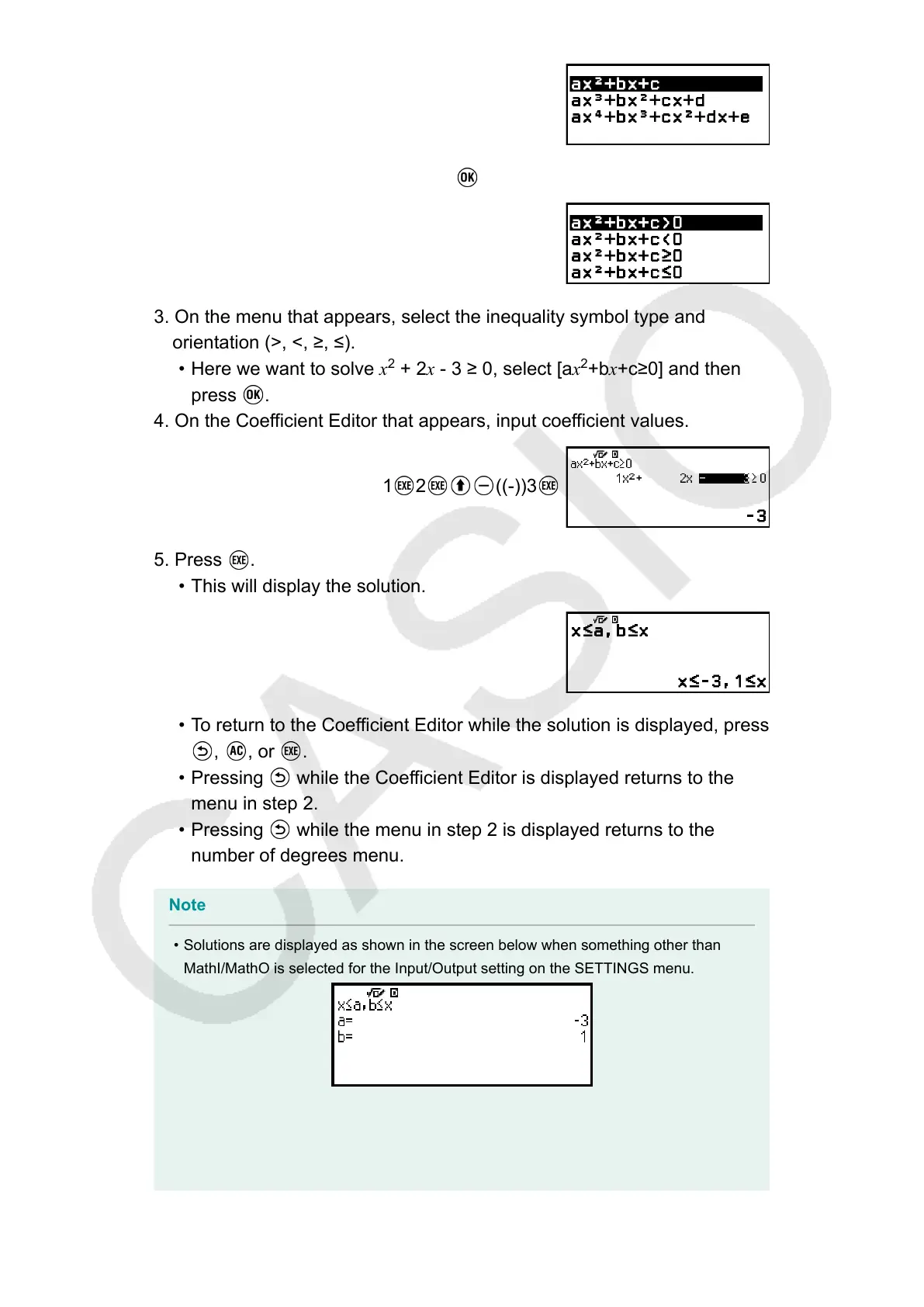
2. Select [ax
2
+bx+c], and then press .
3. On the menu that appears, select the inequality symbol type and
orientation (>, <, ≥, ≤).
• Here we want to solve x
2
+ 2x - 3 ≥ 0, select [ax
2
+bx+c≥0] and then
press
.
4. On the Coefficient Editor that appears, input coefficient values.
1 2 ((-))3
5. Press .
• This will display the solution.
• To return to the Coefficient Editor while the solution is displayed, press
, , or .
• Pressing while the Coefficient Editor is displayed returns to the
menu in step 2.
• Pressing while the menu in step 2 is displayed returns to the
number of degrees menu.
Note
• Solutions are displayed as shown in the screen below when something other than
MathI/MathO is selected for the Input/Output setting on the SETTINGS menu.
• "No Solution" appears on the solution screen when no solution exists for an inequality
(such as x
2
< 0).
• "All Real Numbers" appears on the solution screen when the solution of an inequality
is all numbers (such as x
2
≥ 0).
108



 To Next Page