Converting a Complex Number Solution to Rectangular or
Polar Coordinates
You can use the FORMAT menu that appears when you press
to
convert a complex number solution to rectangular coordinate or polar
coordinate format.
Example 4: To convert the complex number solution displayed in
Example 3 (page 103) to polar coordinate format and then to rectangular
coordinate format
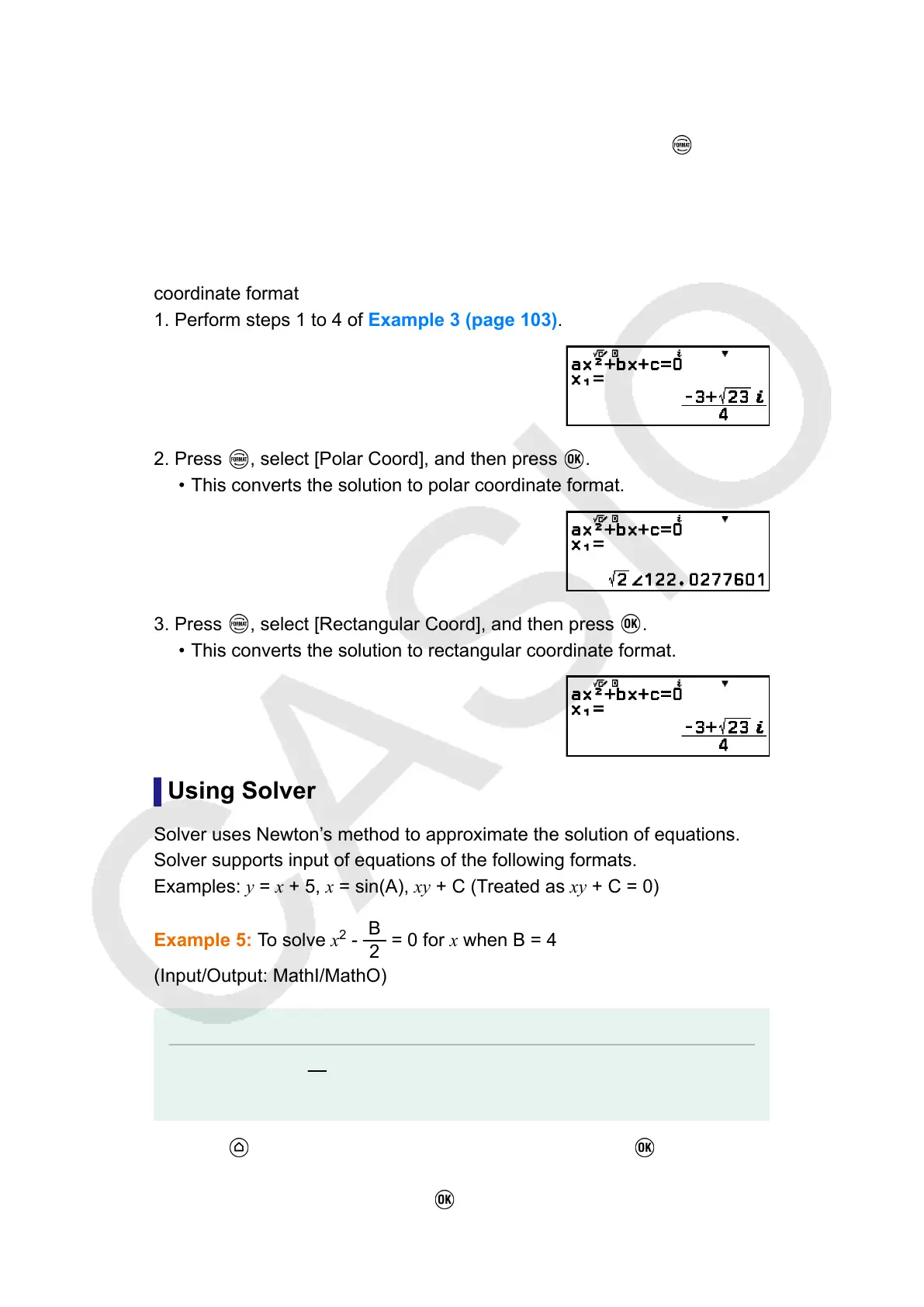
1. Perform steps 1 to 4 of Example 3 (page 103).
2. Press , select [Polar Coord], and then press .
• This converts the solution to polar coordinate format.
3. Press , select [Rectangular Coord], and then press .
• This converts the solution to rectangular coordinate format.
Using Solver
Solver uses Newton’s method to approximate the solution of equations.
Solver supports input of equations of the following formats.
Examples: y = x + 5, x = sin(A), xy + C (Treated as xy + C = 0)
Example 5: To solve x
2
-
B
2
= 0 for x when B = 4
(Input/Output: MathI/MathO)
Note
• Before solving x
2
-
B
2
= 0 for x, 4 needs to be stored to variable B. This is done in step
3 of the procedure below.
1. Press
, select the Equation app icon, and then press .
• This displays the Equation menu.
2. Select [Solver], and then press .
105



 To Next Page